

Loan management
Question about the manual? Ask Claude · Ask ChatGPT
Loan management keeps track of how your properties are financed: bank, amount, fixed interest period, repayment, payouts and the registered land charges. From the interest and repayment rates, SMARTBRIX calculates the monthly repayment plan with interest, repayment and remaining debt. If the interest rate changes or you make a special repayment, the plan is recalculated from that point on.
Where to find loans
Section titled “Where to find loans”Loans are under Invoicing › Accounting › Loans.
Loans are under Accounting › Accounting › Loans.
There you find:
- Loan Management: all loans.
- Loan Installments: the calculated installments of all loans, filtered to future ones by default.
- Land Charges: all land charges, grouped by property.
Create a loan
Section titled “Create a loan”- Open Loan Management and click New.
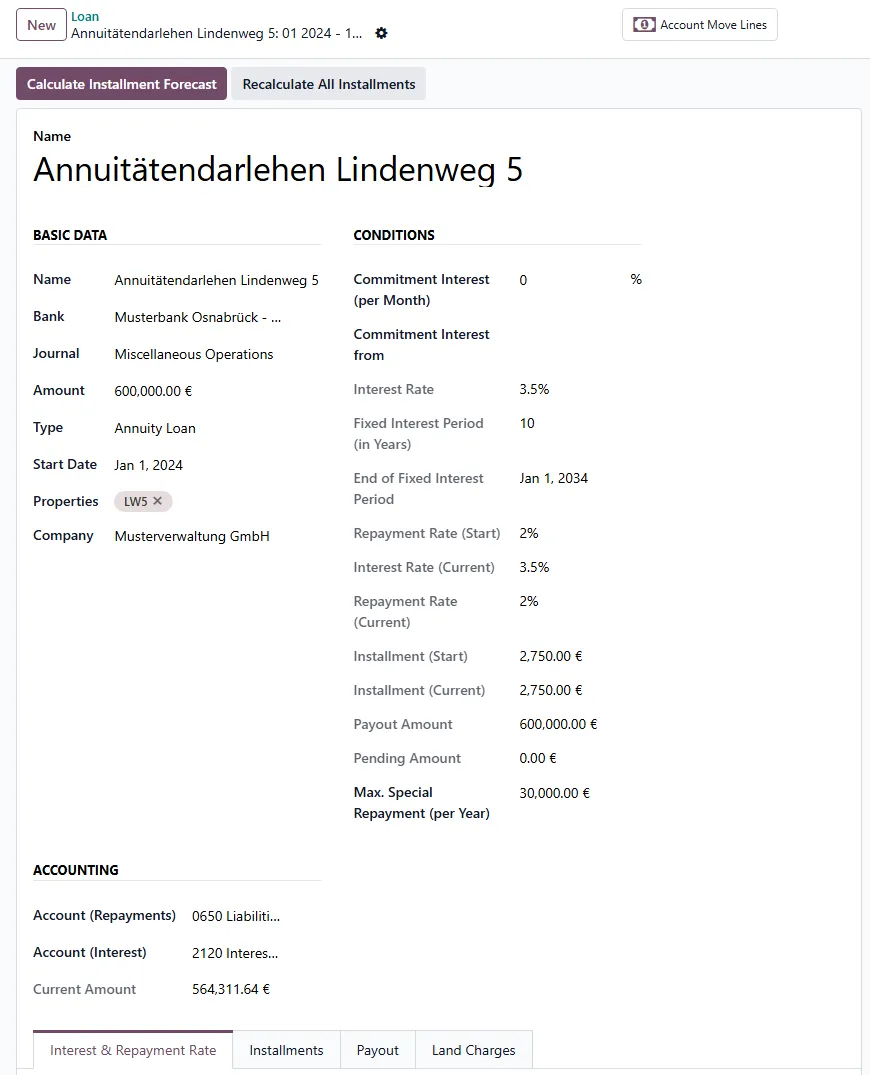
- Fill in the details under Basic Data:
- Name: for example “Annuity loan Lindenweg 5”.
- Bank: the lending bank.
- Journal: the journal that holds the loan entries.
- Amount: the loan amount according to the contract.
- Type: Annuity Loan, Amortizing Loan or Fixed Loan, see below.
- Start Date: when the repayment plan starts. In the Light / Pro plan, the field is called Date.
- Properties: the financed properties.
- Company: the company that holds the loan.
- Fill in under Conditions if needed:
- Commitment Interest (per Month) and Commitment Interest from: for amounts not yet paid out.
- Due Date: only for a fixed loan, where it is required.
- Max. Special Repayment (per Year): the amount the contract allows, for information.
- Under Accounting, choose the Account (Repayments) and the Account (Interest). The Account Move Lines button later shows the entries on these two accounts.
- Save.
Enter interest and repayment
Section titled “Enter interest and repayment”You enter interest and repayment as schedules. Each line applies from its start date until the next line begins.
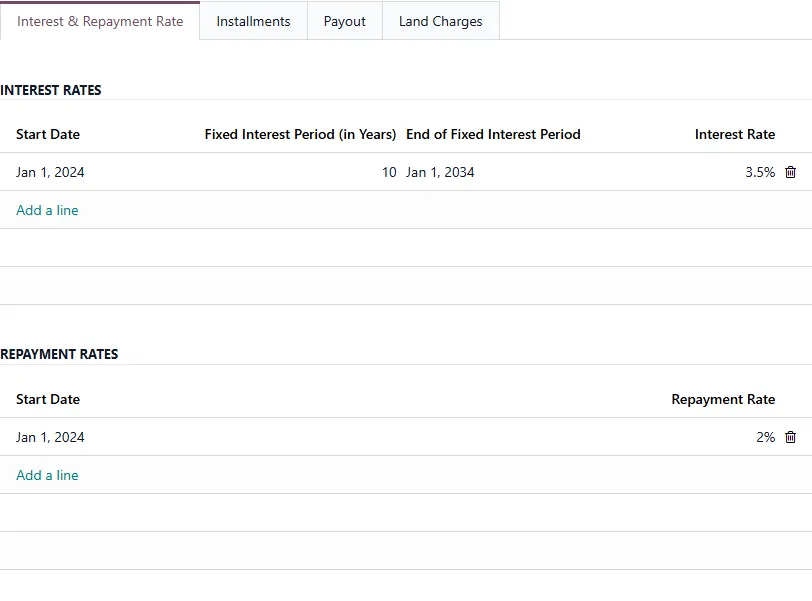
- Go to the Interest & Repayment Rate tab.
- Under Interest Rates, add a line: Start Date, Fixed Interest Period (in Years) and Interest Rate. SMARTBRIX calculates the End of Fixed Interest Period.
- Below it, under Repayment Rates, add a line: Start Date and Repayment Rate.
- Save. SMARTBRIX recalculates the repayment plan.
The loan then shows Interest Rate, Repayment Rate (Start), Installment (Start) and End of Fixed Interest Period. The fields marked “current” show the values that apply today.
How the repayment plan is calculated
Section titled “How the repayment plan is calculated”SMARTBRIX calculates in monthly installments. The interest for a month is the remaining debt times the annual interest rate divided by twelve, rounded to the cent.
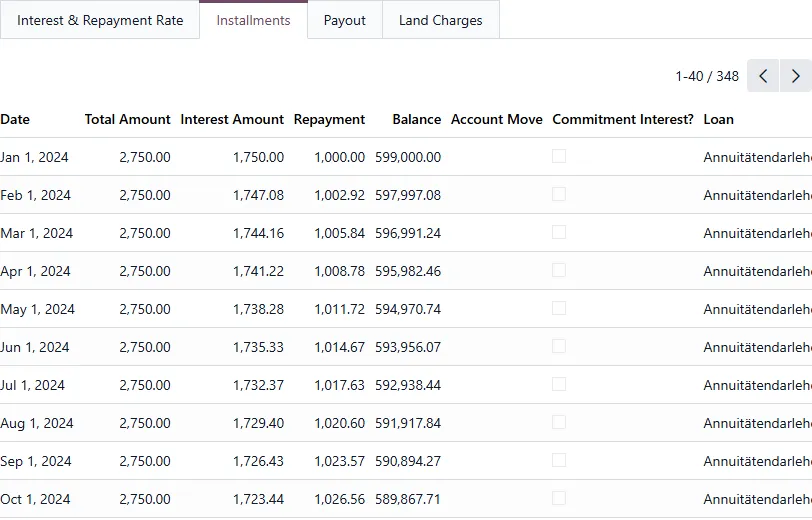
- Annuity loan: a constant installment from the initial interest and initial repayment rate. With each installment, the interest part falls and the repayment part rises. Example: €600,000 at 3.5% interest and 2% repayment gives €2,750 a month.
- Amortizing loan: The repayment is a fixed share of the remaining debt, so the installment falls over time.
- Fixed loan: Until the Due Date, interest and the agreed ongoing repayment are paid; the remaining debt is due with the last installment.
The installments are on the Installments tab with Date, Total Amount, Interest Amount, Repayment and Balance. The Current Amount under Accounting is the remaining debt after the last installment up to today.
Changes during the term
Section titled “Changes during the term”- New interest rate after the fixed interest period: Add a new line in the interest schedule with the start date of the follow-up financing. Installments from that date use the new rate.
- New repayment rate: likewise, as a new line in the repayment schedule.
- Special repayment: In the installment in which the special repayment was made, change the Balance. From the following day, SMARTBRIX continues with the new remaining debt.
- Partial payouts: Record each payout on the Payout tab with date and amount. Until the loan is fully paid out, SMARTBRIX calculates commitment interest on the amount not yet paid out, for at most 36 months. You cannot pay out more than the loan amount.
After each of these changes, SMARTBRIX recalculates the plan by itself. To recalculate it by hand, use the buttons at the top:
- Calculate Installment Forecast: recalculates the installments from today.
- Recalculate All Installments: recalculates the whole plan from the start date, after a confirmation.
If the repayment rate is missing for an annuity or amortizing loan, SMARTBRIX reports “Enter a repayment rate before calculating the installments.”
Land charges
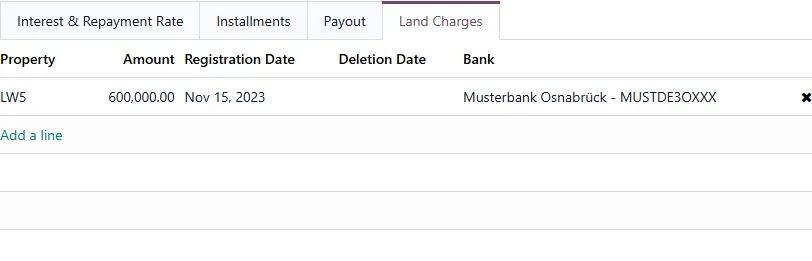
Section titled “Land charges”- On the loan, go to the Land Charges tab.
- For each land charge, enter Property, Amount, Registration Date and, once it has been deleted from the land register, Deletion Date. SMARTBRIX takes the Bank from the loan.
A land charge (Grundschuld) can secure several loans. On the property, the Financial tab shows the Land Charges group and the Total Land Charge Amount. You find all land charges in the Land Charges menu, and with the Current Land Charges filter only those still registered.
What happens automatically
Section titled “What happens automatically”- On the first of each month at 8 a.m., the scheduled action “Loan Management: value update” updates the current values of each loan: interest rate, repayment rate, installment, payout amount and end of the fixed interest period. For a savings plan, it increases the saved amount by the savings rate.
- SMARTBRIX does not post the installments of the repayment plan by itself. You post interest and repayment like any other payment in Bank matching to the interest and repayment accounts.
Frequently asked questions
Section titled “Frequently asked questions”Can I link a fixed loan to a savings contract? Yes. On the fixed loan, check Savings Plan?. In the Savings Plan section, enter Savings Rate and Assumed Return. SMARTBRIX shows the Assumed Outcome at the due date and updates the Current Saved Amount every month.
One loan finances several properties. How does SMARTBRIX split the interest? Loan management does not split anything. Assign the interest and repayment entries to the properties when you post them.
Didn't find an answer? Contact support