

Setup
Question about the manual? Ask Claude · Ask ChatGPT
Before you create assets, define who carries out the maintenance and which master data describes duties and assets. Only users with manager rights for building maintenance see the Catalog and Configuration menus.
Settings
Section titled “Settings”The settings are under Property Maintenance › Configuration › Settings.
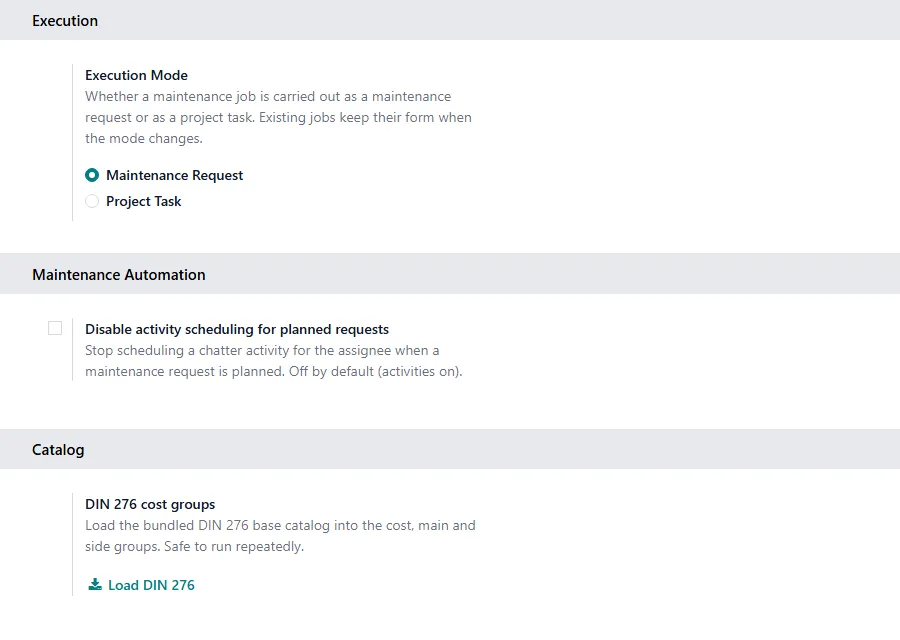
- Execution Mode: whether a job is created as a Maintenance Request or as a Project Task. The default is Maintenance Request. See Jobs as project tasks.
- Disable activity scheduling for planned requests: if unchecked, the responsible user of every scheduled maintenance gets an activity for the date. If checked, this activity is not created. Reminders before a deadline continue.
- DIN 276 cost groups: the Load DIN 276 link fills the asset catalog. See Asset catalog and templates.
Maintenance teams
Section titled “Maintenance teams”A maintenance team groups the technicians who take on maintenance together, such as your in-house technical staff or a crew. You manage the teams under Property Maintenance › Configuration › Maintenance Teams:
- Team Name: for example “Haustechnik”.
- Team Members: the users who can act as technicians. Only internal users are available.

The team “Maintenance Team” is included. It applies as long as an asset has no team of its own. Each asset takes its team from the property, and you can change it on the asset.
Qualifications
Section titled “Qualifications”Under Property Maintenance › Configuration › Qualifications you define which expertise a duty requires, for example “Elektrofachkraft” or “Fachkraft Heizungstechnik”. The qualification later appears on every duty and serves as a grouping in the maintenance demand. This shows you which jobs the same specialist contractor can handle in one appointment.
Maintenance type
Section titled “Maintenance type”Under Property Maintenance › Configuration › Maintenance Type you classify duties by the kind of work, such as inspection, maintenance or repair. The maintenance type is for classification only and does not change any deadline.
Asset features
Section titled “Asset features”Asset features are the characteristics you record for each asset, for example fuel or nominal output. They are under Property Maintenance › Configuration › Asset Features:
- Name: for example “Brennstoff”.
- Value Type: Dropdown if only fixed values are allowed, or Value for free entry.
- Feature Values: for a dropdown, the allowed entries, for example “Erdgas”, “Heizöl”, “Fernwärme”.
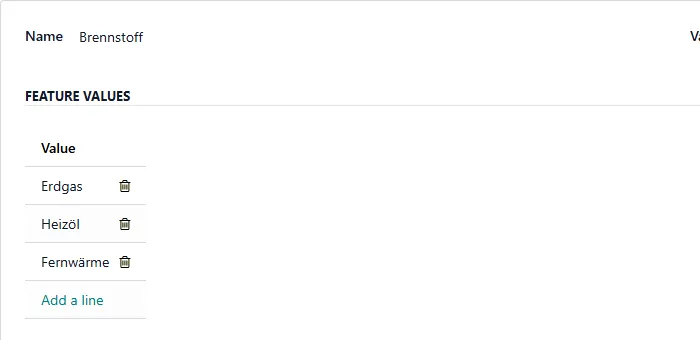
The asset template determines which features an asset gets. You enter the value on the asset on the Features tab.
Configuration also contains Inspection Features and Inspection Duties. Inspection Features holds the inspection characteristics you assign to a maintenance type. Inspection Duties opens the list of all duties, described under Inspection duties and routine tasks.
Didn't find an answer? Contact support