

Portal inquiries
Question about the manual? Ask Claude · Ask ChatGPT
When a prospect writes to you through a portal about one of your listings, SMARTBRIX creates an opportunity in the CRM. You do not have to fetch or retype anything. This requires a listing that SMARTBRIX has transferred, see List on property portals.
What an inquiry creates
Section titled “What an inquiry creates”- Opportunity: the title starts with “Portalanfrage:” (German for portal inquiry), followed by the external headline of the property and the name of the prospect. The property is filled in, and the prospect’s message is on the Notes tab.
- Contact: SMARTBRIX looks up the prospect by email address and creates the contact if it does not exist yet. Only a contact without a company or in the property’s company qualifies. If the address belongs to a contact of another company, SMARTBRIX creates a new contact without a company and leaves the existing one unchanged.
- Source: the name of the portal, for example “Immobilienscout24”. This lets you evaluate opportunities by portal.
- Responsibility: the opportunity goes to the user responsible for the property and their sales team.
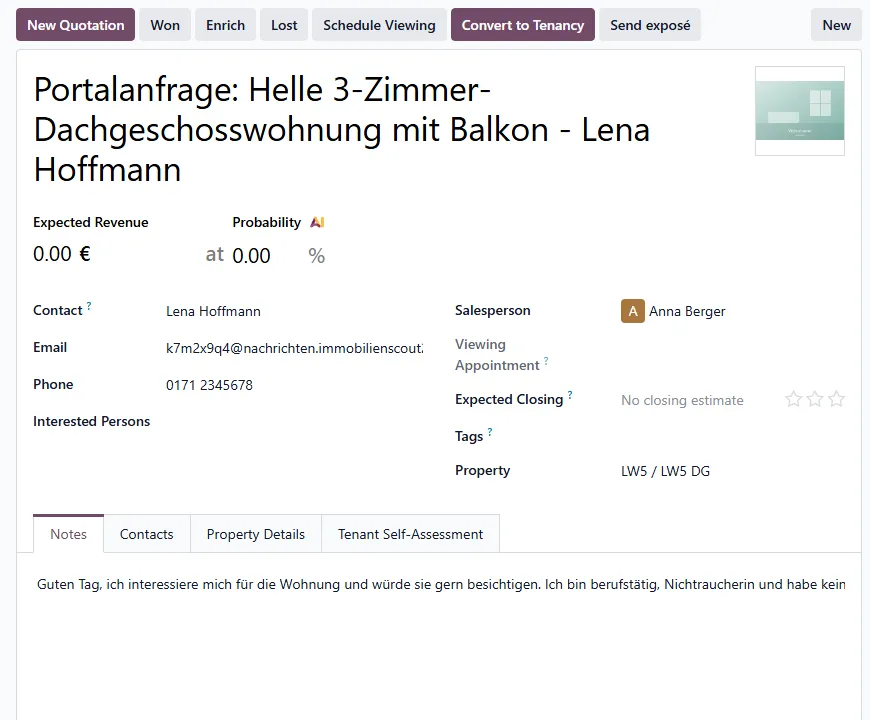
If the prospect keeps writing, the messages land in the same opportunity as “Antwort über” (reply via) followed by the portal name. If the same inquiry arrives twice within a few minutes, SMARTBRIX does not create a second opportunity but notes it in the first one.
Which channel applies to which portal
Section titled “Which channel applies to which portal”The Enquiries block on the Sales tab of the property shows how inquiries arrive for each portal:
- Webhook: the portal reports the inquiry directly to SMARTBRIX. This applies to Immobilienscout24, Immowelt, eBay-Kleinanzeigen and WG-Gesucht.
- Email: the portal sends the inquiry to the Portal Email of the responsible user. For it to become an opportunity, this address must be entered as the email alias of a sales team. If it is not, the block points this out and the inquiry does not reach the CRM.
The Lead Source column shows the source that opportunities from this portal get.
Automatic reply
Section titled “Automatic reply”SMARTBRIX can answer every new inquiry by email right away. This applies to portal inquiries and to inquiries from the website.
Company default. Under Settings › Properties, block Automatic reply:
- Automatic reply to inquiries: every inquiry about a property of this company gets the reply email, unless the property says otherwise.
- Reply Email: the template for the reply. If you choose the exposé template, the prospect gets a personal link to the web exposé, and the delivery shows on the opportunity as after Send exposé.
- Notify salesperson: the salesperson of the opportunity gets a notice once the reply has gone out.
- No second exposé within … days: if the same contact asks about the same property again within this time, no second exposé is sent. With 0, every inquiry gets one.
Override on the property. On the Sales tab of the property:
- Automatic Reply: Company default follows the company setting, Always replies even when the company does not ask for it, Never never replies.
- Reply Email Template: a template of its own for this property. Empty uses the reply email of the company.
- Notify salesperson on auto-reply: notifies sales even when the company does not ask for it.
Contacts that belong to an internal user get no reply. If the property has no exposé version yet, no exposé is sent; the opportunity gets a note, and you send the exposé by hand once it is produced.
Reply to the prospect
Section titled “Reply to the prospect”Some portals, including Immobilienscout24 and WG-Gesucht, do not pass on the prospect’s real email address but a relay address of the portal. The contact then shows the notice Temporary portal email.
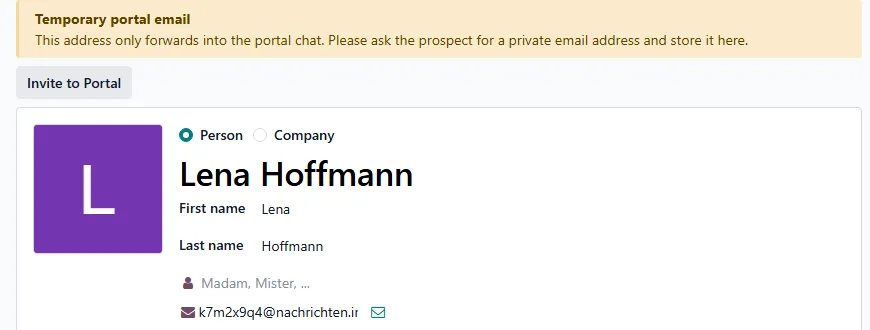
- Open the opportunity.
- In the chatter, click Send message, not Log note.
- Write your reply and send it.
SMARTBRIX sends the reply to the relay address, and the portal delivers it in the portal chat. When the prospect answers, the message appears in the opportunity again.
The relay address is enough for the first messages. Ask the prospect for their private email address and enter it on the contact. The notice then disappears.
Which addresses count as relay addresses is set under Property Management › Configuration › Portal Sync › Portal Email Patterns. The list comes prefilled for the known portals.
Frequently asked questions
Section titled “Frequently asked questions”An inquiry has no email address. Some portals only send a name and phone number. SMARTBRIX still creates the opportunity, but no automatic reply goes out.
An inquiry is missing in the CRM. Once a day, SMARTBRIX fetches all inquiries from the last seven days that did not arrive. For portals with the Email channel, check that the portal email is entered as the alias of a sales team.
An inquiry could not be processed. If SMARTBRIX cannot create an opportunity from an inquiry, the team leader of the sales team in the property’s company gets the activity “Portal inquiry could not be processed”. Without a team leader, it goes to the person responsible for the property. The activity opens the inquiry with the error message. Fix the cause and click Retry: the opportunity is created and the activity disappears. SMARTBRIX also retries failed inquiries itself every 15 minutes. All inquiries are listed under Property Management › Configuration › Portal Sync › EstateSync Requests, the failed ones under the Failed filter.
Didn't find an answer? Contact support