

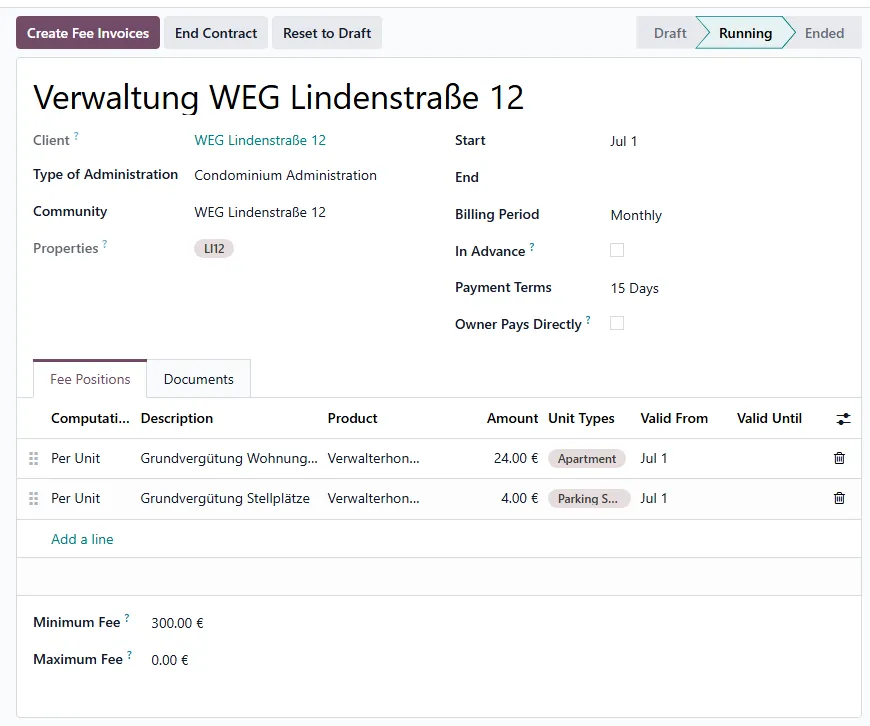
As a property or condominium manager, you charge your clients a management fee. The client is a condominium community or an owner. You record the terms in a management contract. Every day, SMARTBRIX creates the fee invoices that are due as drafts. You review the drafts and post them. When you post, SMARTBRIX also posts the expense on the client’s side: in the condominium community with a cost type for the annual settlement, in rental management on the owner’s property for the owner’s client export.
The parts for condominium management and rental management are added automatically as soon as the respective management is active in your system. Calculation as a percentage of the rent is only available with rental management.
The procedures are described on three pages:
- Create a management contract: define the client, properties, term and fee positions.
- Fee run: when drafts are created, how you review them, what happens at the start and end of a contract.
- Post and pay a fee invoice: what posting creates and how the money flows.
- Management fee: the remuneration you charge your client for the management. It consists of the base fee and special fees.
- Base fee: the part of the management fee for the regular duties, charged on an ongoing basis per period.
- Special fee: the part for a special service agreed individually in the management contract. So far, SMARTBRIX only calculates the base fee.
- Management contract: your contract with a client about one type of administration (condominium administration or rental administration) for a list of properties.
- Fee position: a calculation rule in the management contract, for example “€24 per apartment” or “4% of the target rent”. A contract can have any number of them.
- Rent basis: the rent from which a percentage fee position is calculated.
- Fee invoice: your invoice to the client for the management fee of one period.
- Fee run: the daily run that creates the fee invoices as drafts.
Why there are two documents
Section titled “Why there are two documents”A fee invoice has two sides:
- Manager side: your invoice as the manager. It carries your income and belongs in your own accounting. It is not linked to any property.
- Client side: the matching entry for the client. It carries the expense of the condominium community or the owner and is linked to their property. It is paid from the community’s account or from the owner’s trust account.
With a single document, your income would appear in the owner’s client export, and the owner’s tax advisor would receive entries that are none of their business. That is why SMARTBRIX posts two linked documents. The client side always follows the manager side; you never change it separately.
Which sides are created depends on how you work:
| How you work | Manager side | Client side |
|---|---|---|
| You keep your own accounting in SMARTBRIX | yes | yes |
| You keep your own accounting elsewhere | no | yes, with a number from the number range |
| The owner pays directly under the contract | yes | no |
The settings apply per company. If you manage several companies, select the company you are setting up at the top right.
- Open Settings › Management Fee. Administrators reach the same page under Management Fee › Settings.
- In the Fee Invoices section, fill in the fields as described below.
- Click Save.
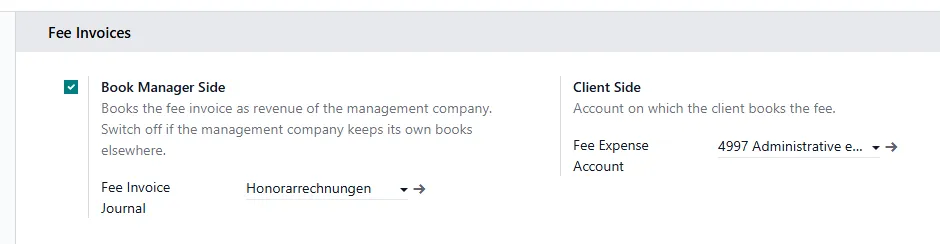
- Book Manager Side: when enabled, SMARTBRIX posts your invoice as a customer invoice and also the client side. Disable it if you keep your own accounting outside SMARTBRIX. SMARTBRIX then posts only the client side.
- Fee Invoice Journal: only with the manager side enabled. The sales journal for fee invoices, with its own number range. This keeps fee invoices from mixing with rent invoices and owner contributions.
- Fee Invoice Number Range: only with the manager side disabled. Each fee invoice gets a consecutive number from it when posted.
- Fee Expense Account (section Client Side): the account to which SMARTBRIX posts the client’s expense, both in the condominium community and on an owner’s property. Choose an expense account such as “Verwaltungskosten” (administrative costs).
You set up the cost type for the condominium community in the condominium management settings:
- Open Settings › Condominium.
- In the Owner Contributions and Booking section, under Management Fee, choose the Management Fee Cost Type.
- Click Save.
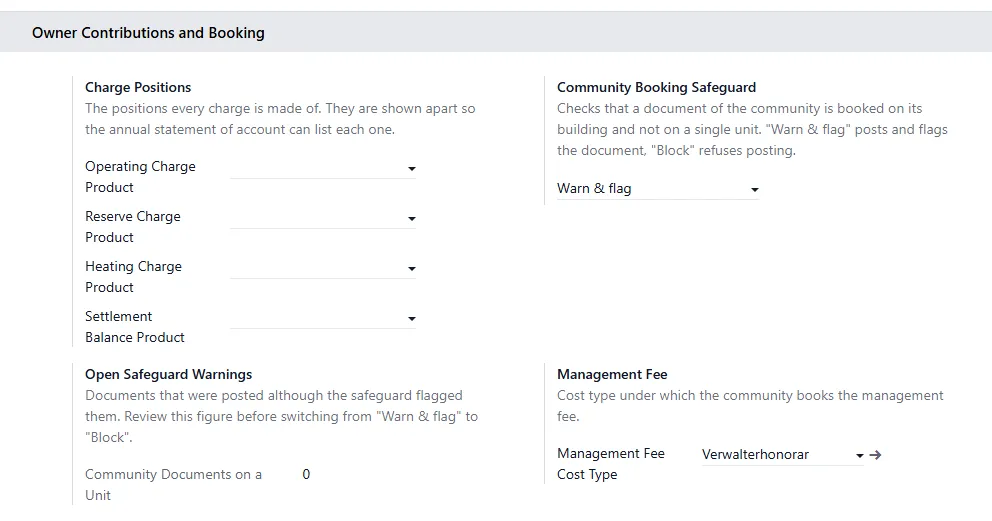
SMARTBRIX posts the management fee in the condominium community with this condominium cost type. The annual settlement uses its allocation key to split the fee among the units. The cost type does not have to be enabled on the community’s property for this.
The income account and tax rate come from the product of each fee position. Your customer invoice carries the switch No property relation, concerns the managing company only. SMARTBRIX therefore posts the income without a property, even if the income account normally requires one. This way it ends up in your own export and not in an owner’s client export.
If the journal is missing, or the expense account with the manager side disabled, the daily fee run creates nothing for the contract concerned and gives the reason in the fee run log. It continues with the other contracts. If something is missing that is only needed when posting, such as the management fee cost type, the expense account or the number range, posting stops with a message.
Previous data on the property
Section titled “Previous data on the property”If you already maintained management fee data on the property, SMARTBRIX creates a draft rental management contract per property from it when the rental management part is installed. The contract carries the name of the property. The client is the owner of the property; billing is monthly in arrears, starting on the first day of the current month. A fixed amount becomes a flat fee, a percentage becomes a fee position as a percentage of the target rent on the base rent. The product is taken over. If the owner or the product is missing on the property, SMARTBRIX creates no contract and notes the property in the fee run log.
Review these contracts before you click Start Contract. Afterwards, the data no longer appears on the property itself.
Not yet available
Section titled “Not yet available”- Special services: SMARTBRIX does not yet calculate special fees, for example for a second owners’ meeting.
- Actual rent: a percentage of the rent is calculated only from the target rent, not from payments received.
- Time tracking: fees based on recorded time are not yet available.
- Sending: you send fee invoices yourself; SMARTBRIX does not send them automatically.
- Input tax for the client: the client side posts the gross amount as an expense. For clients who have opted for VAT, SMARTBRIX does not deduct input tax.
Didn't find an answer? Contact support