

Adjust prepayments
Question about the manual? Ask Claude · Ask ChatGPT
After each service charge statement you decide whether a tenant’s prepayments still fit. For this, SMARTBRIX proposes a new prepayment per tenant and settlement block in the overall statement. You check the proposals and correct them where needed. The notice of the new prepayment is printed at the bottom of the statement. On release, SMARTBRIX creates the new rent line on every tenancy concerned.
Prerequisites
Section titled “Prerequisites”- The tenancy has a rent line with a prepayment for the settlement block (service charges, heating costs or electricity costs).
- After the calculation, the overall statement is In Review (see Create the overall statement).
Set up the rules
Section titled “Set up the rules”The rules apply to the whole company. Open Settings, choose Property Administration on the left and go to New Prepayments in the Accounting Journals block.
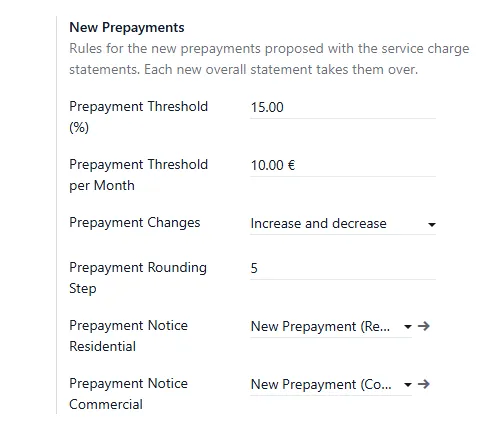
- Prepayment Threshold (%): A new prepayment is only proposed if it differs from the current one by more than this percentage. “0” turns the threshold off.
- Prepayment Threshold per Month: the same idea as an amount per month. If both thresholds are set, both must be exceeded. “0” turns the threshold off. If both are “0”, a single cent counts.
- Prepayment Changes: Increase and decrease or Increase only. With Increase only, a lower prepayment stays at the old amount.
- Prepayment Rounding Step: The new prepayment is rounded up to a multiple of this amount in whole euros, never down. “0” keeps the cent. A large step leads to high prepayments.
- Prepayment Notice Residential and Prepayment Notice Commercial: the texts of the notice on the statement, see Notice to the tenant. SMARTBRIX ships “New Prepayment (Residential)” and “New Prepayment (Commercial)”.
For new companies, both thresholds and the rounding step are “0” and the changes are set to Increase and decrease.
Rules and date on the overall statement
Section titled “Rules and date on the overall statement”Each new overall statement takes over the company’s rules. On the New Prepayments tab of the overall statement you change them for this building, for example for a commercial property, without touching the settings. After the release the fields are locked.
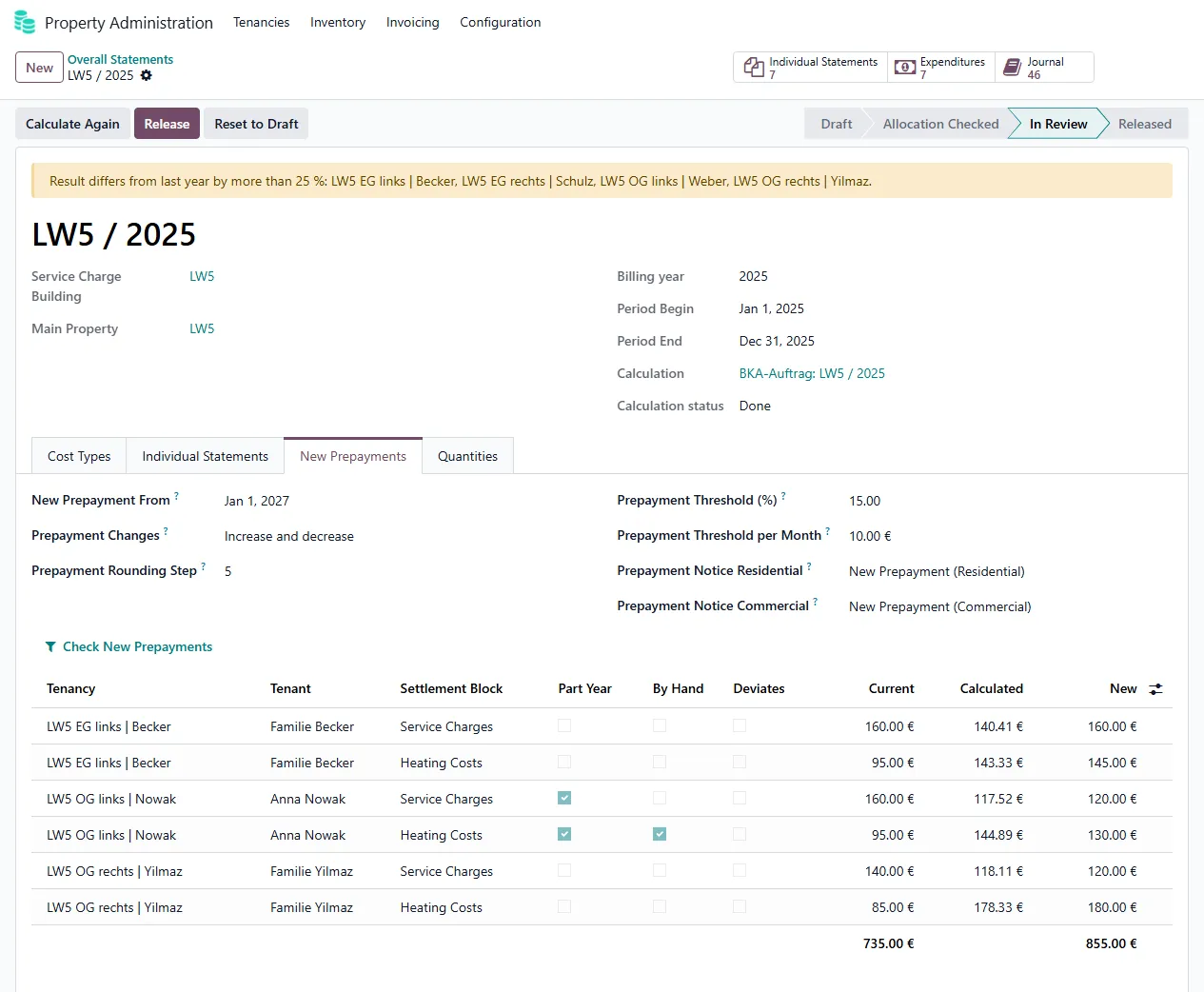
New Prepayment From is the day from which the new amounts apply. The default is the first day of the month after next, counted from the day the overall statement was created. Created in November, it shows January 1. This gives the tenant time to change the standing order. Adjust the date to your mailing date. If you change it on the overall statement, all statements take the new date, except those that already carry a date of their own.
How the proposal is calculated
Section titled “How the proposal is calculated”During the calculation, SMARTBRIX creates a line for each statement and each settlement block with a prepayment. The lists show these columns for it:
- Current: the monthly prepayment of the rent line valid on the New Prepayment From date.
- Calculated: the settled costs of the settlement block per day of participation, converted to one month: costs ÷ days × 365 ÷ 12. For tenants with VAT, SMARTBRIX calculates net, as on the rent line.
- New: the calculated value, rounded up to the rounding step. If the change stays below a threshold or goes in the wrong direction, this shows the current prepayment. Nothing changes for that block.
- Part Year: The tenancy took part for less than twelve months. Seasonal costs can distort the value: a tenant who moves in in April does not have the expensive heating months January to March in their costs.
Example with the rules from the picture above (15%, €10.00, rounding step 5): in 2025 the Becker family bore €1,720.00 heating costs over 365 days. €1,720.00 ÷ 365 × 365 ÷ 12 gives €143.33 per month. That is €48.33 more than the previous €95.00; both thresholds are exceeded. Rounded up to €5, the new heating prepayment is €145.00. For the service charges SMARTBRIX calculates €140.41. The difference to €160.00 is 12.2% and stays below 15%. The service charge prepayment stays at €160.00.
No proposal is made for:
- vacancies,
- settlement blocks agreed as a flat amount,
- tenancies that end before the New Prepayment From date. In the example these are the tenants Schulz and Weber, who moved out.
- tenancies with a statement over a later period that is already released, see Special cases.
Check and correct the proposals
Section titled “Check and correct the proposals”All tenants in one list
Section titled “All tenants in one list”- Open the overall statement in the In Review stage and switch to the New Prepayments tab.
- All proposals already appear below the rules. To filter them, click Check New Prepayments above them. The list shows all proposals of the building with tenancy, tenant, settlement block and the totals of the current and new prepayments.
- The To Check filter shows only the lines with Part Year or Deviates, the Changed filter only the lines whose new prepayment differs from the current one. Group the list by Settlement Block.
- Click into the New column and enter the amount that should apply.
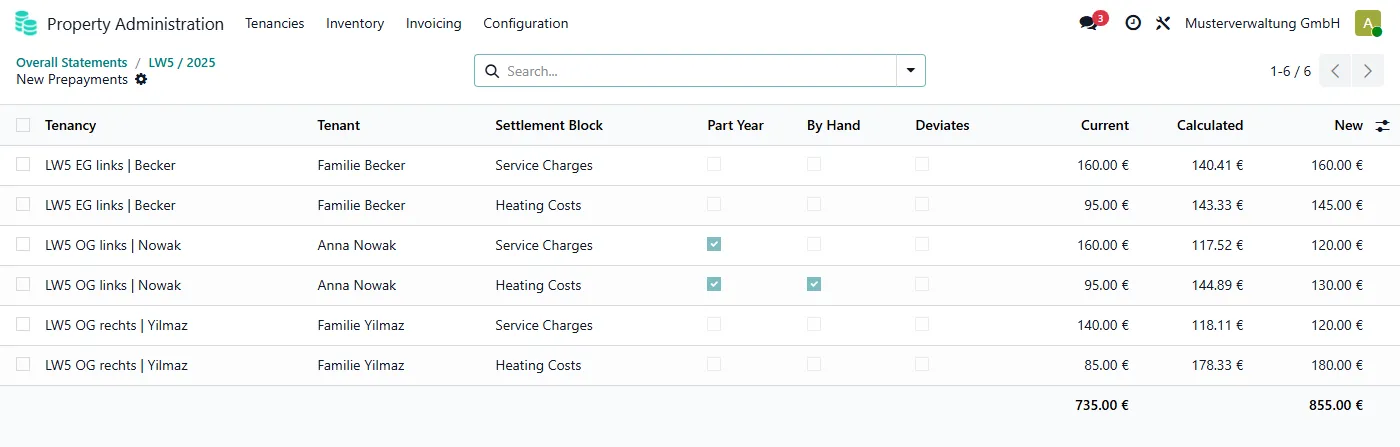
A value you change by hand gets the By Hand tick. It stays when you use Calculate Again. If the recalculated proposal then differs from your value by more than the thresholds, SMARTBRIX ticks Deviates.
To keep a block unchanged for a tenant, enter the current prepayment in the New column. That block then gets neither a notice nor a rent line.
On the individual statement
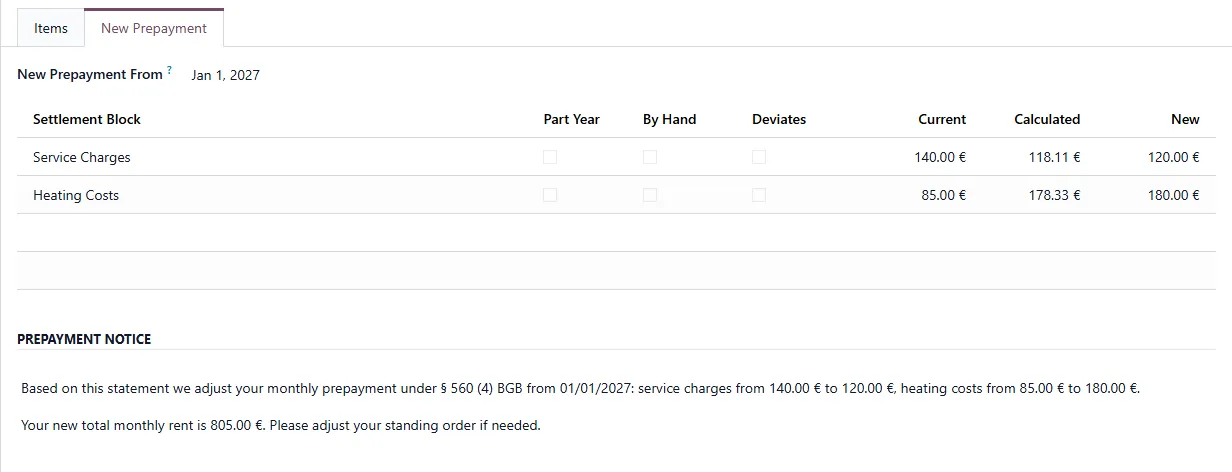
Section titled “On the individual statement”The same lines appear on each service charge statement on the New Prepayment tab, with the notice that is printed on the statement below them. Here you can also set New Prepayment From differently for this one tenant, for example if you send their statement later.
Notice to the tenant
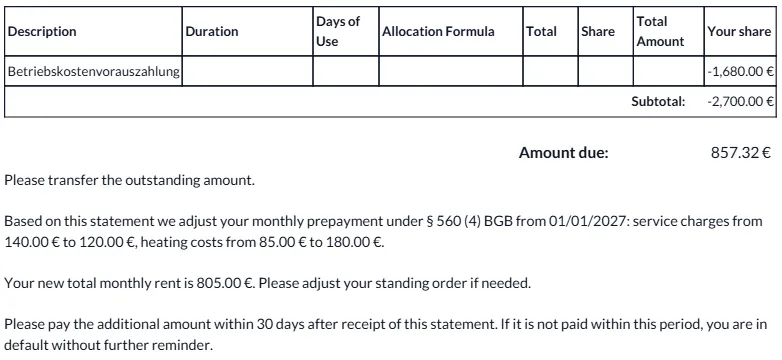
Section titled “Notice to the tenant”If a tenant has at least one changed prepayment, SMARTBRIX creates the Prepayment Notice from the notice template. Residential tenants get the residential notice referring to § 560 (4) BGB, the German rule that lets landlord and tenant adjust prepayments after a statement. Tenants with commercial rent get the commercial notice referring to the adjustment clause of their lease. The text appears in the tenant’s language, like the rest of the statement. Without a change there is no notice.
You change the notice of a single tenant directly on the New Prepayment tab of the statement. Your text then stays, even if you change prepayments afterwards. If you empty the field, SMARTBRIX creates the text again from the template. Calculate Again on the overall statement creates the statements anew and the notices with them.
On the printout the notice follows the amount due:
Your own notice
Section titled “Your own notice”The shipped texts are email templates for the service charge statement. Open a template with the arrow behind the field in the settings and adapt the text. Updates do not overwrite your changes to these two texts. You can also create your own template for the service charge statement and select it in the settings or on the overall statement. How to edit templates is described under Email templates.
Insert placeholders with / and Dynamic Placeholder. The notice has these fields, all as formatted text in the tenant’s language:
| Field | Content |
|---|---|
| New Prepayment From (Text) | the date from which the new amounts apply |
| Changed Prepayments (Text) | each changed prepayment with its old and new amount, for example “heating costs from €85.00 to €180.00” |
| Service Charges Prepayment Old (Text) and New (Text) | the old and the new service charge prepayment; without a change the new amount is the old one |
| Heating Costs Prepayment Old (Text) and New (Text) | the same for heating costs |
| Electricity Costs Prepayment Old (Text) and New (Text) | the same for electricity costs |
| New Prepayments Total (Text) | the total of all monthly prepayments from the new date |
| New Total Rent (Text) | net base rent plus all prepayments and additional products from the new date |
Release
Section titled “Release”Click Release on the overall statement as usual (see Invoice for the service charge statement). SMARTBRIX checks the date first: if New Prepayment From is today or earlier for a tenant with a changed prepayment, SMARTBRIX refuses the release and names the tenants. Change the date in that case.
Then each tenancy with a changed prepayment gets its new rent line:
- SMARTBRIX copies the rent line valid on the New Prepayment From date, with that day as start date. Base rent, space and the other values stay the same; only the changed prepayments are new. If a rent line already starts on that day, SMARTBRIX only overwrites its prepayments.
- Later rent lines that still carry the old prepayment, such as the steps of a graduated rent, get the new amount. This stops at the first rent line with a different amount.
- The history of the tenancy shows “New prepayments from 01/01/2027 according to the overall statement LW5 / 2025.”
- Rent invoices already posted for the period from that date stay unchanged. You get the to-do “Correct posted rent invoices” on the tenancy.
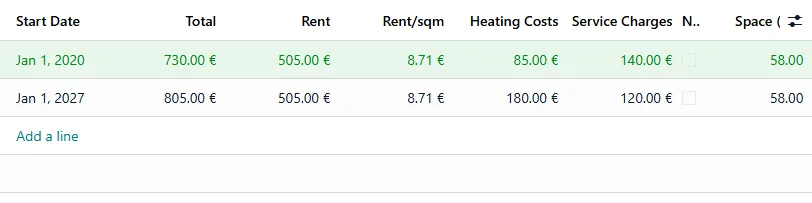
The rent debits take the new amounts from that date on their own.
If you reset a released overall statement with Reset to Draft, SMARTBRIX also takes back the rent lines: the old prepayment returns and a newly created rent line is deleted. This only applies to rent lines nobody has changed since the release and for whose period no rent invoice is posted. All others stay, and the history of the tenancy shows a note asking you to check the prepayments.
Legal framework
Section titled “Legal framework”The following points are general information, not legal advice. SMARTBRIX does not check them.
- An adjustment only applies to the future, not retroactively. This is why SMARTBRIX requires a date after the day of release.
- The basis is the result of the statement. A flat safety surcharge is not allowed. A large rounding step can work like such a surcharge.
- For residential space, landlord and tenant may adjust the prepayment after a statement (§ 560 (4) BGB). For commercial space this needs a clause in the lease.
Checkpoints
Section titled “Checkpoints”- The New Prepayments tab only lists tenants who still live there after the date.
- Every statement with a changed prepayment shows a prepayment notice; statements without a change show none.
- After the release, each tenancy concerned has a rent line from New Prepayment From with the new amounts.
Common errors
Section titled “Common errors”| Problem | Cause | Solution |
|---|---|---|
| “New prepayments have to start after today.” on release | For the tenants named, the date is today or earlier. | Set the date on the overall statement or on the individual statement to a future day. |
| A tenant is missing from the list | The tenancy ends before the date, is a vacancy, has a flat amount for the block or already has a released statement over a later period. | Not an error. These tenancies get no new prepayment. |
| No proposal although the costs changed | The change is below a threshold, or it is a decrease with Increase only. | Check thresholds and direction on the New Prepayments tab, or set the value by hand. |
| My edited notice is gone | The overall statement was calculated again. | Edit the notice again after the recalculation. |
Special cases
Section titled “Special cases”Move-in during the year. With less than twelve months of participation, SMARTBRIX calculates with the days the tenant was there. Check these lines (To Check filter), especially for heating costs.
Settlement block without settled costs. If a settlement block has no costs, for example heating while the heating cost statement is still missing, there is no basis for a new amount. Calculated then shows 0, and New keeps the current prepayment. This block gets neither a notice nor a rent line.
Prepayment changed during the year. The proposal does not depend on the previous prepayment but on the settled costs. A change during the year does not affect it.
Commercial. Tenants with commercial rent get the commercial notice. SMARTBRIX does not check whether the lease allows an adjustment. Without such a clause, enter the current prepayment as the new one.
Later statement already released. If you settle an older year, for example 2024, while 2025 is already released for the same tenancy, that tenancy gets no proposal in the older statement. The later statement has already adjusted the prepayment. Without an overall statement, a later statement with a posted invoice counts. If the later statement is only released after the older one was calculated, releasing the older one removes the proposals of that tenancy and empties its prepayment notice, even one edited by hand. No rent line is created. If you had set values by hand there, a note on the overall statement names the tenants concerned.
Refund. With a credit note, the notice appears on the document as well.
What is not included
Section titled “What is not included”- SMARTBRIX does not adjust flat amounts.
- An adjustment at the tenant’s request outside the statement is maintained as a rent line, as before.
- SMARTBRIX does not correct posted rent invoices itself.
- In a condominium there is no adjustment from the annual settlement. The owner contribution is set by the resolution on the annual budget.
- Installments to utilities are a separate topic, see Utility installments.
Didn't find an answer? Contact support