

Opening balance for the first settlement
Section titled “Opening balance for the first settlement”When you settle a community in SMARTBRIX for the first time, enter the carried-forward values that do not result from postings. Nothing is posted in the process.
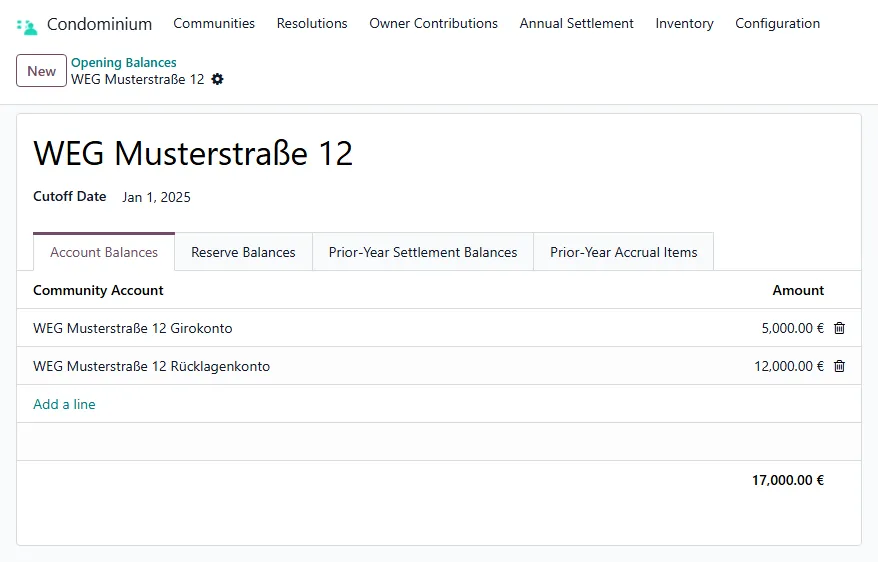
- Open Condominium › Communities › Opening Balances and click New. Select the community and, as the Cutoff Date, January 1 of the first settlement year or the December 31 before it.
- Account Balances: the balance of each community account on the cutoff date.
- Reserve Balances: the balance of each reserve on the cutoff date.
- Prior-Year Settlement Balances: the open amount per unit from earlier settlements. A positive amount means the apartment owner owes money.
- Prior-Year Accrual Items: the item per condominium cost type from the previous manager’s last settlement.
Calculate a draft
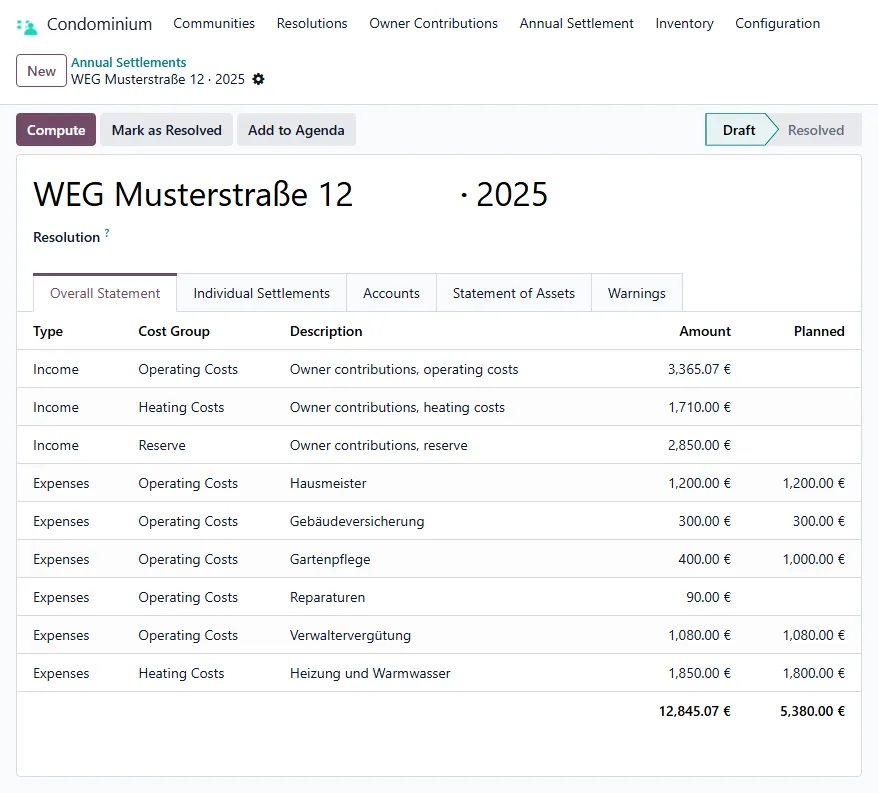
Section titled “Calculate a draft”- Open Condominium › Annual Settlement › Annual Settlements and click New. Select the community, enter the year and save. The title then reads something like “WEG Musterstraße 12 · 2025”.
- Click Compute.
SMARTBRIX builds the settlement from scratch out of condominium expenditures, metering amounts, owner contribution invoices and postings. As long as it is a draft, click Compute again after every correction.
Work through the warnings
Section titled “Work through the warnings”The Warnings tab lists what SMARTBRIX noticed while calculating. Warnings shown in red with Blocking checked prevent the resolution; the others are notices.
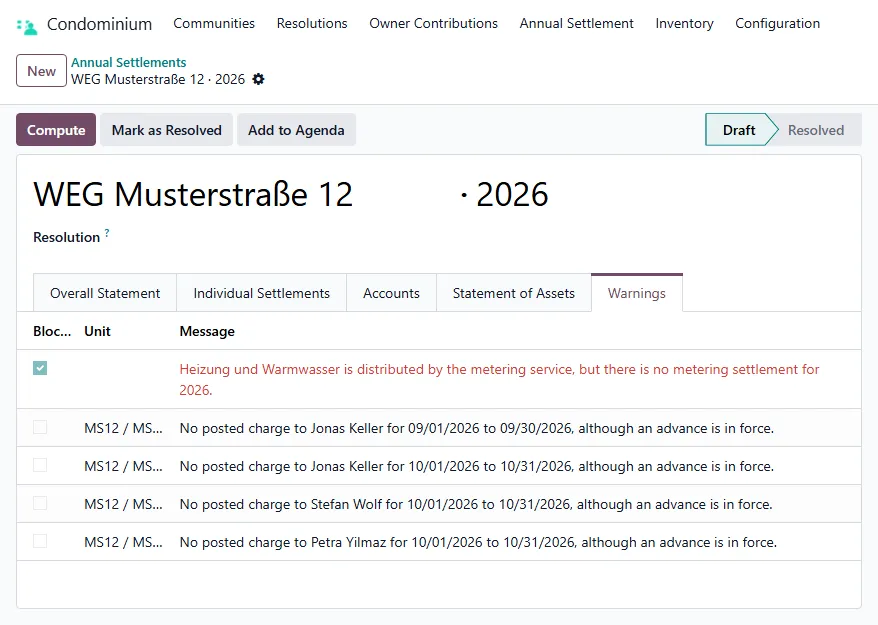
Blocking:
- a condominium cost type is distributed through the metering service, but there is no metering settlement
- a unit’s metering amount has not been entered
- a direct assignment without a unit
- an allocation key without values
- a condominium cost type still allocated by Person Days (see Object keys)
- the settlement does not add up (see below)
- an invoice on a condominium cost type of the kind Reserve Contribution
- an expense marked as a withdrawal from a reserve but not paid from it
Notice:
- charges apply, but there is no posted owner contribution invoice for the period
- an expense paid from a reserve without a resolution
- an account balance in the opening balance differs from the posted balance
- neither a previous year’s settlement nor a matching opening balance
- income on an account without a condominium cost type (see below)
- the total of the co-ownership shares or of an object key differs from its target total (see Object keys)
Fix the cause where it arises, for example in the metering settlement or on the condominium expenditure, and click Compute again.
Income without a condominium cost type
Section titled “Income without a condominium cost type”Income of the community, for example from renting out a common area, appears in the overall statement under income. If it is on an account that no condominium cost type lists, “(not distributed)” follows the account name, and the Warnings tab shows a notice. Such income reduces no cost share, so the settlement balances do not include it.
If the income should benefit the apartment owners, enter the account on a condominium cost type under Accounts for Direct Bookings (see Condominium cost types) and click Compute again. The income then reduces the costs of this type and is distributed with its allocation key. Interest that stays in a reserve is not distributed. Enter the interest account on the reserve (see Reserves): the interest then appears as “Reserve interest” with the name of the reserve, the tax withheld as a deduction next to it, and without a notice. Interest on the checking account stays “not distributed”.
Accounts and consistency
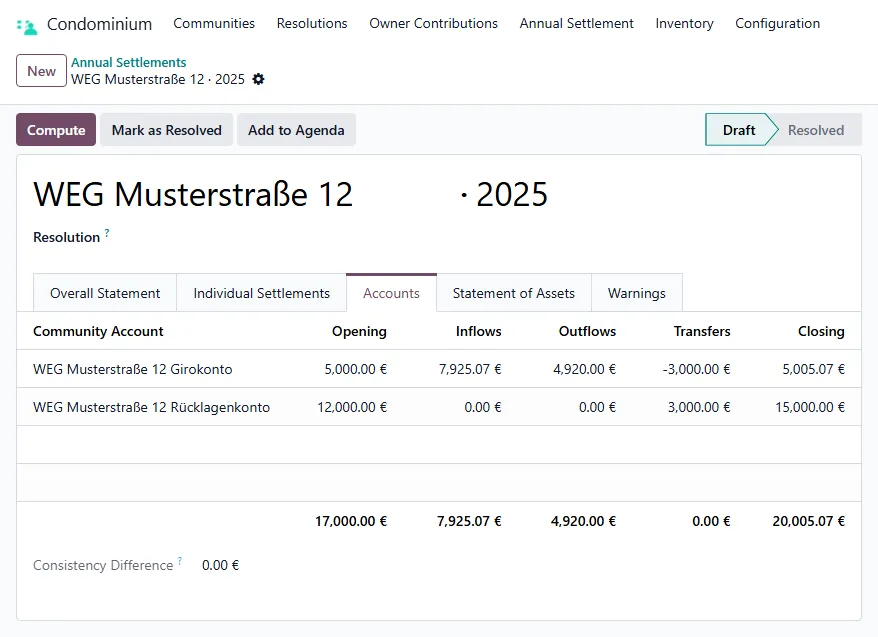
Section titled “Accounts and consistency”The Accounts tab shows the opening balance, inflows, outflows, transfers and closing balance of each community account. The settlement adds up when the closing balances equal exactly the opening balance plus income minus expenses plus transfers. The Consistency Difference is then €0.00.
Statement of assets and individual settlements
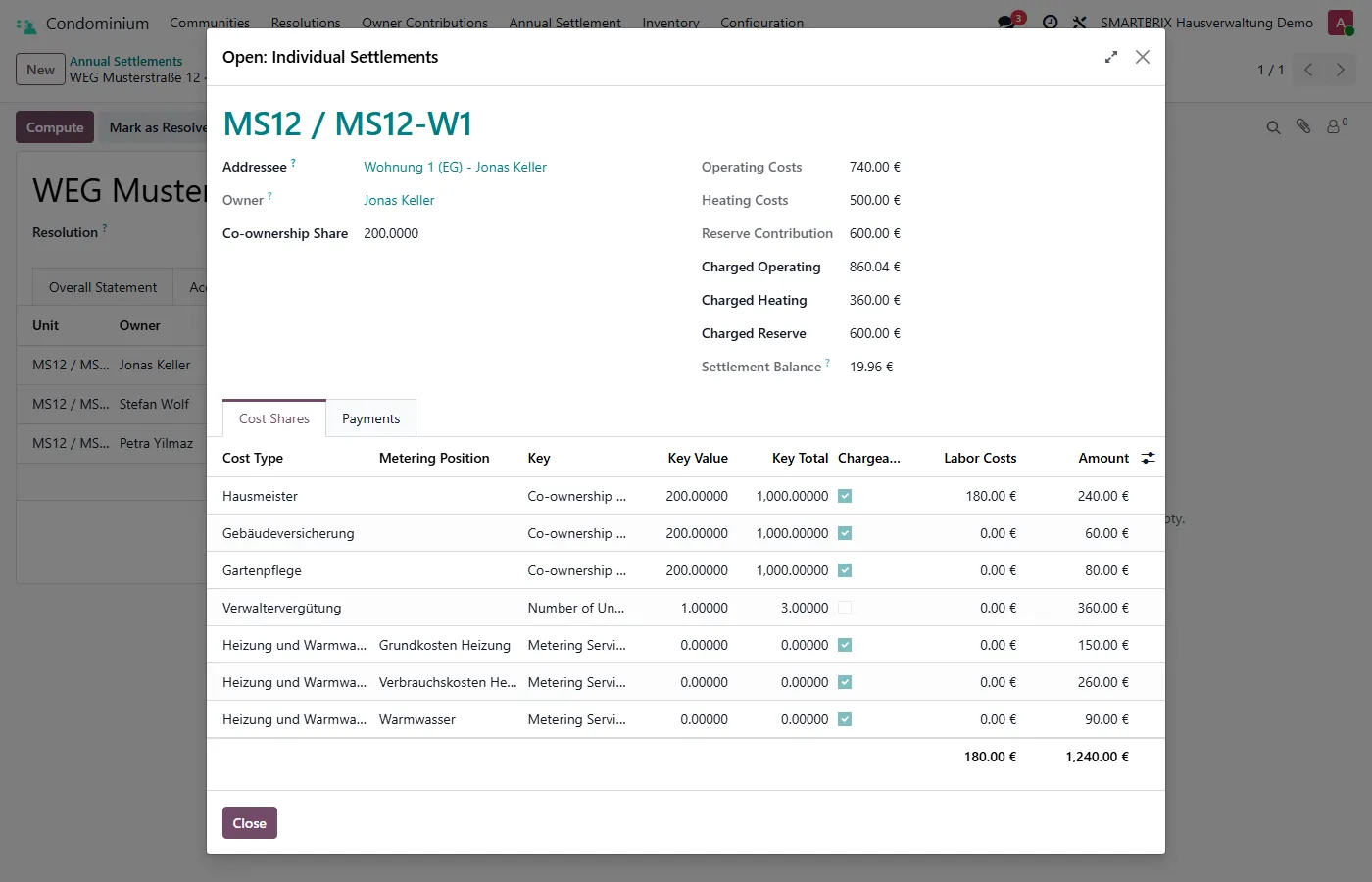
Section titled “Statement of assets and individual settlements”The Statement of Assets tab is explained on the page Asset status and asset report. The Individual Settlements tab shows the costs and the owner contributions due for each unit, split into operation, heating and reserve, and the resulting settlement balance. Click a line to see the cost shares per condominium cost type with their key, and the payments of the year per payer.
The Payments tab of the individual settlement also shows the amount paid per group and the open items on December 31. Each payment is split proportionally across the positions of its owner contribution invoice, so a partial payment does not settle the reserve first. The Reserves and § 35a EStG tabs show the same figures as the “Your reserves” section and the annex in the printout (see below).
Link the resolution and mark as resolved
Section titled “Link the resolution and mark as resolved”- Put the annual settlement on the agenda with Add to Agenda and announce the resolution (see Resolution procedures and register of resolutions). SMARTBRIX enters it under Resolution.
- If you entered the resolution by hand (type Additional Contributions / Adjustment, result Passed, resolution date of the meeting), select it under Resolution in the annual settlement.
- Click Mark as Resolved.
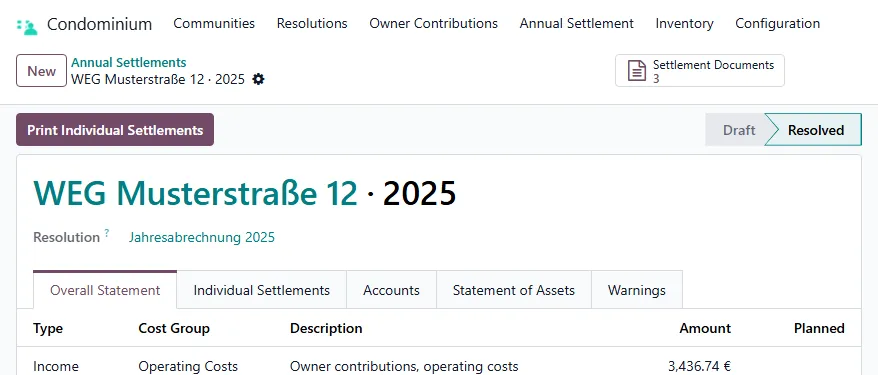
SMARTBRIX recalculates the settlement once as of the resolution date and seals it. For every unit with a settlement balance, a posted document is created for the invoice address: an invoice if the apartment owner pays more, a credit note for a credit. The document date is the resolution date; it falls due after the period set on the community. The Settlement Documents button lists them.
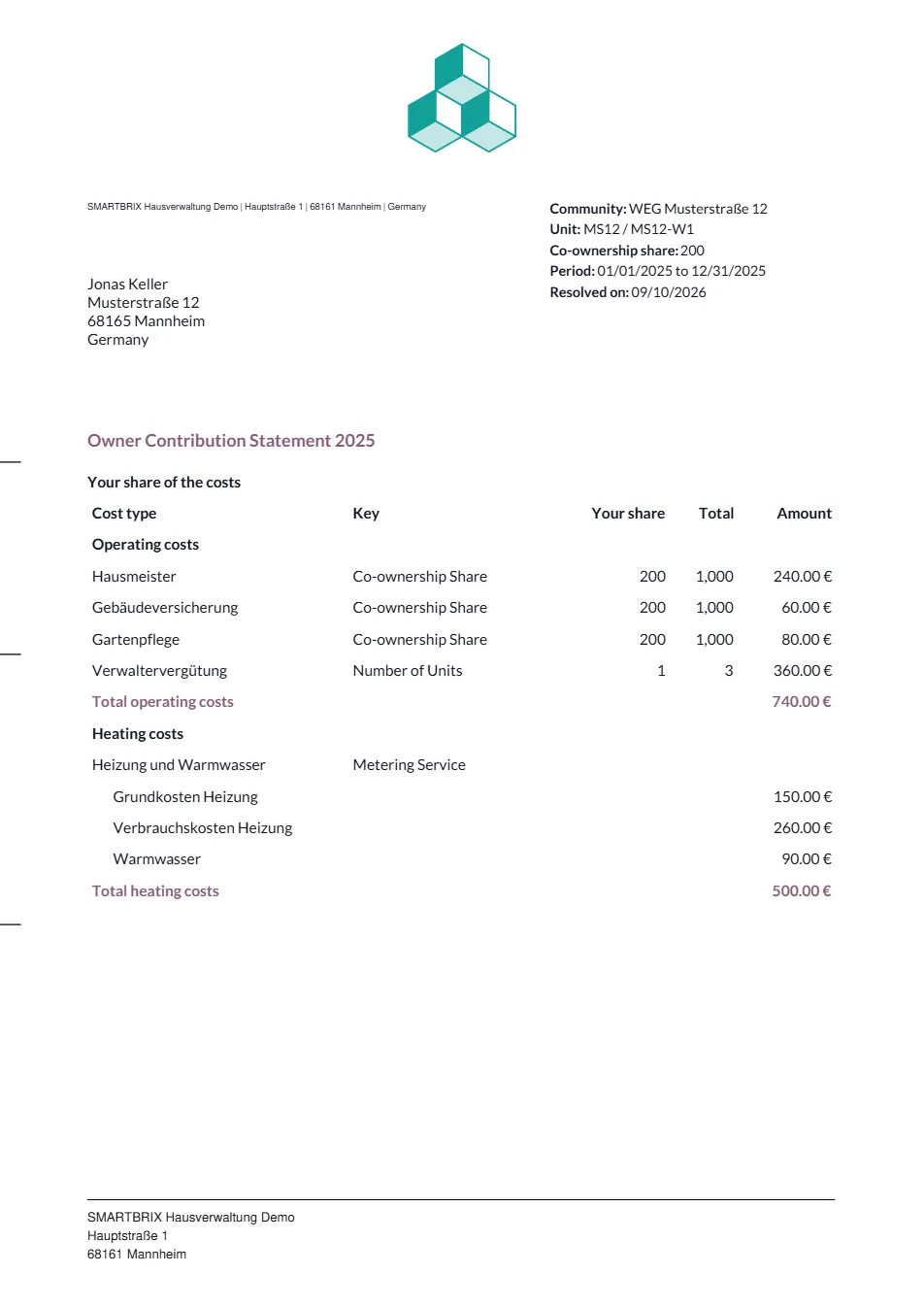
- Owner Contribution Statement (the individual settlement per unit): Print Individual Settlements above the list on the Individual Settlements tab for all units (in the header once resolved), or Print at the end of a line for one unit. It goes to the invoice address and is printed in its language. If SMARTBRIX settles the heating costs itself, the unit’s heating cost statement follows it as a document of its own. The annex to the owner contribution statement comes last.
- Overall Statement: gear icon Actions next to the title › Overall Statement. It is addressed to the community and printed in the company’s language.
- Settlement Overview: gear icon Actions › Settlement Overview. For each unit it lists the owner, costs, owner contributions due, additional payment or credit, reserve contribution and the amounts paid in the year, followed by the totals. It serves as an attachment to the resolution on the additional payments. The payments are shown for information only and do not change the additional payment or credit.
- Quantity Check: Quantity Check in the header, as soon as the settlement has been computed. For each allocation key it lists the values of every unit with Valid from, days and weighted value, followed by key total, target total and difference. The printout shows the state of the last Compute and is printed in the company’s language (see Object keys).
If there is an asset report for the community and the year, SMARTBRIX attaches it to the overall statement as a document of its own with its own header. An asset report that is still a draft is included too, then with the note “Draft, not yet closed.” This does not make it part of the settlement, and it is not resolved.
Before the resolution, the printouts carry a draft note. After the resolution, the owner contribution statement names the document and due date of the settlement balance.
Owner contribution statement
Section titled “Owner contribution statement”For each condominium cost type, the owner contribution statement shows the allocation key with “Total quantity” and “Your quantity”, plus the “Total costs” of all units and “Your share”. This lets the apartment owner recalculate every share.
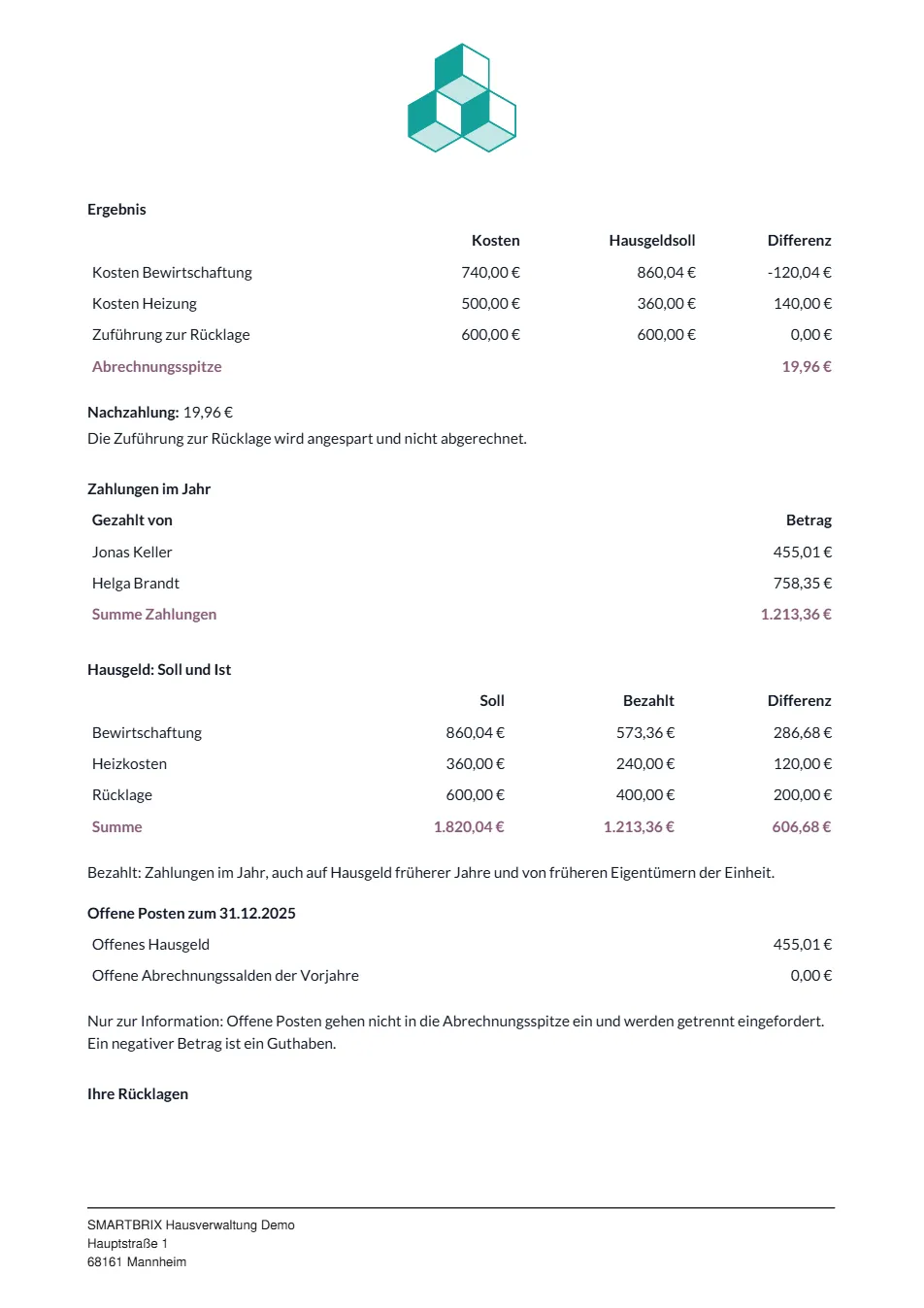
If there is an additional payment, “Please pay only to the community’s account:” follows with the bank details. Before the resolution, this is the community’s checking account; afterwards, the account on the settlement balance document (see Create a community). If the apartment owner pays by direct debit, the line is omitted.
Below the payments of the year follows the table “Owner contributions: charged and paid” with operation, heating and reserve, each with charged, paid and difference. Paid counts all payments in the year, including those on charges of earlier years and by earlier owners of the unit. For apartment owners with the VAT option, charged and paid include VAT.
Below it follow the “Open items on” December 31: open owner contributions and open settlement balances from earlier years, only those of the apartment owner the statement is addressed to. A seller’s arrears do not appear on the buyer’s statement. The open items are for information only: they are not part of the settlement balance and are claimed separately. A negative amount is a credit.
Your reserves
Section titled “Your reserves”The section “Your reserves” shows for each reserve:
- “Contribution charged” and “Contribution paid”, only for the reserve that the reserve line of the owner contributions posts to
- the unit’s share of the withdrawals for maintenance and for improvements, of the interest and of the capital gains tax and solidarity surcharge
- “Your notional share of the closing balance”
The shares follow the unit’s co-ownership share on December 31 in relation to all co-ownership shares. How long the apartment owner held the unit during the year does not matter. The owner needs the shares of withdrawals, interest and tax for their tax return. The notional share is not a credit balance; the reserve belongs to the community.
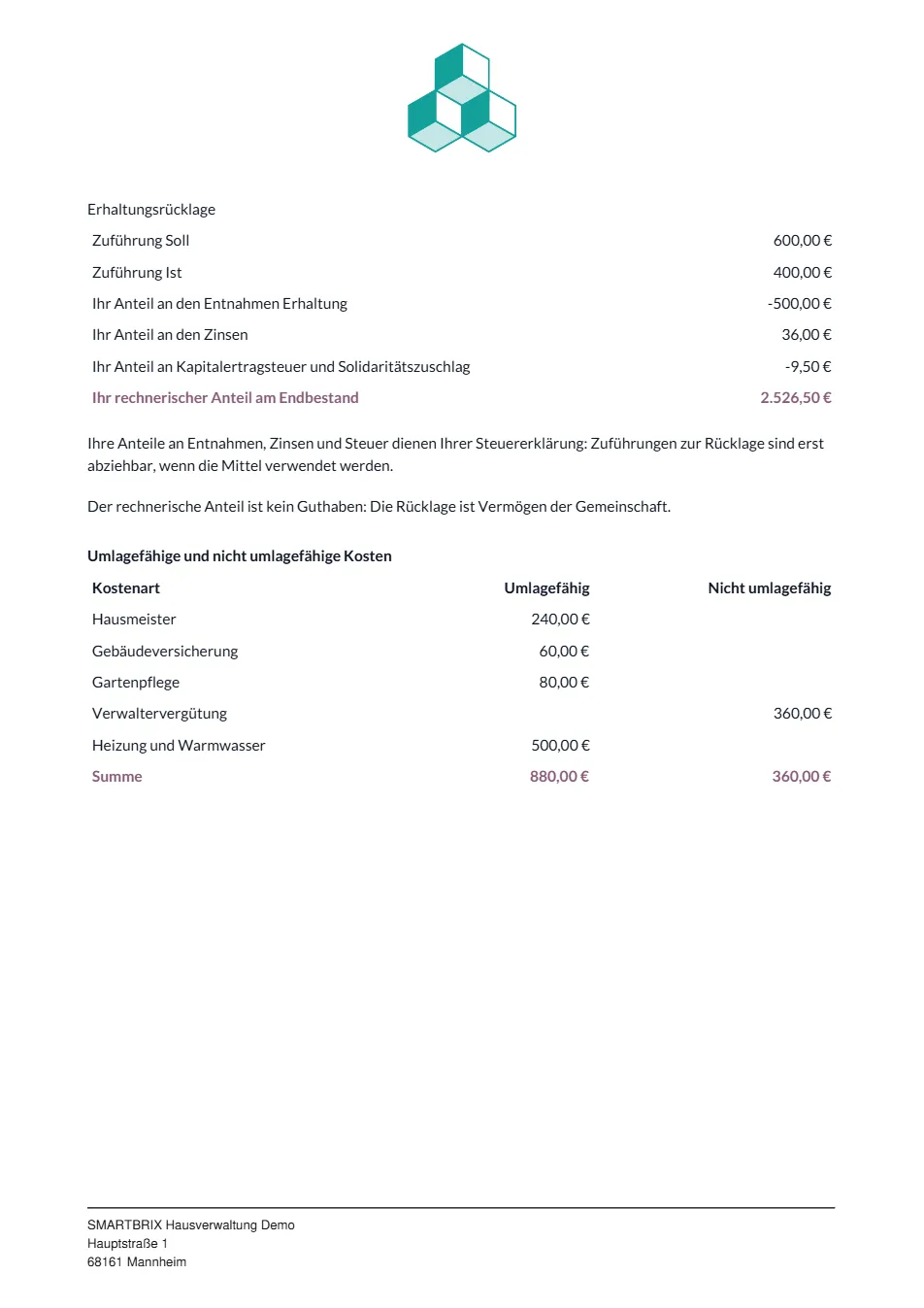
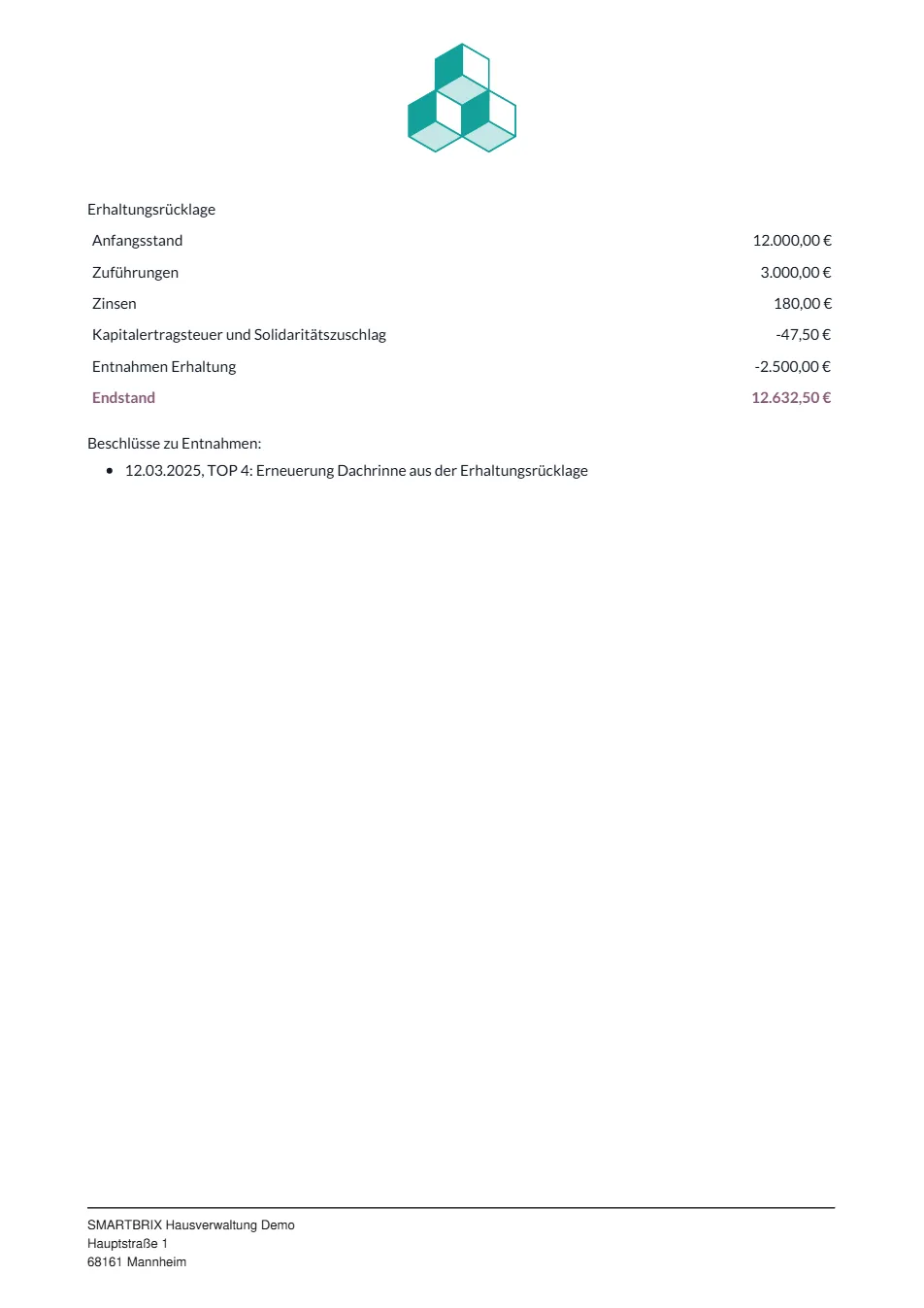
In the example, apartment 1 has a co-ownership share of 200 out of 1,000, that is 20%. Of the €2,500.00 withdrawal, €500.00 falls to it, and €2,526.50 of the €12,632.50 closing balance.
Household-related services and craftsmen’s services
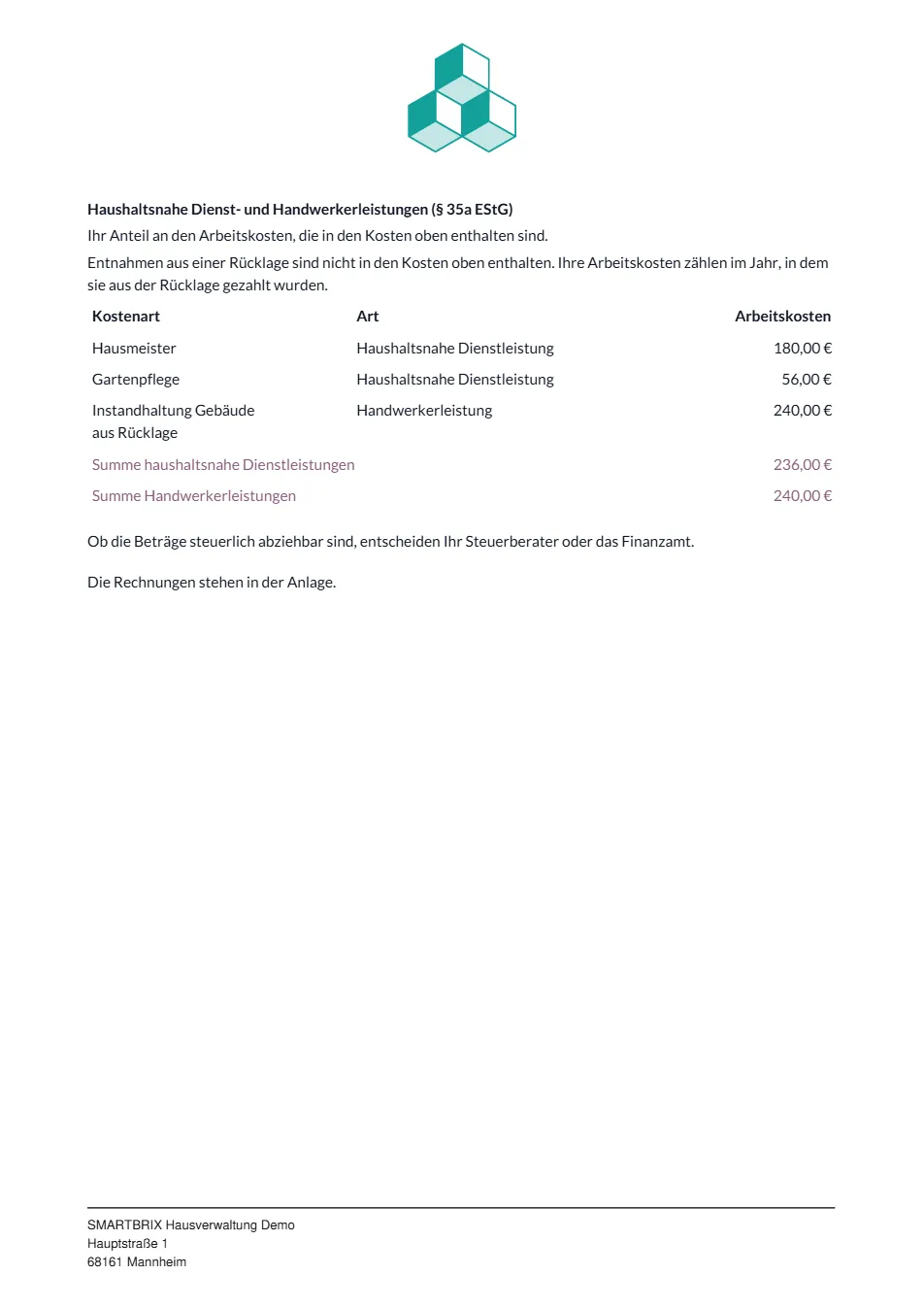
Section titled “Household-related services and craftsmen’s services”If the costs include labor costs, the owner contribution statement shows the table “Household-related services and craftsmen’s services (§ 35a EStG)”: for each condominium cost type the kind and the unit’s share, followed by “Total household-related services” and “Total craftsmen’s services”. Labor costs of a cost type without a classification appear as “Not assigned” and count toward no total. SMARTBRIX takes the kind from the condominium cost type when it computes (see Condominium cost types). After the resolution, a new classification no longer changes the printout.
Expenses paid from a reserve with labor costs appear as a line of their own marked “from reserve”. They are not part of the costs above; their labor costs count in the year they were paid from the reserve.
Annex to the owner contribution statement
Section titled “Annex to the owner contribution statement”The “Annex to the Owner Contribution Statement” follows the owner contribution statement, or the heating cost statement if SMARTBRIX settles the heating costs itself. For each kind and condominium cost type it lists every bill of the year with labor costs: payment date, vendor, invoice number, gross amount, labor costs and your share, with subtotals and a total. The totals per cost type match the § 35a table.
- What counts is what was paid in the year. A bill paid across two years appears in each year with its part.
- Expenses paid from a reserve carry the note “from reserve” and are split by co-ownership share on December 31, because for tax purposes the outflow from the reserve counts.
- If no single bill falls to a unit, for example because the bills are assigned directly to other units, its share appears as “Share through the distribution without a single bill”.
- Cost types without a classification or classified as not eligible are left out.
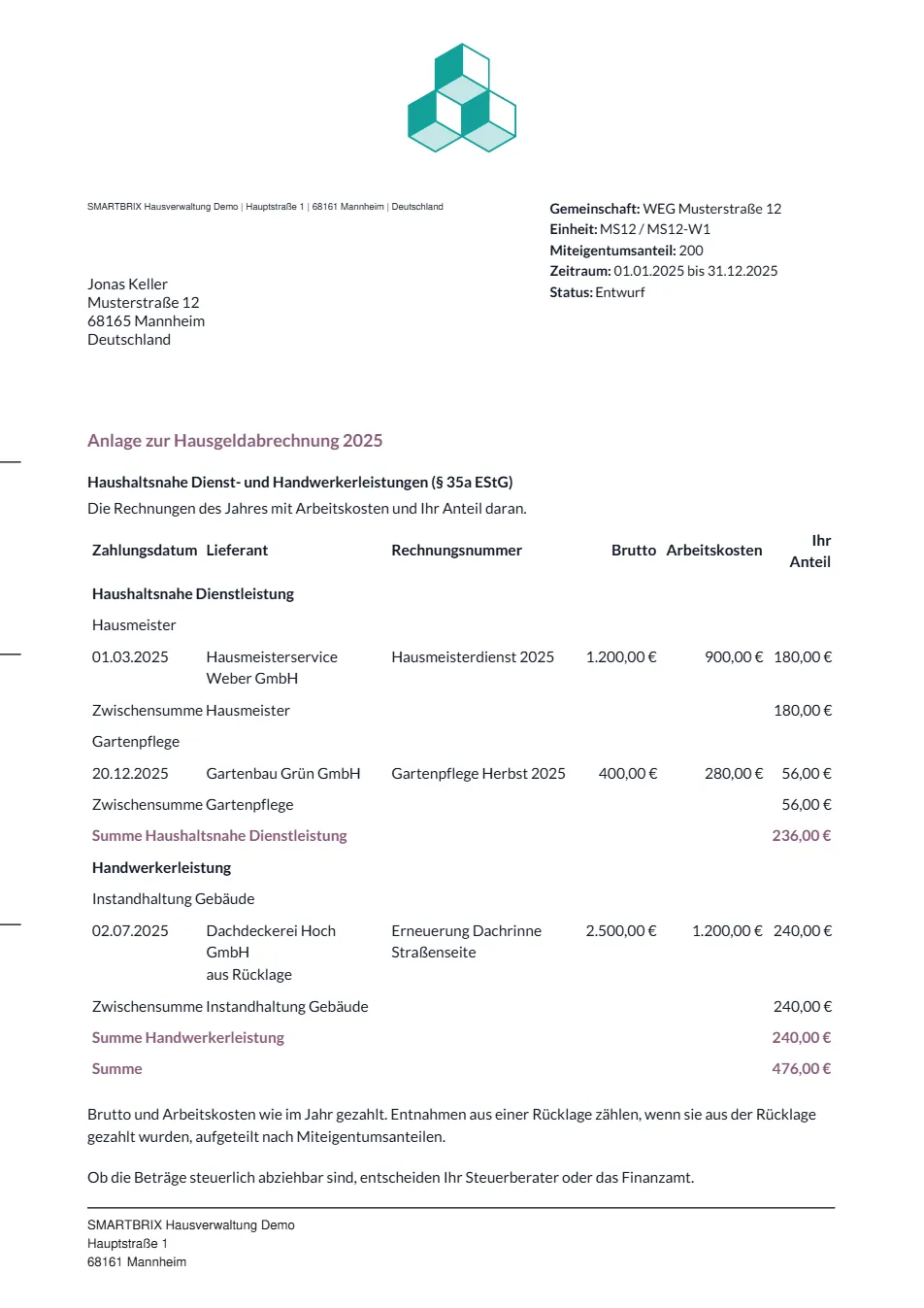
In the example, the gutter cost €2,500.00 gross, of which €1,200.00 were labor costs. Apartment 1 bears 20% of that, so €240.00.
Overall statement
Section titled “Overall statement”The income lists the owner contributions paid per group. The reserve contribution therefore appears under income as the reserve part of the owner contributions, not under expenses. Interest of a reserve appears as “Reserve interest”, the tax withheld as a deduction next to it.
The expenses appear in groups: “Chargeable operating costs”, “Heating and hot water”, “Non-chargeable operating costs” and “Expenses from reserves”. Whether operating costs are chargeable is set on the condominium cost type. Payments to the tax office under the VAT option appear under “Other expenses”. For each condominium cost type, the overall statement shows:
- Key: the allocation key of the year; for expenses from reserves “from reserve” with the name of the reserve
- Planned: the amount from the budget
- Expenses: what was paid in the year
- Deviation: expenses minus planned, empty without a plan
A planned condominium cost type without expenses appears with 0 so that the deviation stays visible. Each group has a subtotal, followed by the total of all expenses. SMARTBRIX stores the key and the planned amount when it computes, so a resolved settlement prints what was resolved.
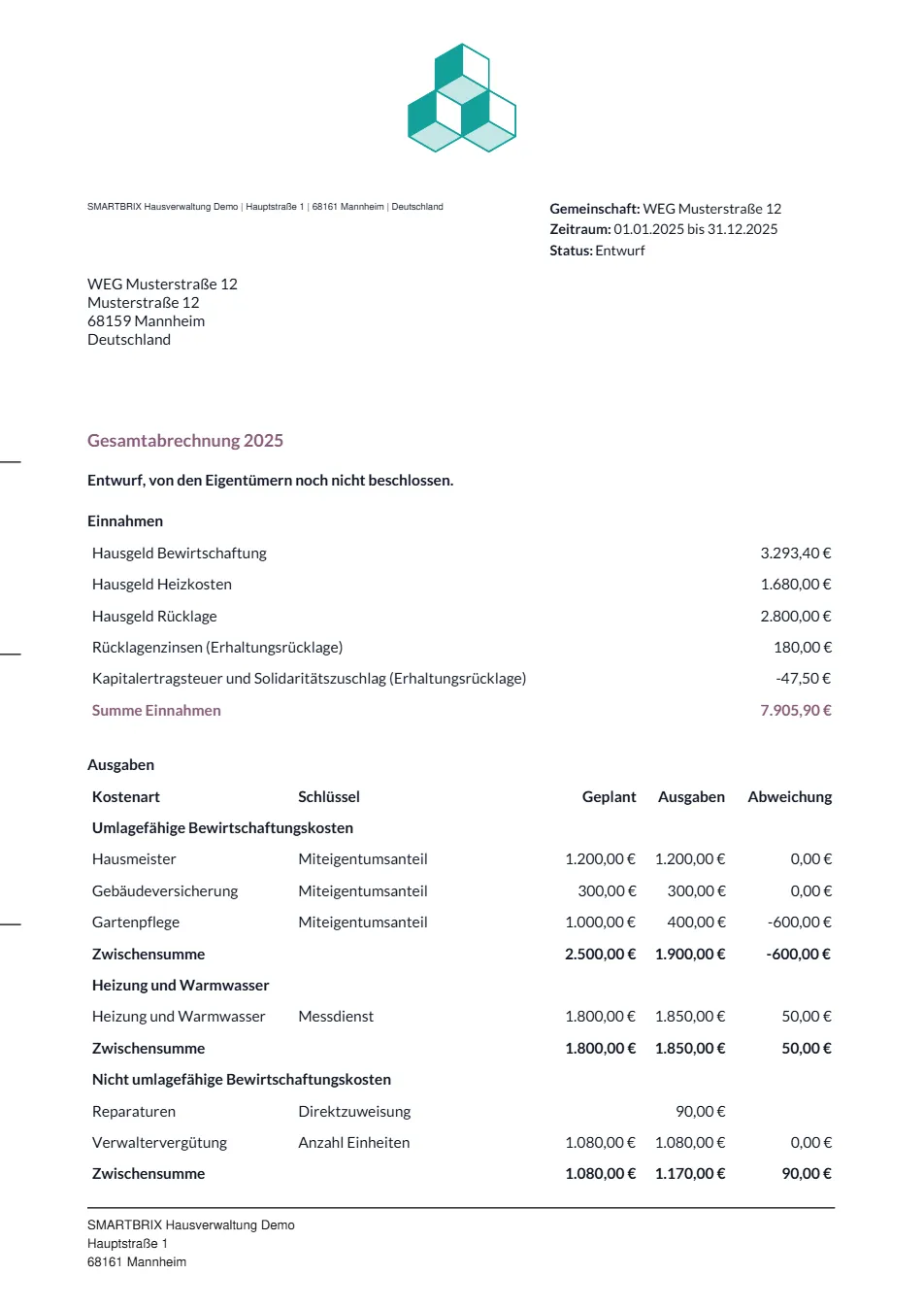
In the example, €1,000.00 was planned for garden maintenance and €400.00 was paid; the deviation is minus €600.00. Page 2 continues with the expenses from reserves, account development, accrual items and statement of assets (see Statement of assets).
The overall statement ends with the section “Development of the reserves”: for each reserve the opening balance, contributions, interest, capital gains tax and solidarity surcharge, withdrawals by type, other movements and closing balance, as in the reserve form. Below it are the date and agenda item of the resolutions on the withdrawals.
Settlement overview
Section titled “Settlement overview”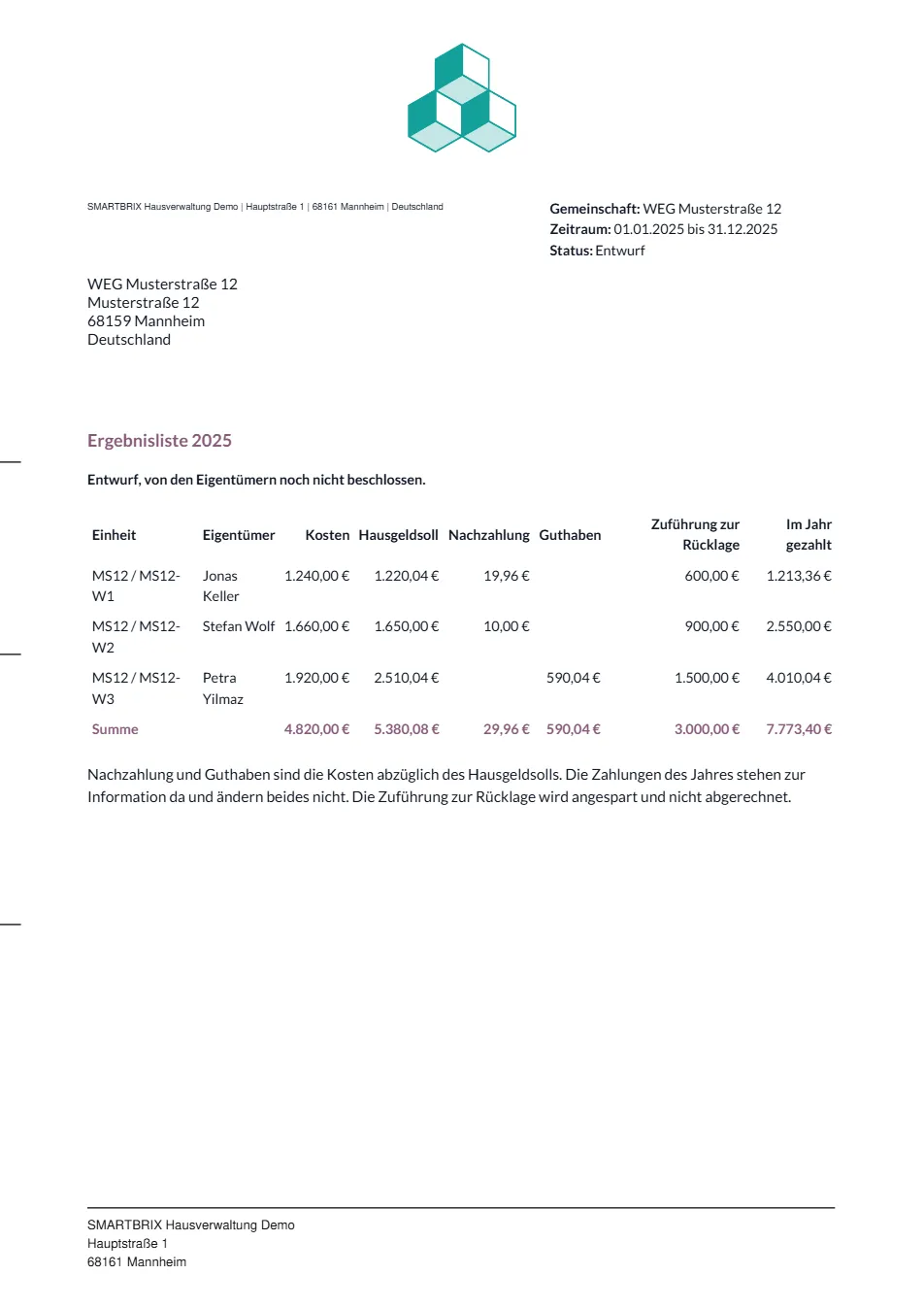
Didn't find an answer? Contact support