

Metering settlement in rental management
Experimental
Question about the manual? Ask Claude · Ask ChatGPT
The heating cost settlement is usually prepared by a metering service. It delivers one amount for heating and hot water per tenant. SMARTBRIX takes over these amounts unchanged into the property’s metering settlement. For this cost type, the service charge statement then uses the metering service’s amounts instead of allocating the expenditures itself.
You define once on the property which cost type the metering service settles. After that, every year you enter its amounts or upload its result file before you settle the service charges.
Metering positions
Section titled “Metering positions”The positions correspond to the items on the metering service’s statement, such as “Heizung” and “Warmwasser”.
- Open the property that the metering service settles, usually the building. Switch to the Energy and Consumption tab and expand the Metering Service section.
- Under Metering Positions, click Add a line:
- Name: as on the metering service’s statement.
- Cost Type: the cost type of your expenditures whose allocation the metering service replaces, for example the one for heating and hot water costs. Several positions may have the same cost type.
- Cost Types in File: only for the import. The metering service’s cost types whose amounts this position takes, for example “050 Arbeitspreis Raumheizung” and “052 Grundpreis Raumheizung” (consumption price and base price for space heating).
- Save.
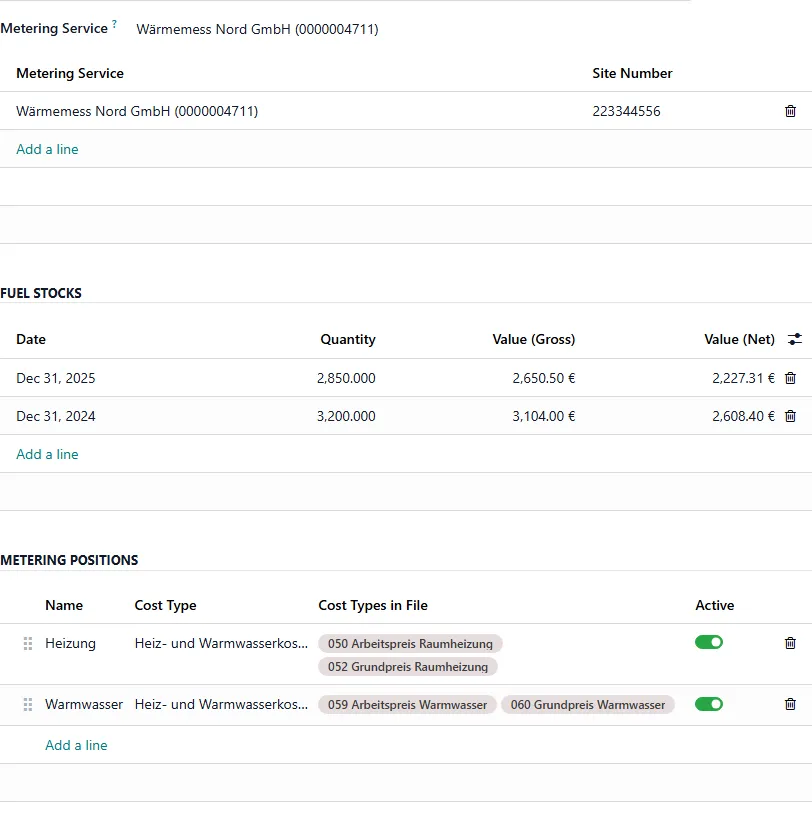
The positions remain in place for the following years. Each metering service cost type belongs to at most one active position per property. A position with recorded amounts cannot be deleted. Turn off Active instead.
Record the metering settlement
Section titled “Record the metering settlement”The metering settlement applies to one property and one calendar year. It holds one amount per usage and position. Periods without a tenant appear as vacancy.
- Open Property Administration › Invoicing › Data › Metering Settlements and click New.
- Choose the property and enter the year. SMARTBRIX at once creates one line for each usage of the year and each position, including usages of type Vacancy.
- On the Amounts tab, enter the metering service’s amounts in the Amount column.
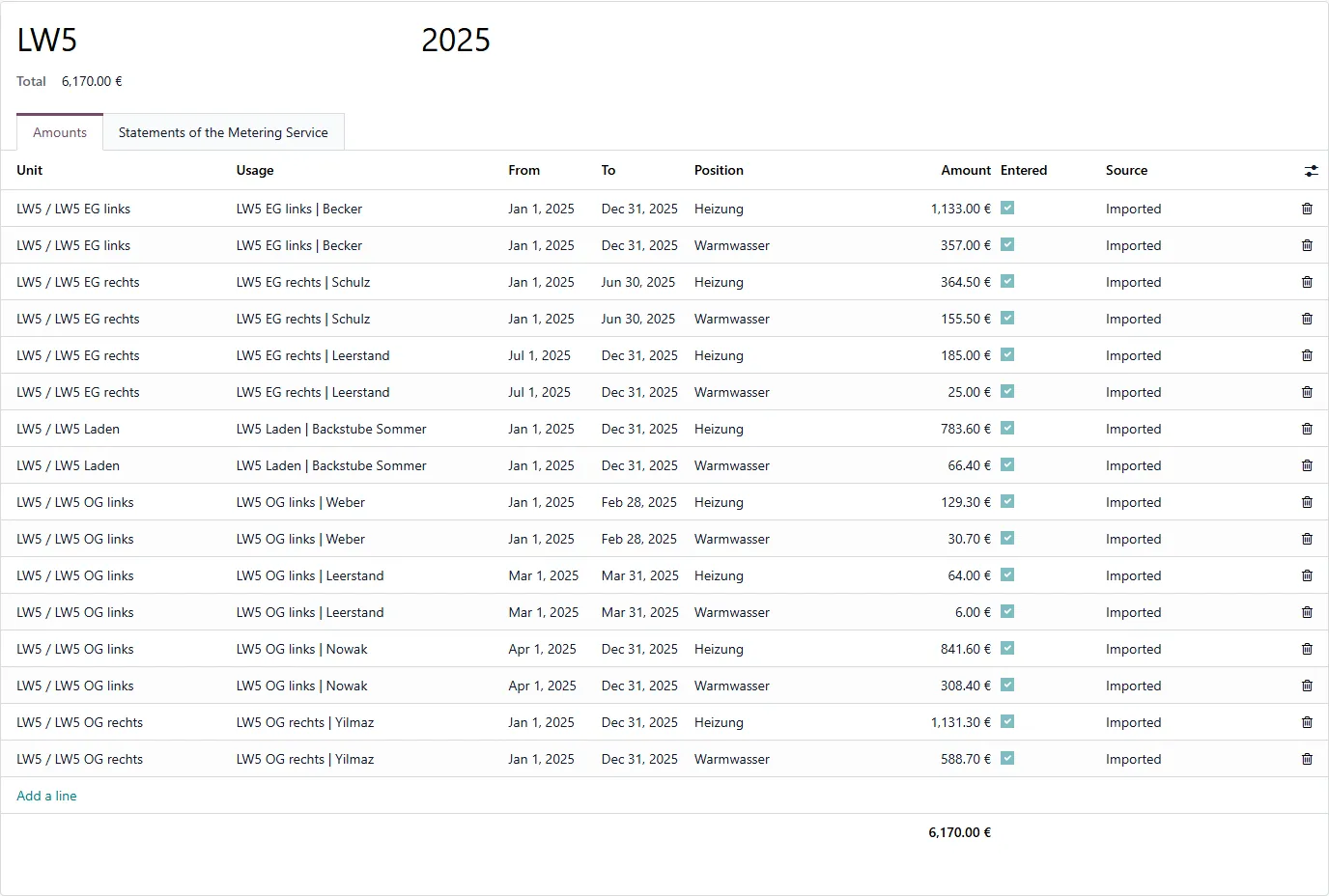
- When you enter an amount, SMARTBRIX checks Entered by itself. If a tenant has no consumption, check Entered at 0 by hand.
- For a period in which the unit had no usage at all, create a line with Unit, From and To and leave Usage empty. The owner bears this amount.
- In a line you add by hand, Unit offers only the objects below the chosen property and Usage only the usages of the year on that unit. When you pick a usage, SMARTBRIX fills in the unit, From and To.
- As in condominium management, Source shows whether an amount was Imported, Changed After Import or Entered by hand.
- If you change the property or the year before entering an amount, SMARTBRIX creates the lines anew. Once the metering settlement is saved, Fill Usages and Positions adds missing lines, for example after a new usage, and never overwrites an amount.
Attach the statements of the metering service
Section titled “Attach the statements of the metering service”The metering service sends one statement per tenant as a PDF. Store it on the metering settlement and it goes out with the tenant’s service charge statement.
- In the metering settlement, open the Statements of the Metering Service tab. SMARTBRIX has created one line there for each usage of the year, including vacancies.
- Click a line and upload the metering service’s PDF under Files. If a usage has several files, upload all of them.
- Close the window and save the metering settlement.
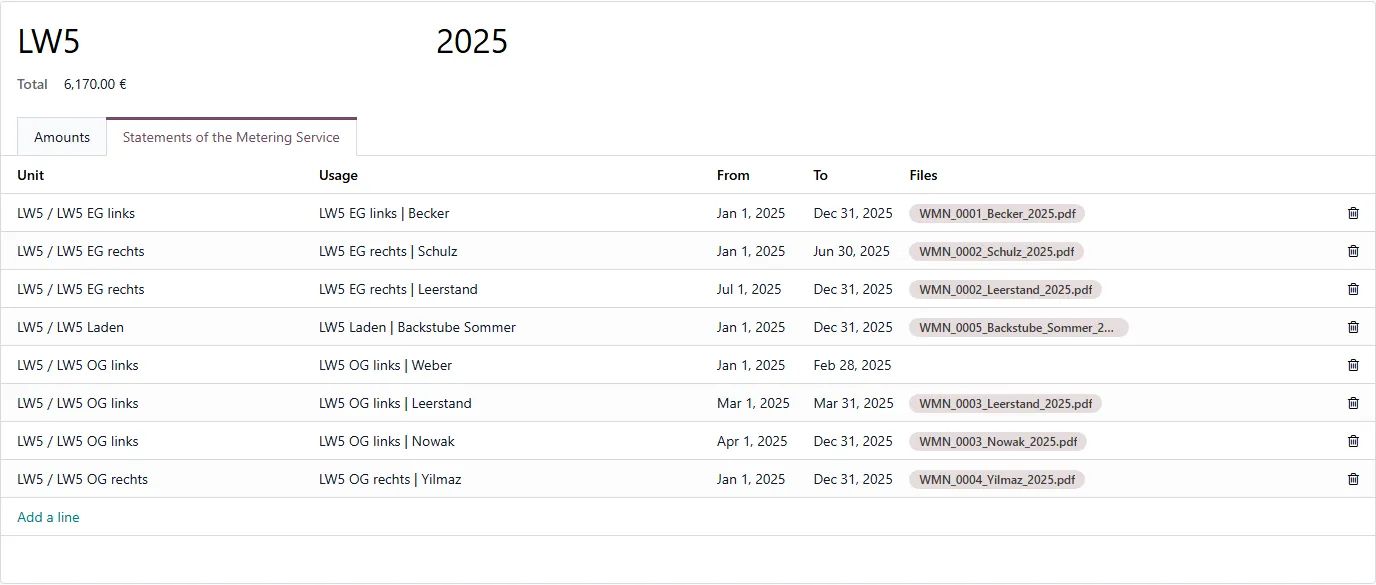
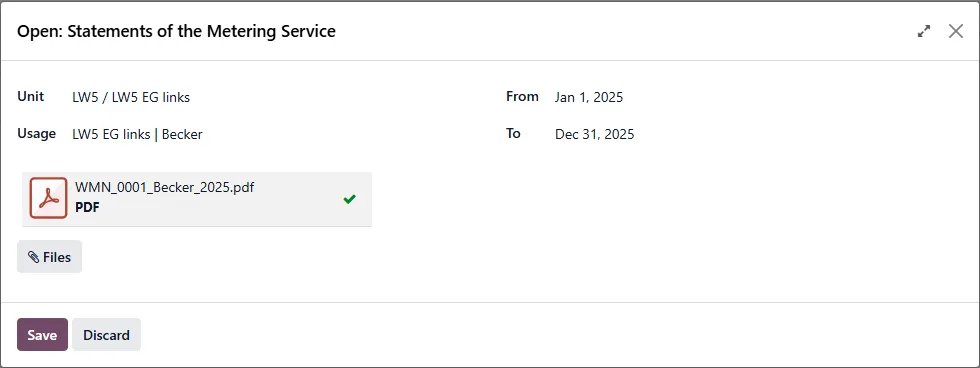
The statement belongs to the usage, not to the unit. After a change of tenant, each tenant only gets their own. For a period without any usage, create a line with Unit, From and To; that file goes to no tenant.
The service charge statement takes the files of every metering settlement its period touches:
- Print: the files follow the service charge statement in the same PDF.
- Send by email: the files are attached to the email.
- Send by LetterXpress: the files go into the same envelope.
Below the table, the service charge statement then says that the costs of the metering service are distributed as in the enclosed statement. Without a file, the sentence is left out. A file uploaded after the settlement run goes out with the next print or send.
PDFs delivered by an import stay on the metering settlement itself and do not go out with the service charge statement.
Import the metering service’s result
Section titled “Import the metering service’s result”If the metering service delivers its result as an ARGE file, the metering import fills the metering settlement. Setup and procedure are the same as in condominium management, see Metering import by ARGE file. You find the imports under Property Administration › Invoicing › Data › Metering Imports and the metering services under Property Administration › Configuration › Metering Services. Enter the user numbers on the units that have the usages, not on a framework agreement.
For rental properties, the following also applies:
- Assignment: A result belongs to the usage that runs on the last day of its usage period. If the metering service’s move-out date differs by a few days, that does no harm.
- Vacancy: If no usage runs on that day, SMARTBRIX takes over the result as a vacancy, starting the day after the unit’s previous result. Framework agreements and usages without service charge allocation do not count here.
- Double occupancy: If two results fall on the same usage, the import puts the property on hold. The message names the unit and the end dates. Clarify the change of tenant with the metering service or correct the usage dates and run the import again.
- Lock: Once a service charge statement for the property that touches the year is settled or posted as an invoice, the import no longer changes anything.
SMARTBRIX does not take over prepayments and balances from the file. SMARTBRIX calculates the service charge statement itself.
Effect on the service charge statement
Section titled “Effect on the service charge statement”If a cost type has a metering position and a metering settlement exists for the year, the service charge statement does not allocate the expenditures of this cost type. Instead, each usage gets a line with the cost type and the sum of its amounts from the metering settlement. The allocation key of the cost type plays no role here. SMARTBRIX allocates all other cost types as before.
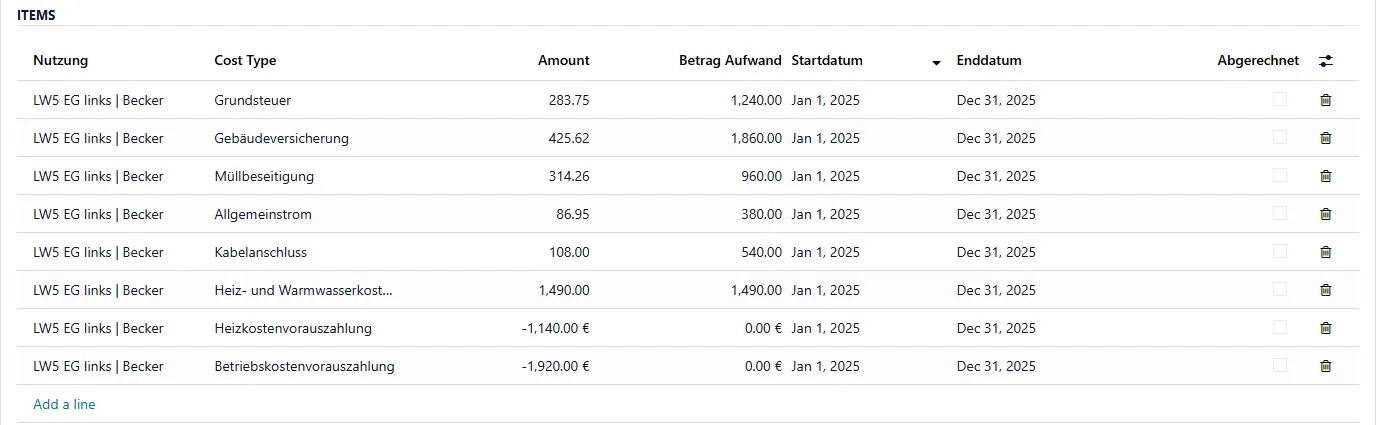
- Only with complete years: If the settlement period touches two calendar years, each of them needs a metering settlement for the cost type. If one is missing, SMARTBRIX allocates the cost type as before.
- Day by day: If the settlement period covers only part of a calendar year, the metering service’s amount counts pro rata by days.
- Flat amount: If a flat amount is agreed for the heating costs, no line is created. The amount stays with the owner.
- Vacancy: Amounts of a usage of type Vacancy appear in its statement. Amounts without a usage appear in no statement; the owner bears them.
- Difference: If the total of the metering settlement differs from the expenditures of the cost type, the owner bears the difference.
- Labor costs: The labor cost share of the expenditures passes to the usages in proportion to the amounts.
The statement then ignores the amounts you entered for this cost type under Direct Assignment on an expenditure.
Notices in the allocation check
Section titled “Notices in the allocation check”The allocation check shows three notices about the metering settlement:
- The metering service’s total differs from the expenditures of the cost type. The notice names both amounts. The owner bears the difference.
- A usage of the year has no entered amount in the metering settlement.
- A usage has an entered amount but no statement of the metering service as a file.
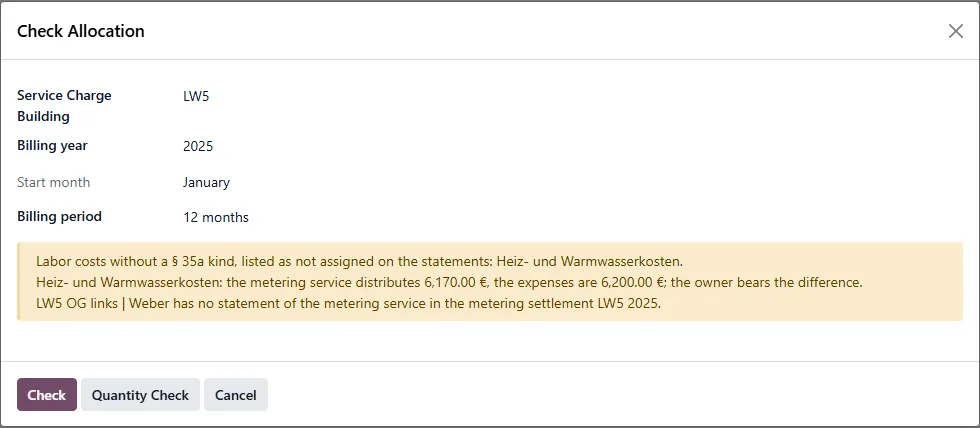
The notices do not block anything. Check them before the settlement run.
Metering settlement or direct assignment
Section titled “Metering settlement or direct assignment”Direct assignment remains available for individual cases, for example an invoice that only one tenant bears (see Record expenditures). For the metering service’s result, use the metering settlement: it covers the costs of the whole year, not one invoice at a time, and can be filled from a file.
Data for the metering service
Section titled “Data for the metering service”You hand costs, tenants, vacancies, paid heating cost prepayments and fuel stocks to the metering service with the metering export.
Didn't find an answer? Contact support