

Before a metering service can split the heating and hot water costs, it needs from you the costs of the year, the fuel stocks for heating oil or pellets, and the occupants of each unit with their periods. The metering export collects this data from SMARTBRIX and writes it as an ARGE file (DTA, version 03.10). An export covers one metering service and one calendar year and includes all of its sites, condominium communities and rental properties together.
You set up once which costs the metering service receives. After that, you create an export every year, check the preview, fix whatever holds it up and create the file. You hand the file to the metering service yourself, by email or through its portal. You then take over the metering service’s result with the metering import.
You set up the metering service, the site number and the user numbers as for the import, see Metering import by ARGE file. For the export, every unit with an owner or a usage needs a user number. If it is missing, ask the metering service for it.
Which costs the metering service receives
Section titled “Which costs the metering service receives”The export takes the invoices of the cost types that are linked to a metering position: in condominium management on the community in the Metering Positions tab, in rental management on the property in the Energy and Consumption tab, Metering Service section (see Metering settlement in rental management). No other costs are sent.
An invoice counts toward the year if its service period touches the year. If it has no service period, the invoice date counts. A gas invoice from October to September is therefore sent in full in both years. The metering service limits it to the year.
Metering service cost type on the cost type
Section titled “Metering service cost type on the cost type”Each invoice needs the cost type under which the metering service keeps it, for example “201 Lieferung / Rechnung” for a fuel invoice or “221 Wartungskosten”. Set it on the cost type:
- Condominium: Condominium › Configuration › Cost Types. You can edit the list directly. Show the Applies To and Tax Service Type columns through the column menu on the right of the list header.
- Rental management: Property Administration › Configuration › Cost Allocation › Cost Types, the Metering Service section in the form.
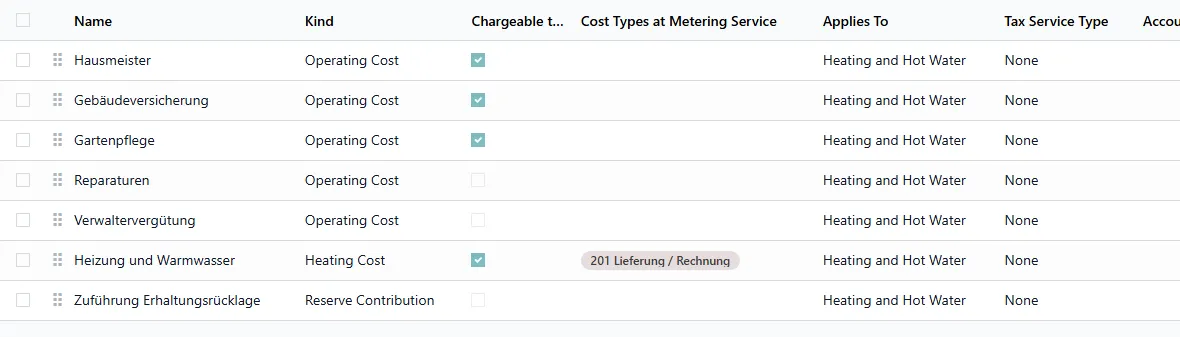
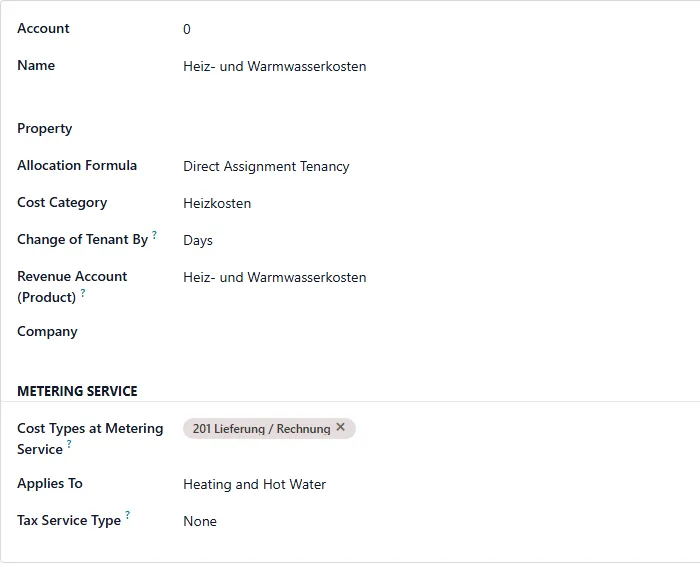
- Cost Types at Metering Service: the metering service’s cost type. You can search by key or name. One is allowed per data exchange, because the ARGE file exchange and the BVED interface have their own catalogs. The export uses the one of the data exchange through which the metering service is connected.
- Applies To: whether the costs concern “Heating and Hot Water”, only “Heating” or only “Hot Water”. The default is “Heating and Hot Water”.
- Tax Service Type: the type of service under which the labor costs of the invoices are reported, for example “Craftsmen’s Services”. The default is “None”. For invoices without labor costs, SMARTBRIX always reports “None”.
Different cost type and quantity on the expenditure
Section titled “Different cost type and quantity on the expenditure”If different invoices run under one cost type, for example fuel and maintenance under “Heating”, set a different metering service cost type on the individual expenditure. Open the expenditure (Condominium › Annual Settlement › Condominium Expenditures or Property Administration › Invoicing › Data › Expenditures), section Metering Service:
- Cost Types at Metering Service: applies only to this invoice. If empty, the cost type’s setting applies.
- Quantity (in rental management Delivered Quantity): the delivered quantity, for example liters of heating oil. SMARTBRIX fills in the quantity of the invoice line if it is not 1.
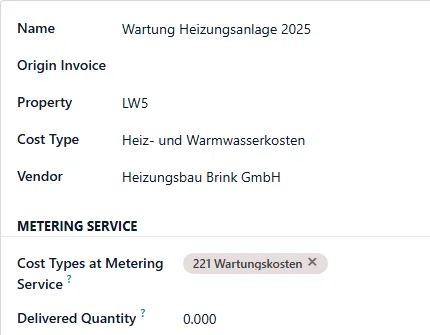
The quantity is required for deliveries of a storable fuel, that is heating oil, pellets or liquid gas. For gas and district heating, you can leave it empty.
Fuel type
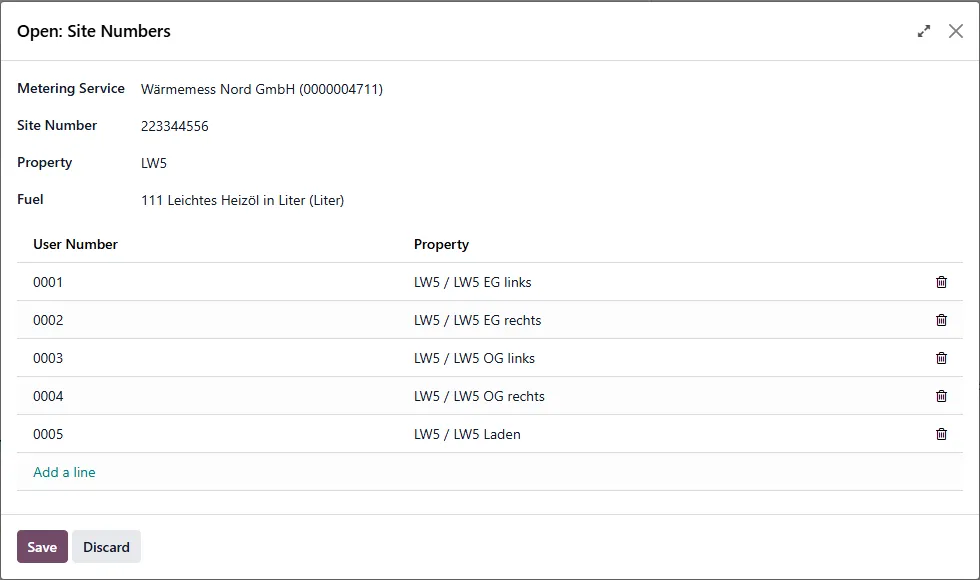
Section titled “Fuel type”Open the property, Energy and Consumption tab, Metering Service section, and click the line with the site number. The Fuel field shows the fuel that the metering service settles. SMARTBRIX fills it in from the property’s main energy source, for example “111 Leichtes Heizöl in Liter” for oil. If there is no suggestion or it does not fit, choose the fuel type yourself.
Fuel stocks
Section titled “Fuel stocks”For heating oil, pellets or liquid gas, the metering service needs the stock at the start and at the end of the year. This gives the consumption: opening stock plus deliveries minus remaining stock.
- Open the site’s property, Energy and Consumption tab, Metering Service section.
- Under Fuel Stocks, click Add a line and enter Date, Quantity, Value (Gross) and Value (Net).
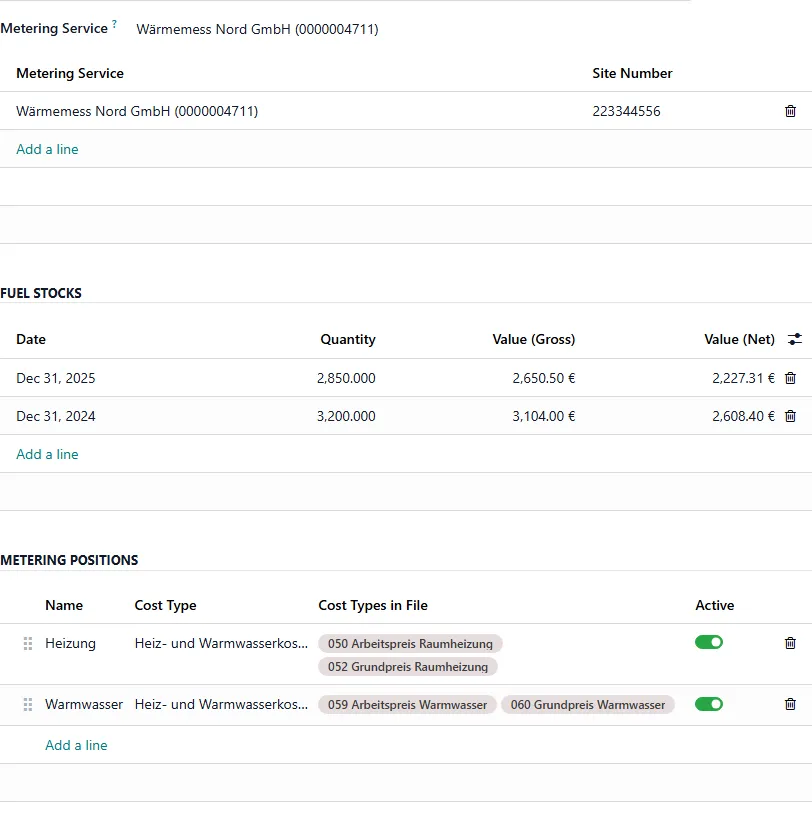
For each reference date, the export takes the last stock on or before January 1 and on or before December 31. It may be at most 31 days earlier. The remaining stock on December 31 of the previous year is therefore also the opening stock of the new year. Fuel stocks apply to condominium and rental management alike. For gas and district heating, you do not record any.
Create the export
Section titled “Create the export”- Open Condominium › Annual Settlement › Metering Exports or Property Administration › Invoicing › Data › Metering Exports and click New. Both menu items show the same list.
- Select the Metering Service and the Year. The previous year is suggested.
- Check the Sites tab. SMARTBRIX enters all sites of the metering service. Remove a site that you want to send separately later.
- Click Preview.
For each site, SMARTBRIX collects the occupants, the fuel stocks and the invoices. If everything can be reported, the export is set to “Ready”, otherwise to “On Hold”.
When the export is on hold
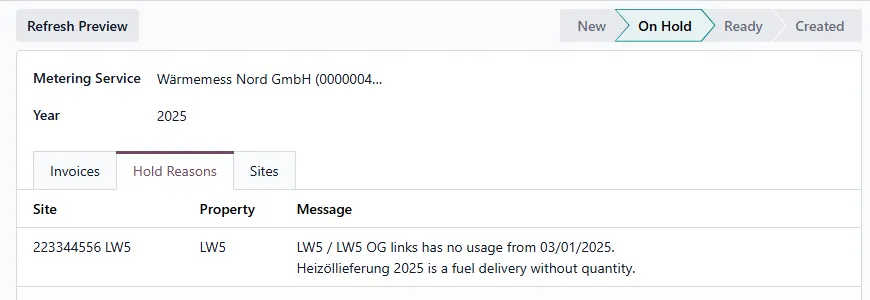
Section titled “When the export is on hold”The Hold Reasons tab lists what is missing for each site. As long as anything holds up the export, there is no file.
| Message | What you do |
|---|---|
| A unit has no user number at this metering service | Ask the metering service for the number and enter it on the site. |
| A unit has no owner from a certain date (condominium) | Add the missing condominium ownership. |
| A unit has no usage from a certain date (rental management) | Create a usage for that period, for a vacancy one of type Vacancy. |
| An invoice has no metering service cost type | Set the metering service cost type on the cost type or on the expenditure. |
| An invoice is a fuel delivery without a quantity | Enter the delivered quantity on the expenditure. |
| The site has no fuel type | Choose the fuel type on the site. |
| The fuel stock at the start or end of the year is missing | Record the fuel stock on the property. |
| Invoices are posted to buildings of several sites (condominium) | The metering service settles the condominium in several sites. Post the invoices to the respective building. |
| No management type provides data for a property | The property is neither a condominium nor does it have usages. Check whether the site number is on the right property. |
After the correction, click Refresh Preview.
Check and deselect invoices
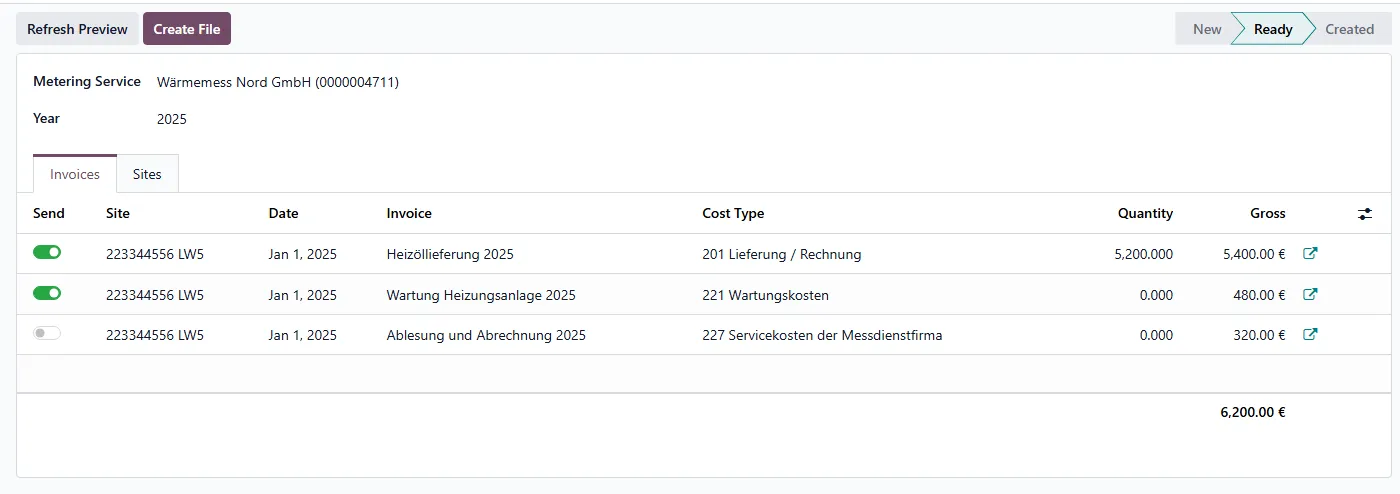
Section titled “Check and deselect invoices”The Invoices tab shows every invoice that is sent, with site, date, metering service cost type, quantity and gross amount. The arrow icon at the end of the line opens the expenditure. Show the net amount and labor costs through the column menu.
If an invoice should not be sent, turn off the switch in the Send column. The deselection is kept when you refresh the preview. The total below the list counts all invoices, including deselected ones.
Create the file
Section titled “Create the file”- Click Create File. SMARTBRIX collects everything again. If something holds it up now, the export is set back to “On Hold” and no file is created.
- Download the file in the File field. It is named after your customer number and the year, for example “0000004711_2025.dta”.
- Send the file to the metering service.

A created export stays in place with its file and invoices, so you can see later what you reported. It can no longer be changed. If you correct an invoice afterward, create a new export.
Condominium and rental management
Section titled “Condominium and rental management”An export may contain condominiums and rental properties of the same metering service at the same time. SMARTBRIX recognizes from the site whether its property belongs to a condominium. The data differs as follows:
| Condominium | Rental management | |
|---|---|---|
| Occupants | the owners from the condominium ownerships, with name and address | each usage with its invoice recipient; plus the owner of the property |
| Change of occupant | a change of owner results in two occupants of the same unit | a change of tenant results in two occupants of the same unit |
| Vacancy | does not exist | a usage of type Vacancy is sent as vacancy |
| Prepayments | are not reported; the condominium calculates owner contributions and the settlement balance itself | the heating cost prepayments paid in the period for each usage, except for vacancies and a heating cost flat amount |
| Base shares heating | the unit’s heated area, otherwise the living area | the heating space from the rent line at the end of the period, otherwise the area |
| Base shares hot water | the unit’s living area | the area from the rent line |
The export does not report framework agreements or usages without service charge allocation, such as a garage. If an area is missing, SMARTBRIX sends no base share, and the metering service keeps its own values.
Each invoice is sent with gross, net, labor costs, quantity, invoice date and the value from Applies To. As each unit’s own number, SMARTBRIX reports the property’s internal reference.
What is not sent
Section titled “What is not sent”- Prepayments in condominium management, and prepayments of blocks other than heating costs in rental management.
- Bank details and the risk of loss of allocation (Umlageausfallwagnis).
- Meter readings, hot water quantities and heating values.
- CO2 data.
- A second fuel type per site.
- Cold water as a separate settlement.
Limits
Section titled “Limits”- Only files in ARGE format version 03.10 and only calendar years.
- For district and local heating, the format requires data on primary energy and CO2 emissions. SMARTBRIX does not send it. A metering service may reject such files.
- SMARTBRIX does not send the file to the metering service itself.
- Not yet tested with a metering service. Whether a metering service takes over the base shares from SMARTBRIX or keeps its own is open. Before the first transfer, agree on the file name, character set and transfer method with the metering service.
The page Metering service interface (BVED) describes the exchange through the BVED web services.
Didn't find an answer? Contact support