

Renewal options
Question about the manual? Ask Claude · Ask ChatGPT
Fixed-term tenancy agreements, especially commercial ones, often contain a renewal option: the tenant may extend the agreement by a fixed period up to a deadline. Automatic renewal is just as common: the agreement renews itself unless someone objects by the deadline. SMARTBRIX keeps both cases on the tenancy, on the Options tab, sends a reminder before the option date and adjusts the end of the agreement.
Record renewal options on the tenancy
Section titled “Record renewal options on the tenancy”- Open the tenancy under Property Administration > Tenancies > Tenancies.
- On the Configuration tab, select Options?. The Options tab appears.

- On the Options tab, click Add a line and add one line per option.
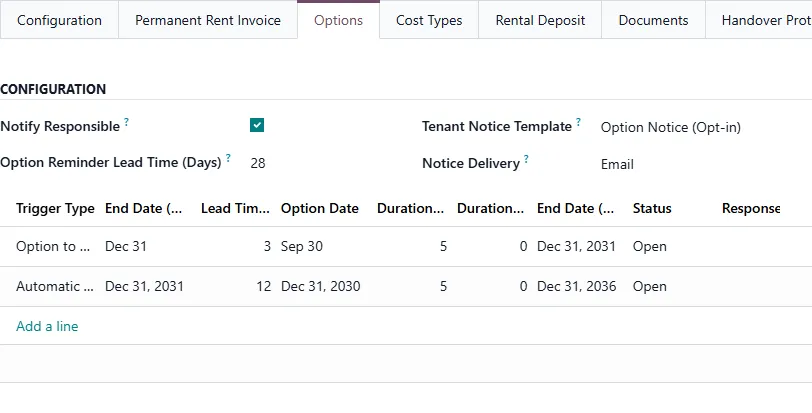
For each line:
- Trigger Type:
- Option to exercise: The agreement is only extended if the tenant exercises the option. Otherwise it lapses.
- Automatic renewal: The agreement is extended unless someone objects by the option date. Without a duration, it continues for an indefinite period.
- End Date (Old): the end of the agreement before this option. SMARTBRIX suggests the current end of the agreement, and for further lines the end of the previous option.
- Duration (Years) and Duration (Months): how much the agreement is extended by. SMARTBRIX calculates End Date (New) from this. An end date on the last day of a month stays on the last day of the month.
- Lead Time (Months): how many months before the old end of the agreement the tenant’s declaration must be received. This gives the Option Date.
- Status: Open, Exercised, Declined or Lapsed.
- Response Received On: the day the tenant’s declaration was received, not the day it was sent.
- Responsible User: who gets the reminder. Empty means the responsible user of the property.
- Documents: for example the tenant’s declaration exercising the option.
At the top of the tab are the settings for this tenancy:
- Notify Responsible: turns the reminder on. It is on by default.
- Option Reminder Lead Time (Days): how many days before the option date the reminder comes. You set the default for all tenancies in the Property Administration settings; it is 28 days.
- Tenant Notice Template and Notice Delivery: text and channel of the option notice, see below.
Reminder before the option date
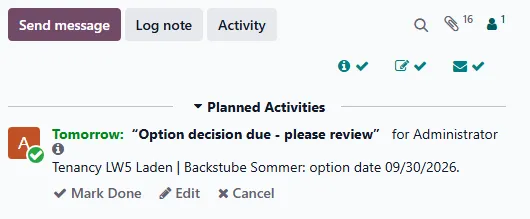
Section titled “Reminder before the option date”Every night SMARTBRIX checks all open options. When an option date comes within the reminder lead time, the responsible user gets a task on the tenancy, due on the option date:
- for a renewal option: “Option decision due”,
- for an automatic renewal: “Automatic renewal” with a note on the objection deadline.
Option notice to the tenant
Section titled “Option notice to the tenant”To remind the tenant of their option, click the paper plane icon Send option notice to the tenant in the line. It appears as long as the option is open and a Tenant Notice Template is selected.
- Notice Delivery: Email: The email window opens with the text of the template, addressed to the invoice recipient.
- Notice Delivery: PDF: SMARTBRIX creates the letter as a PDF to download and notes this in the history.
The notice does not change the status of the option.
Enter the decision
Section titled “Enter the decision”If the tenant exercises the option, set the Status to Exercised and enter Response Received On. SMARTBRIX immediately sets the end of the agreement to the new end date and notes this in the history. If the tenant declines or objects to an automatic renewal, set Declined.
What happens without any action from you when the option date passes:
- Option to exercise: It becomes Lapsed. The agreement ends on the old end date.
- Automatic renewal: SMARTBRIX extends the agreement by the duration and notes “Contract automatically renewed until …” in the history. The line stays Open and moves on to the next period.
Overview of all options
Section titled “Overview of all options”Property Administration > Tenancies > Options lists the options of all tenancies, initially filtered to Open. The filters Option date overdue, Option date within 90 days and Current Tenancy Options and grouping by status, trigger type or option date help you keep track of deadlines.

Didn't find an answer? Contact support