

SMARTBRIX settles the heating costs itself under the Heating Costs Ordinance (HeizkostenV) when you read the devices yourself or get the readings from the metering service. The heating cost statement is created with the overall statement of the service charges or with the condominium’s annual settlement. It splits the heating costs into base and consumption costs, separates heating and hot water, and deducts the landlord’s share of the CO2 costs. Every tenant gets a printout of their own.
You set up once on the building how the costs are settled, and you record the meter readings. Every year you book the supplier’s invoices as expenditures and start the statement as before.
Prerequisites
Section titled “Prerequisites”- The building is the property with the heating system; the flats are its sub-properties with a living space.
- The heating costs are in cost types of the settlement block for heating costs (see Set up service charges).
- The meters exist and have been read (see Meters and readings). If a reading at the start or end of the settlement period is missing, SMARTBRIX works it out (see Readings on the reference date).
Set up the building
Section titled “Set up the building”Open the building, switch to the Energy and Consumption tab and expand the Heating Costs section.
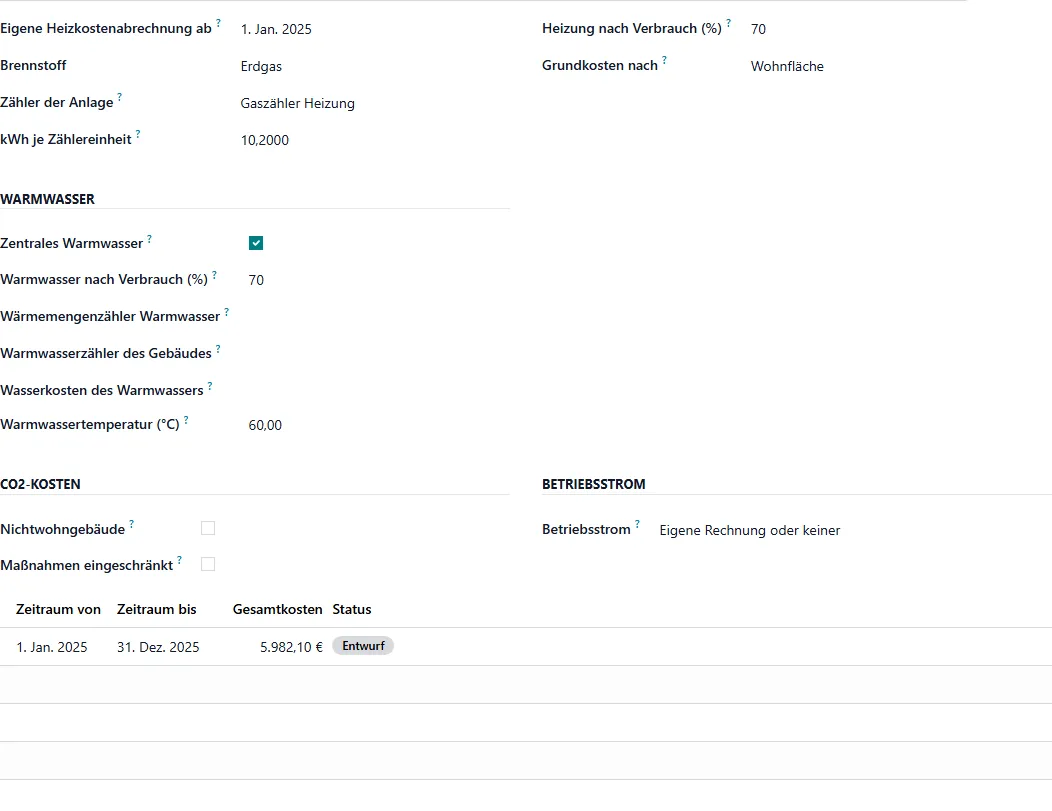
- Own Heating Cost Statement From: from this day on, SMARTBRIX settles the costs itself. Settlement periods that start earlier take the metering service’s amounts as before. Without a date, all other fields stay hidden.
- Fuel: natural gas, heating oil, liquefied petroleum gas, wood pellets, district heating or heat pump. The CO2 emissions and the standard value for hot water depend on it. The printout names the fuel.
- Fuel Mix of the Supplier: only for district heating. The fuels of the heating network as the supplier states them, for example “70 % natural gas, 20 % biomass, 10 % waste”. The printout names the mix; the heating cost statement points out an empty field.
- Meter of the Heating System: the gas meter, heat meter or fill level meter that shows how much energy the heating system used.
- kWh per Meter Unit: only for a meter that does not count kWh. For gas, the calorific value times the state factor from the supplier’s invoice, for example “10.2”. Empty or 0 uses the standard value of the fuel.
- Heating by Consumption (%): the share of the heating costs distributed by consumption, between 50 and 70. The rest are base costs.
- Base Costs by: Living Space or Heated Area. Hot water base costs always go by living space.
Under Hot Water:
- Central Hot Water: the heating system also heats the hot water. SMARTBRIX then splits the costs into heating and hot water.
- Hot Water by Consumption (%): as for heating, between 50 and 70.
- Heat Meter of the Hot Water: measures the heat used for hot water. Without it, SMARTBRIX works out the heat from the hot water volume and the Hot Water Temperature (°C).
- Hot Water Volume Meter: measures all hot water of the building. Without it, SMARTBRIX adds up the hot water meters of the flats.
- Water Costs of Hot Water: cost types of the water that is heated. Their costs go wholly into the hot water of the heating cost statement instead of the service charge statement.
Under CO2 Costs:
- Non-Residential Building: the landlord bears half of the CO2 costs, whatever the emissions.
- Measures Restricted: listed building, conservation area or an obligation to connect to a heat network. The landlord’s share is halved.
Under Operating Power you set how the power of the heating system comes out of the general power:
- Own Invoice or None: the operating power is a separate expenditure in a heating cost type, or there is none.
- Intermediate Meter: a meter behind the Main Meter of the General Power measures the power of the heating system. SMARTBRIX takes this share of the costs out of the General Power. The kWh of the heating system cost as much as the general power does on average: costs of the general power times kWh of the intermediate meter divided by kWh of the main meter.
- Estimate: the operating power is a Share of Fuel Costs (%), for example “5”.
With an intermediate meter or an estimate, choose under General Power the cost type the operating power comes from. Its amount in the service charge statement drops by the operating power, which appears in the heating cost statement instead. If SMARTBRIX finds no costs of the general power for the period with an intermediate meter, the operating power is left out and the heating cost statement points this out.
Cost types and expenditures
Section titled “Cost types and expenditures”On the cost type of the fuel, for example “Natural gas” or “Heating oil”, tick Fuel. The field appears on cost types in the heating cost settlement block. From the expenditures of these cost types, SMARTBRIX works out the energy used, the estimated operating power and the CO2 costs. Maintenance, flue gas measurement or device rental go into heating cost types of their own without the tick.
Book the supplier’s invoice as an expenditure, as described in Record expenditures. For a fuel cost type, the expenditure shows three more fields:
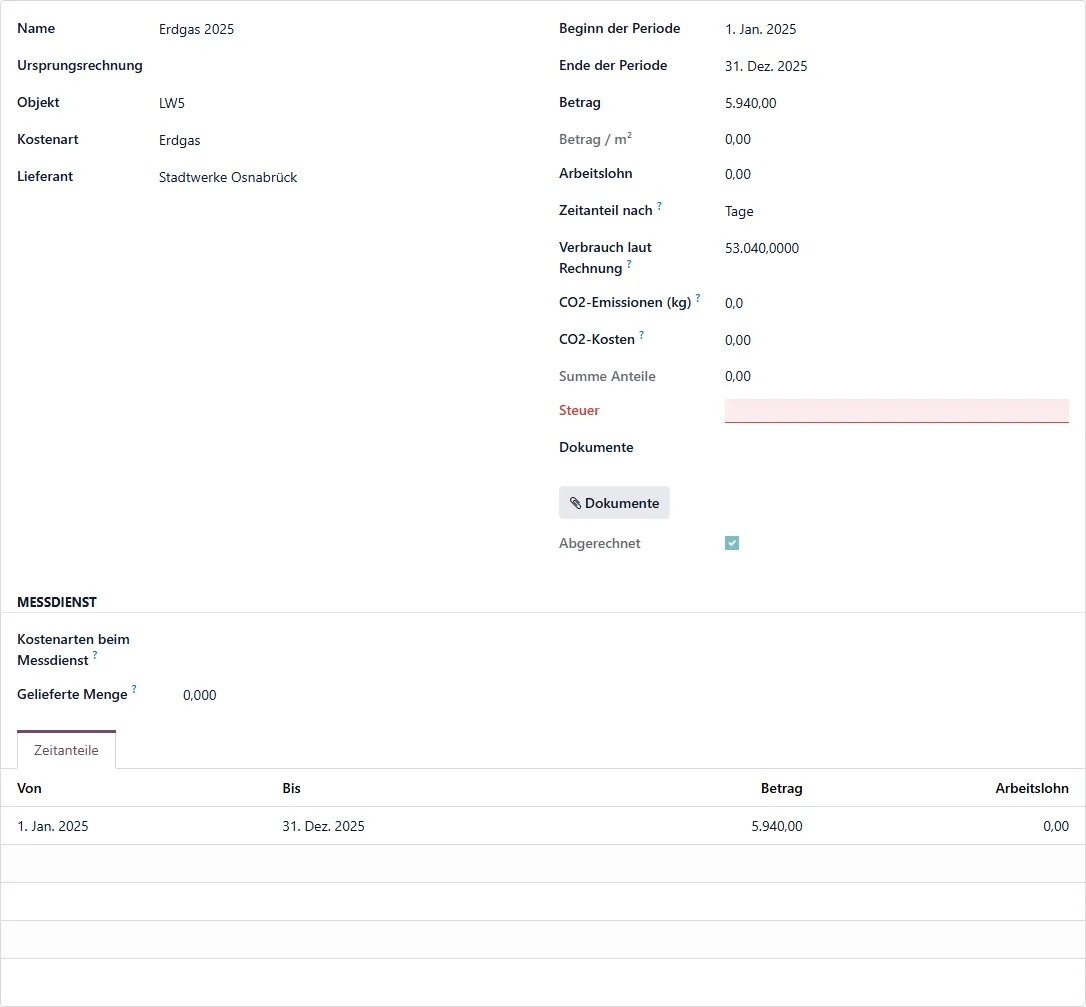
- Consumption per Invoice: the kWh on the invoice. Without a meter of the heating system, SMARTBRIX takes this value as the energy used.
- CO2 Emissions (kg) and CO2 Costs: as stated on the invoice. Empty, SMARTBRIX works out both from the energy, the fuel and the CO2 price of the year.
If an invoice for natural gas, district heating or a heat pump does not match the settlement period, for example 10/01 to 01/03, each year counts only the fuel used in that year (§ 7(2) HeizkostenV). SMARTBRIX therefore splits it by the Meter of the Heating System: the count at the end of the settlement period follows from the readings before and after it. If a real reading is missing on one side, SMARTBRIX splits by degree days, so a winter day counts more than an autumn day. SMARTBRIX never splits fuel by plain days. This applies once SMARTBRIX settles the building’s heating costs itself. A part already contained in an earlier statement stays as it is; the current year takes the rest.
For natural gas, district heating and heat pumps, SMARTBRIX checks during the calculation whether the expenditures of the fuel cost types cover the settlement period without gaps. If days are missing, for example between two gas contracts, the heating cost statement names them: “No fuel invoice covers …; the costs of that time are missing.” Usually the default supplier delivered during that time and sends an invoice of its own. Post it and click Recalculate. Heating oil, liquefied petroleum gas and pellets come as deliveries, so SMARTBRIX checks no gaps there.
If the supplier credits a bonus, for example with the annual bill, book it as a credit note with the same cost type (see Utility installments). The expenditures are then lower than the amount “Unsere Leistungen” (our services) on the invoice. That is correct; the bonus benefits the tenants.
Meters and devices
Section titled “Meters and devices”The devices of the flats belong to the flat, not to the building. SMARTBRIX takes whatever is attached to each flat:
- Heat Meter: counts the heat in kWh.
- Heating Cost Meter: the heat cost allocator on the radiator. A flat may have several.
- Hot Water Meter: counts the hot water in m³.
A heat cost allocator has three more fields:
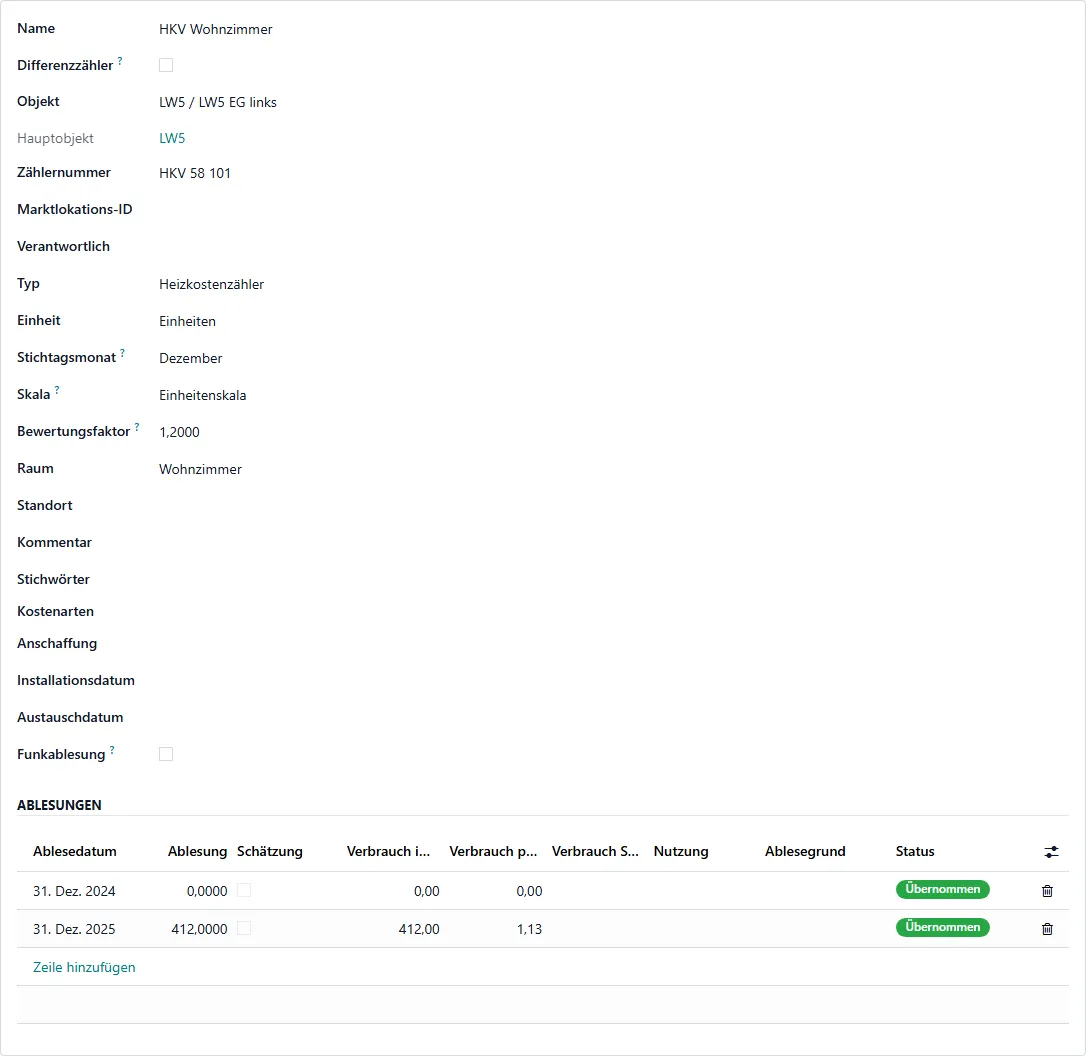
- Scale: Unit Scale when the device counts units without weighting, or Product Scale when it already includes the radiator.
- Rating Factor: the radiator’s factor as the metering service states it. With the unit scale, the reading counts times this factor.
- Room: printed next to the device. If no device of the unit has a room, for example with one heat meter per unit, the column is left out.
Heat cost allocators start again at 0 after the reference date. Enter the month of this date under Restart Month; December is the default. SMARTBRIX works out the consumption across the restart.
Readings on the reference date
Section titled “Readings on the reference date”The statement needs a reading of every meter at the start and at the end of the period, and on the move-in and move-out day when the tenant changes. If one is missing, SMARTBRIX works it out when calculating and creates it as a reference date reading on the meter. This applies to all meters: the devices of the flats, the meter of the heating system and the hot water meters. How SMARTBRIX calculates and when it stops is described under Calculate a reference date reading.
- SMARTBRIX spreads heat cost allocators and heat meters of the flats by degree days, so a winter day counts more than a summer day. The meter of the heating system and the heat meter of the hot water also count the hot water, which is used evenly over the year. SMARTBRIX spreads them by days, like all other meters.
- A reading between two readings is not an estimate under § 9a. A reading without a later reading is marked as Estimate.
- SMARTBRIX replaces an estimate on its own as soon as a later reading is approved. A reading between two readings, however, stays and is not worked out again on the next calculation. If the readings are far apart, for example from May to August of the following year, a real reading or the reading from the supplier’s invoice is more accurate. Enter it, delete the reference date reading and click Recalculate.
Import readings
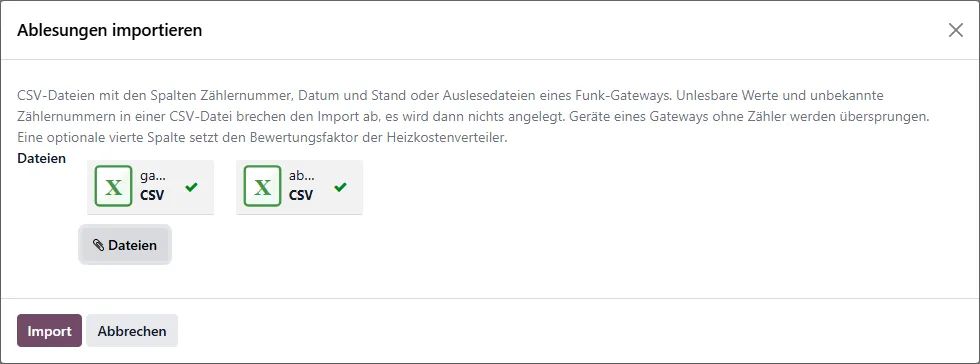
Section titled “Import readings”To load many readings at once, use Properties › Inventory › Meter Management › Import Readings, from CSV files or from the readout files of a radio gateway. How it works is described under Import readings. With the heating cost statement, a CSV file may have a fourth column with the rating factor after meter number, date and reading. SMARTBRIX enters it on the heat cost allocator.
Oil and pellets
Section titled “Oil and pellets”For heating oil, liquefied petroleum gas or pellets, create a Fill Level Meter for the tank on the building and choose it as the Meter of the Heating System. Enter the fill levels like meter readings. The level drops with consumption and rises with a delivery; both are allowed. Enter the delivered quantity on the expenditure of the delivery under Delivered Quantity.
SMARTBRIX works out the consumption from this: level at the start plus deliveries minus level at the end. If there is no level exactly on the reference date, SMARTBRIX estimates it between the readings before and after. SMARTBRIX values the stock with the prices of the deliveries, oldest used first. A higher stock at the end of the year stays with the owner; a lower one raises the heating costs. SMARTBRIX writes the stock at the end into the Metering Service section in the Energy and Consumption tab of the building, unless you recorded it there yourself.
Switch to your own heating cost statement
Section titled “Switch to your own heating cost statement”Until now a metering service settled the heating costs, or they ran through cost types allocated by area or consumption. From Own Heating Cost Statement From on, SMARTBRIX settles them itself. For the consumption of the first year to be right, every meter needs an opening reading on the first day of the period.
- Set Own Heating Cost Statement From on the building to the first day of the first own period, for example January 1, 2025.
- Enter an opening reading on every meter, dated that day. Use the value the last statement ended with, even if it was read a few days earlier, for example on December 28. That way no consumption is counted twice and none is lost.
- For the meter of the heating system, take the reading from the supplier’s invoice.
- Heat cost allocators start at 0 after the reference date. If a device has no reading before the first day, enter 0 for that day.
Date the opening reading on the first day of the new period, not on the last day of the old one. If the previous year is settled up to December 31, SMARTBRIX refuses a reading dated December 31, because it would change the basis of a statement that has already gone out.
If an opening reading is missing, SMARTBRIX works it out from the readings before and after when calculating (see Readings on the reference date). It then lies slightly above the reading the old statement ended with, because the days between the reading and the turn of the year count too. If those readings are missing as well, SMARTBRIX estimates the consumption under § 9a.
If the heating costs used to run through your own cost types, for example “Heating costs 70 % by consumption”, link the meters to the new heating cost types before you archive the old ones. SMARTBRIX does not archive a cost type while a meter is linked to it and to no other.
Settle
Section titled “Settle”- Book all expenditures of the year and enter the meter readings for the end of the period.
- Check the allocation. It also points out devices without a reading at the end of the period.
- Click “Create Service Charge Statement”, or “Calculate” in the existing overall statement.
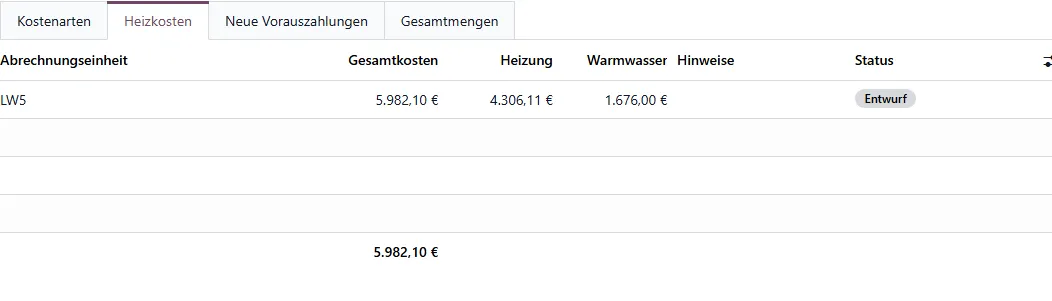
SMARTBRIX then works out the heating cost statement of the building. Its result replaces the allocation of the heating cost types: every tenancy gets its amount from the heating cost statement, split over the heating cost types in proportion to their costs. Advance payments and flat rates work as before. The overall statement shows the heating cost statement in the Heating Costs tab.
In the tenant’s service charge statement, the heating cost types appear like this:
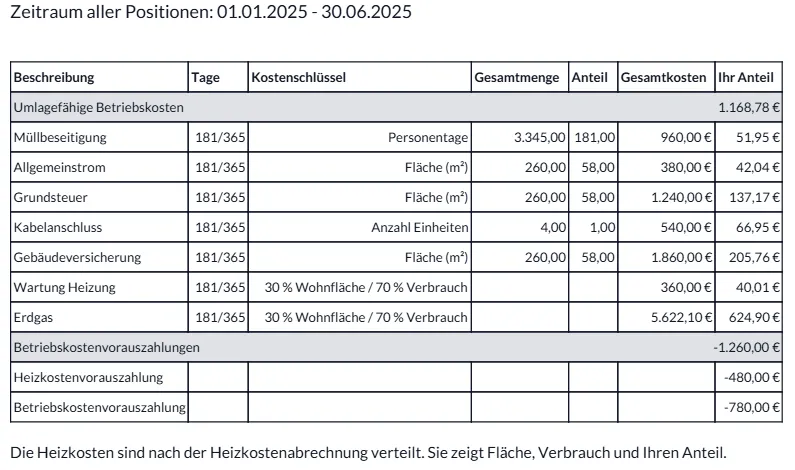
- Allocation Formula: the split set on the building, for example “30 % Living Space / 70 % consumption”. With central hot water and a different hot water split, both appear.
- Days of Use: the tenant’s days in the settlement period, for example “214/365”.
- Total Costs: the costs of this cost type in the heating cost statement.
- Key Total and Share stay empty. The tenant’s area, consumption and share are in their heating cost statement. A note below the table says so.
The line “Operating power of the heating system” deducts the operating power from the general power and keeps its allocation key.
Check the heating cost statement
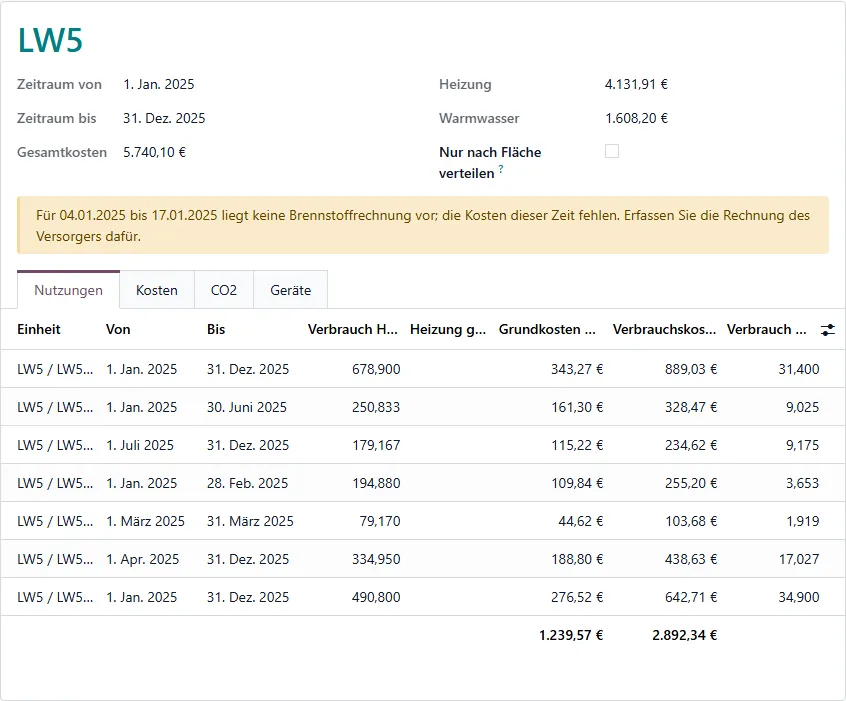
Section titled “Check the heating cost statement”Click the line to open the heating cost statement. The Usages tab shows, per tenancy and vacancy, the consumption and the four amounts: base and consumption costs of heating and of hot water.
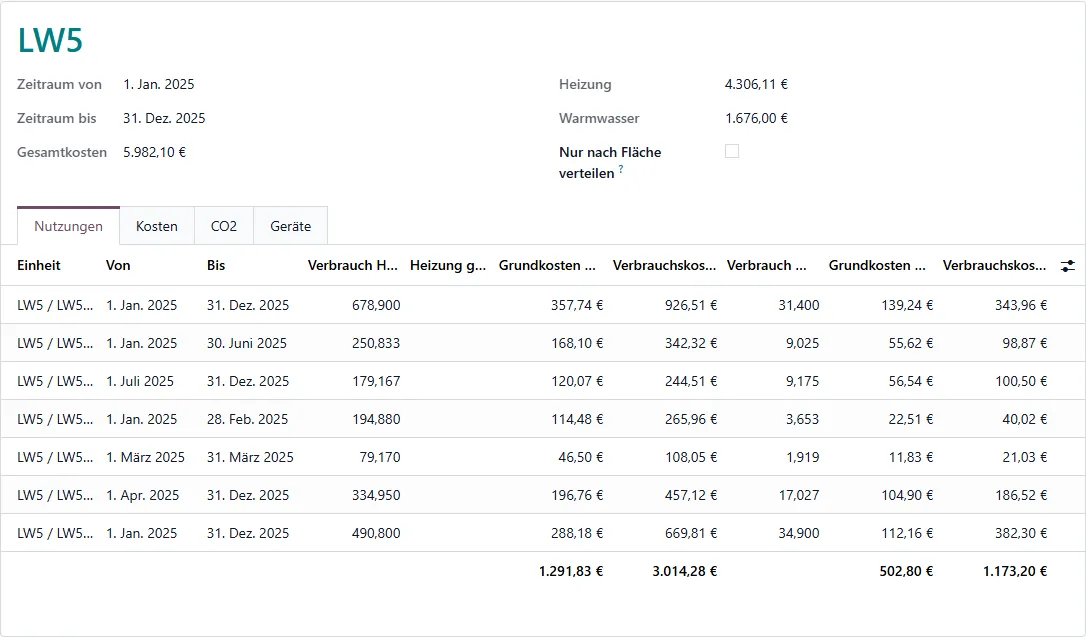
The Costs tab shows which expenditures went in and how SMARTBRIX separated heating and hot water. Heat for Hot Water names the method: measured by heat meter, from the hot water volume or, if both are missing, with 32 kWh per m² of living space.
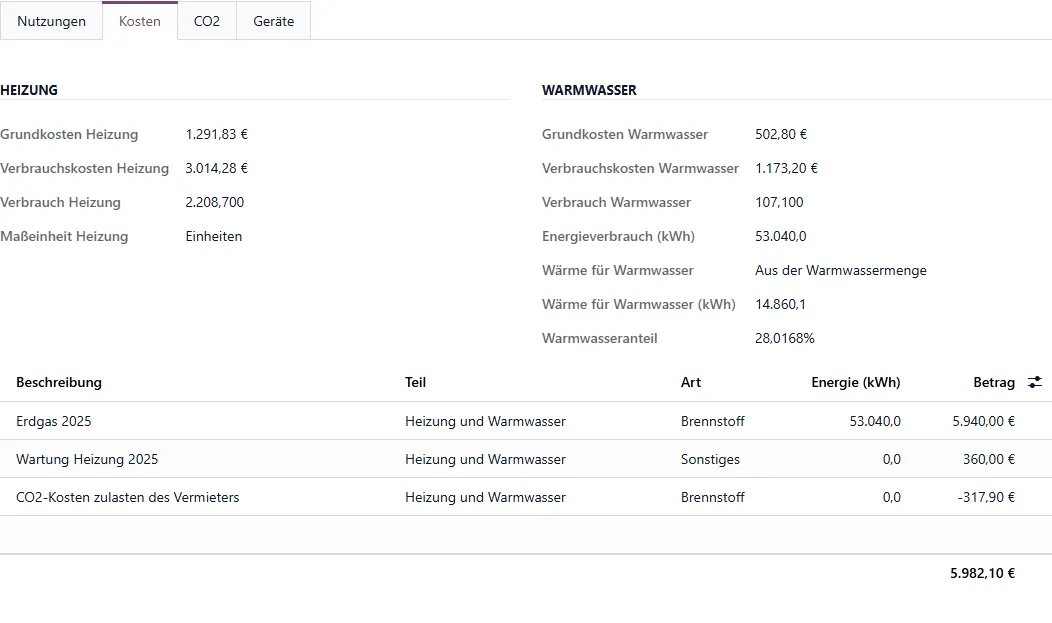
In the example, the heating system used 53,040 kWh. By the formula of the Heating Costs Ordinance, the hot water needed 14,860 kWh, so 28.02 % of the costs go to hot water. Of the heating costs, 70 % go by the readings of the heat cost allocators and 30 % by living space.
The energy used comes from the Meter of the Heating System if one is set, otherwise from the Consumption per Invoice. If the heat meters of the apartments together measured more than the heating system used, the heating cost statement points it out: “The units received … kWh, more than the … kWh the heating system used”. That is technically impossible, a heating system always loses heat. It usually comes from the readings at the start or end of the period, for example an opening reading from 12/28 entered as the reading of 01/01, or estimated closing readings. Also check the kWh per Meter Unit against the gas invoice. Heat pumps get no such note, they produce more heat than the electricity they use.
The CO2 tab shows the emissions, the classification and the landlord’s share.

The landlord’s share appears in the Costs tab as the deduction “CO2-Kosten zulasten des Vermieters” (CO2 costs borne by the landlord). The tenants only pay the rest; the owner bears the deduction.
As long as the overall statement is not released, the heating cost statement is in Draft and you can change it:
- Recalculate: after new readings or expenditures.
- Consumption of an estimated usage: you can overwrite the consumption of an estimated usage in the list. The Heating Estimated column then shows Entered.
- Distribute by Area Only: see Special cases.
“Release” in the overall statement also releases the heating cost statement. “Reset to Draft” resets it as well.
For natural gas, heating oil, liquefied petroleum gas and district heating, the heating cost statement needs CO2 emissions to be released. If they are missing, the release stops with the message “The CO2 values are missing for …” before any invoice is created. Without the CO2 information, the tenant may reduce their share of the heating costs by 3 %. Enter the values on the fuel’s expenditures or as annual values on the property and click Recalculate.
The printout
Section titled “The printout”Print in the heating cost statement creates one printout per usage in the tenant’s language. When you send the service charge statement by email, SMARTBRIX attaches the tenant’s heating cost statement as a second PDF. When you send it by post through LetterXpress, it goes into the same envelope behind the service charge statement. Print on the service charge statement appends it as well.
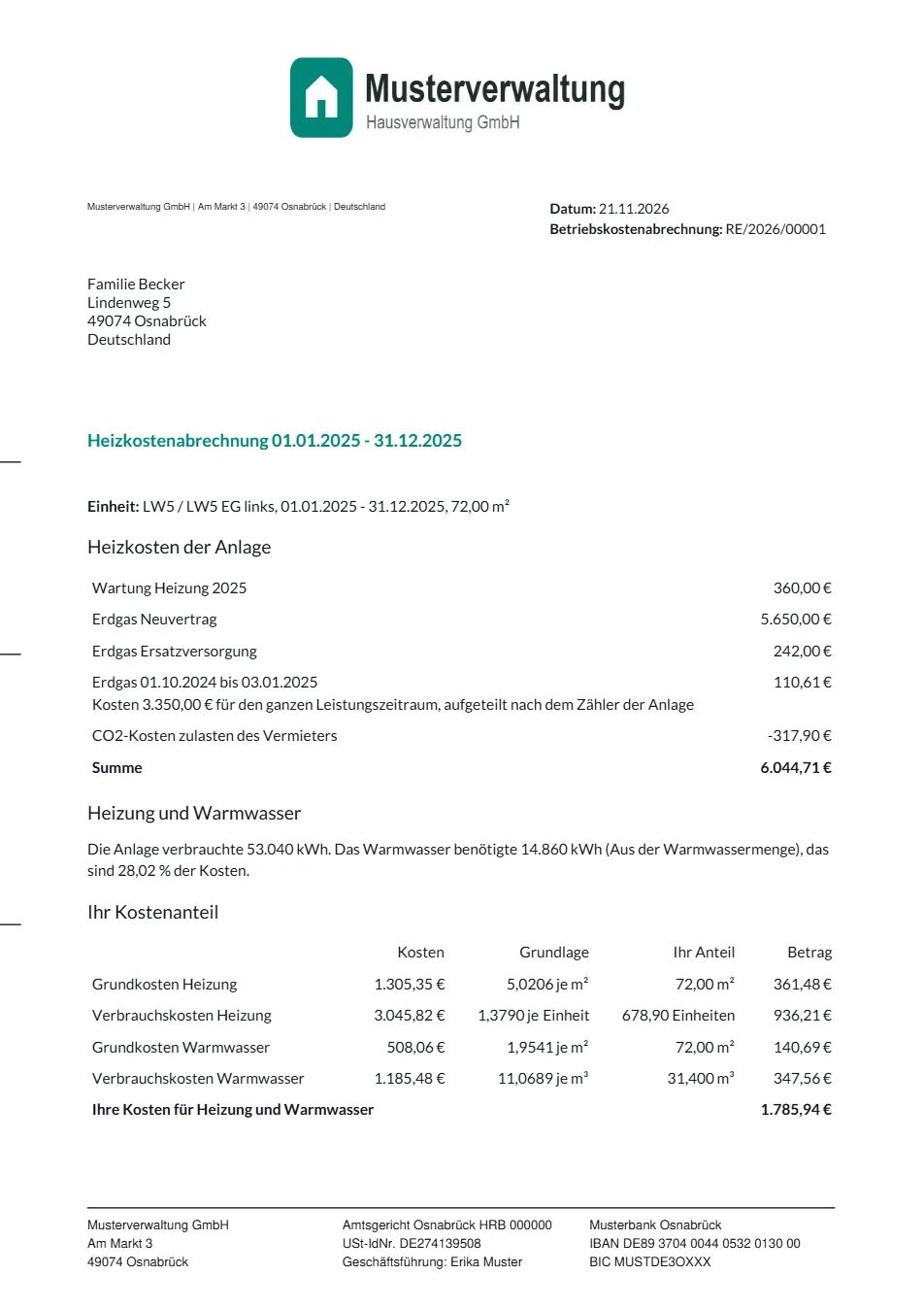
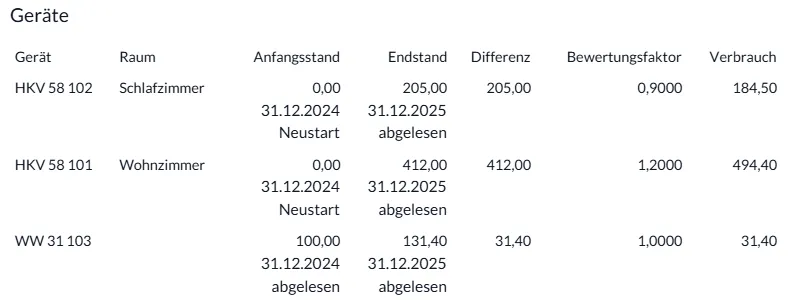
The printout contains the mandatory information of the Heating Costs Ordinance: costs of the heating system, the split, your share with the price per unit, the devices with start and end reading and rating factor, CO2 costs, your consumption against the building’s average, and notes on energy advice and dispute resolution.
- Date and reference: the top right shows the date of the service charge statement and its number. If the usage has no contact, for example a vacancy, the address field shows the recipient of the service charge statement.
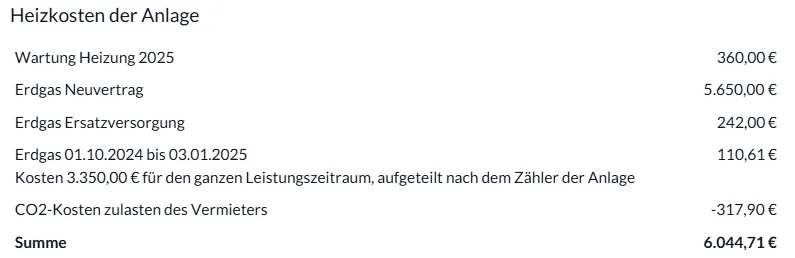
- Costs of the heating system: invoices whose service period reaches beyond the settlement period, for example three part payments and the final invoice of an old gas contract, appear as one line. Below it are the costs of the whole service period and how SMARTBRIX determined the part for this year.
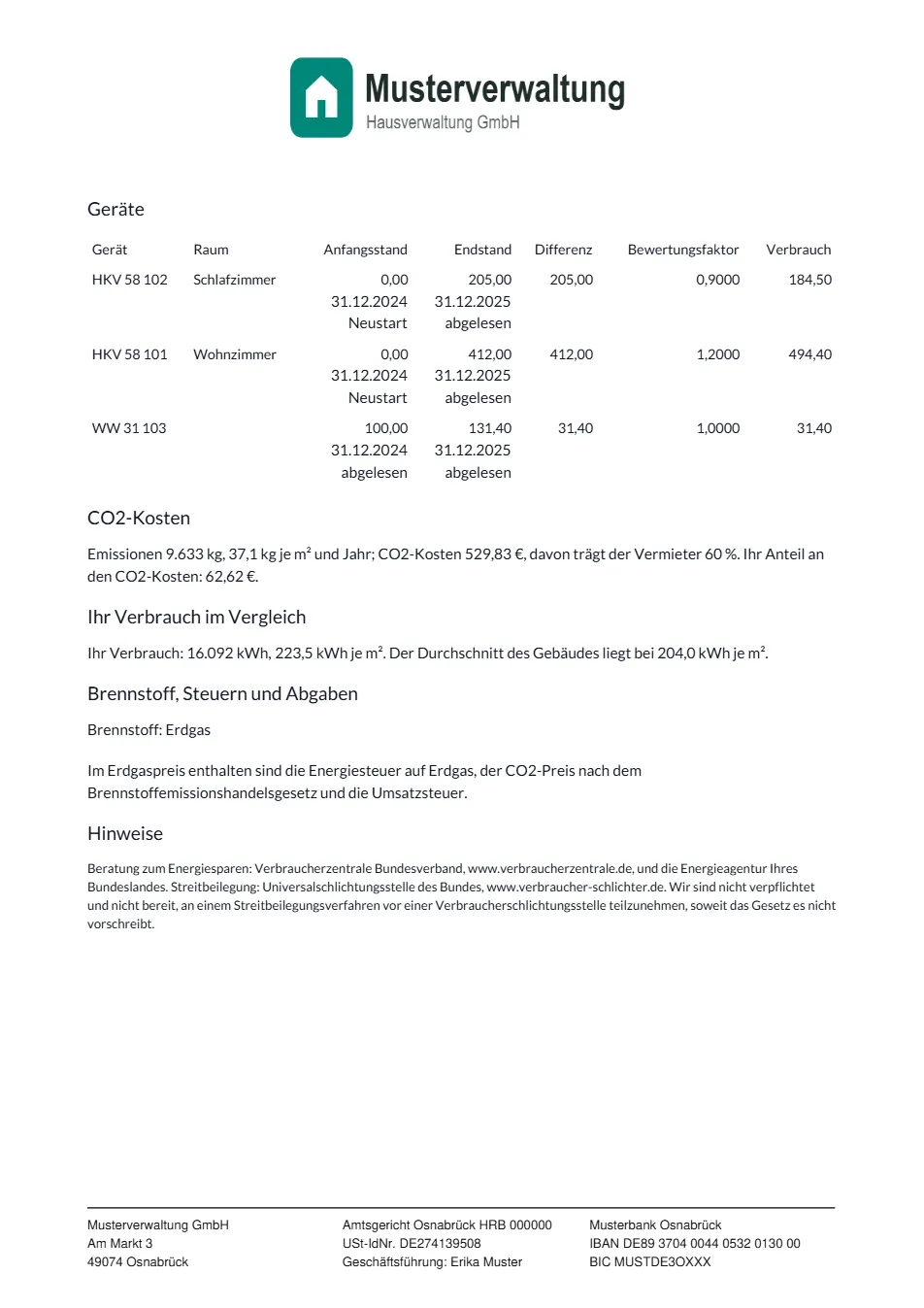
- Devices: each device shows its start and end reading with date and kind: read, computed (count on the qualifying date from two readings), estimated, or restart when a heat cost allocator starts again at 0 after the qualifying date. Next to them are difference, rating factor and consumption. An older heating cost statement shows the readings only after Recalculate.
- Comparison with the previous year: if there is a heating cost statement for the period before, the printout shows the consumption of both years as bars. SMARTBRIX adjusts it with the climate factors of the German Weather Service (DWD) for the building’s postal code. SMARTBRIX fetches the climate factors itself once a month.
- Fuel, taxes and levies: the printout names the fuel, for district heating the supplier’s fuel mix, and explains which taxes and levies the price includes, for example energy tax, CO2 price and VAT. The text names no amounts. You set a text of your own on your company in the Heating Costs tab under Taxes and Levies on Heating Cost Statements. It then applies to all fuels. Empty prints the standard text for the fuel.
- Information: set the text under Information on your company in the Heating Costs tab under Consumer Information on Heating Cost Statements. Empty prints a standard text with the consumer advice centre and the federal dispute resolution body.
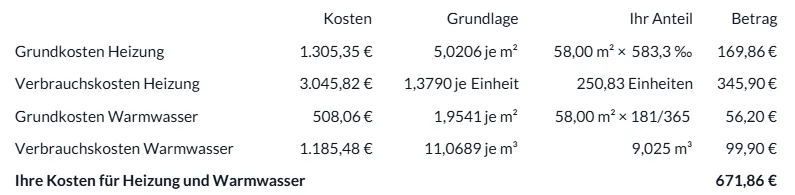
- Part-year usage: if a tenant lived there for part of the period only, the heating base costs show their share of the degree days, for example “58.00 m² × 583.3 ‰”, and the hot water base costs their days, for example “58.00 m² × 181/365”. A sentence below the table explains this. Without central hot water, the part on hot water is left out. The consumption is compared with the building average for the same part of the year: heating by degree days, hot water by days. The average for the whole year follows below.

Condominium management
Section titled “Condominium management”In a condominium, the annual settlement works out the heating cost statement when the community’s property has its own heating cost statement in the Heating Costs section. In the list of community cost types, tick Fuel on the cost type of the fuel. The result appears in the metering service settlement with the source SMARTBRIX. The individual statement shows the unit’s CO2 costs. A condominium has no CO2 deduction borne by the landlord; it belongs in the letting owner’s statement.
The printout of the owner contribution statement includes the unit’s heating cost statement as a document of its own, addressed to the recipient of the individual settlement. This applies when you print all individual settlements as well as a single one. As in rental management, the heating cost statement needs CO2 emissions: without them, the annual settlement cannot be marked as resolved.
Checkpoints
Section titled “Checkpoints”- The total in the Usages tab equals the Total Costs of the heating cost statement.
- The Total Costs are the heating costs of the building minus the landlord’s share of the CO2 costs.
- In the Costs tab, the Energy Used (kWh) matches the meter of the heating system or the supplier’s invoice.
- The apartments together measured less heat than the heating system used.
- In the tenant’s service charge statement, the heating cost types show the amount from the heating cost statement and the split by area and consumption as the allocation key.
Common errors
Section titled “Common errors”| Problem | Cause | Solution |
|---|---|---|
| The overall statement has no Heating Costs tab. | Own Heating Cost Statement From is missing or after the start of the period. | Set the date on the building and recalculate. |
| A tenant is marked Heating Estimated. | Their devices have no reading at the end of the period. | Enter the reading and click Recalculate, or check the estimated consumption. |
| The opening reading is refused: “Service charges for this usage are settled up to …” | The date lies in the previous year, which is already settled, for example on December 31. | Date the reading on the first day of the new period (see Switch). |
| No CO2 costs, the release reports “The CO2 values are missing for …” | No heating cost type has Fuel ticked, or the CO2 price of the year is not stored. | Tick Fuel, or enter the CO2 emissions and CO2 costs from the invoice on the expenditure, then click Recalculate. |
| The heating cost statement points out a missing fuel mix. | The building uses district heating and Fuel Mix of the Supplier is empty. | Enter the mix from the supplier’s invoice or website. |
| The energy used is far too high or too low. | kWh per Meter Unit is missing or does not match the gas invoice. | Enter the calorific value times the state factor from the invoice. |
| The heating cost statement reports that no costs of the general power were found. | With operating power by intermediate meter, no cost type is chosen under General Power, or the cost type has no expenditures in the period. | Choose the cost type or book the expenditures of the general power, then click Recalculate. |
| After resetting a gas invoice, the energy used or the CO2 information is missing. | Posting again created the expenditures anew, without the values entered. | Enter Consumption per Invoice and the CO2 values again, then click Recalculate. |
| The heating cost statement says “No fuel invoice covers …”. | Days are missing between two of the supplier’s invoices, for example when the gas contract changed. | Request the invoice for those days from the supplier or default supplier and post it, then click Recalculate. |
| The heating cost statement says the units received more heat than the heating system used. | Opening or closing readings of the heat meters do not fit the period, or the kWh per Meter Unit is too low. | Check the readings on the first and last day of the period, replace estimated closing readings with real readings, compare the factor with the gas invoice, then click Recalculate. |
| Tenants do not understand the heating cost lines in the service charge statement. | The printout of the heating cost statement is missing, for example when downloaded from the portal. | Send the service charge statement with Send, so the heating cost statement goes with it, or add it with Print. |
Special cases
Section titled “Special cases”Change of tenant without an interim reading: if there is no reading on the move-out day, SMARTBRIX splits the heating consumption by degree days and the hot water by days (see Heating costs when the tenant changes). In the example, Petra Schulz bears 583.3 ‰ of her flat’s heating consumption up to 06/30. With a reading on the move-out day, the actual consumption counts.
Estimated consumption: if a usage has no readings at all, SMARTBRIX estimates under § 9a: with the flat’s consumption in the previous year by days, otherwise with the average per m² of the measured flats. If estimates cover more than a quarter of the area, the heating cost statement points this out. Readings on the reference date between two readings do not count as estimates. Then tick Distribute by Area Only and click Recalculate.
Vacancy: a vacancy gets its share like a tenant. The owner bears this amount.
Operating power through a tenant’s meter: if the heating runs on the electricity meter of a flat and you refund this power to the tenant, book the refund as a vendor bill with the tenant as vendor, the building as property and a heating cost type such as “Betriebsstrom Heizung” (operating power heating). Under Operating Power, keep Own Invoice or None.
What is not included
Section titled “What is not included”- SMARTBRIX does not read a metering service’s radio readings directly, only its own CSV file.
- SMARTBRIX does not check whether your building must use 70 % by consumption. The rule is in the field’s help text.
Didn't find an answer? Contact support