

Landlord certificate
Question about the manual? Ask Claude · Ask ChatGPT
Anyone moving into an apartment in Germany has to register the new address with the registration office and needs a confirmation from the landlord to do so (Wohnungsgeberbestätigung, § 19 Bundesmeldegesetz, the Federal Registration Act). SMARTBRIX fills in the sheet from the tenancy, files it there and tracks in the handover checklist whether it is created in time. You check the details, sign and hand the sheet to the tenant.
Prerequisites
Section titled “Prerequisites”- The tenancy has a Start Date. It becomes the move-in date on the sheet and sets the deadline in the checklist.
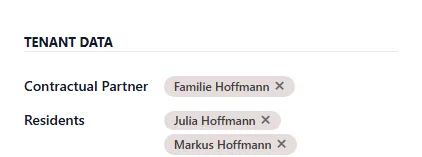
- Everyone moving in exists as a contact and is entered under Residents in the header of the tenancy. If nobody is entered there, the dialog suggests the contract partners. See Create a tenancy.
- The property of the tenancy has a complete address including the house number. The sheet prints the address of the rented unit, not that of the building. If the house number, ZIP or city is missing, the dialog shows a notice.
- Your company has a name, street, ZIP and city. If the property has an Owner other than your company, you confirm on behalf of the owner, and the owner appears on the sheet with their address.
Create the certificate
Section titled “Create the certificate”- Open the tenancy under Property Administration › Tenancies.
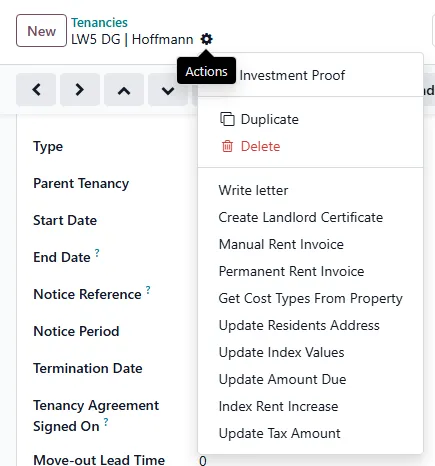
- Click the gear icon Actions next to the name and choose Create Landlord Certificate.
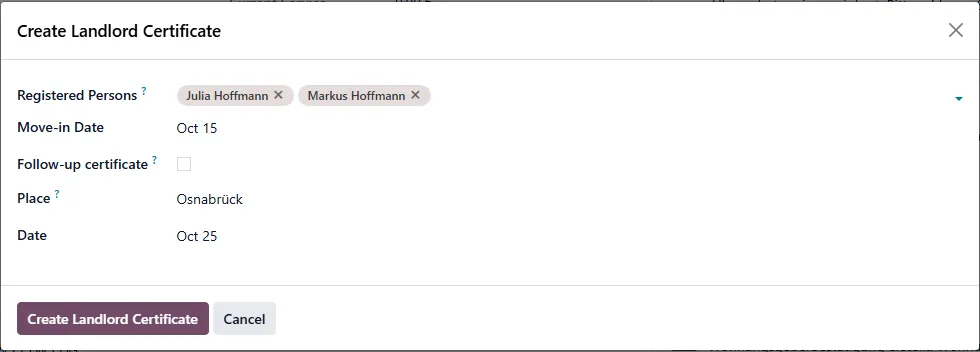
- In the dialog, check Registered Persons. The residents are suggested, or the contract partners if no residents are recorded. You can remove people or add existing contacts.
- Check the Move-in Date. It comes from the start date of the tenancy and can be changed for this sheet.
- Tick Follow-up certificate only if the sheet replaces a confirmation that was already handed out.
- Check Place and Date. The city of your company and today’s date are suggested.
- Click Create Landlord Certificate. The PDF is downloaded and the dialog closes.
The file name starts with “Wohnungsgeberbestätigung”, followed by the contract partner and the date of the sheet. The file is then on the Documents tab of the tenancy and in the chatter with the entry “Landlord certificate created”.
SMARTBRIX also files the document in document management, in the folder of the tenancy and with the Document Type “Landlord Certificate”.
SMARTBRIX also files the document in the Documents app, in the “Internal” folder, linked to the tenancy, the property and the tenant.
What the sheet contains
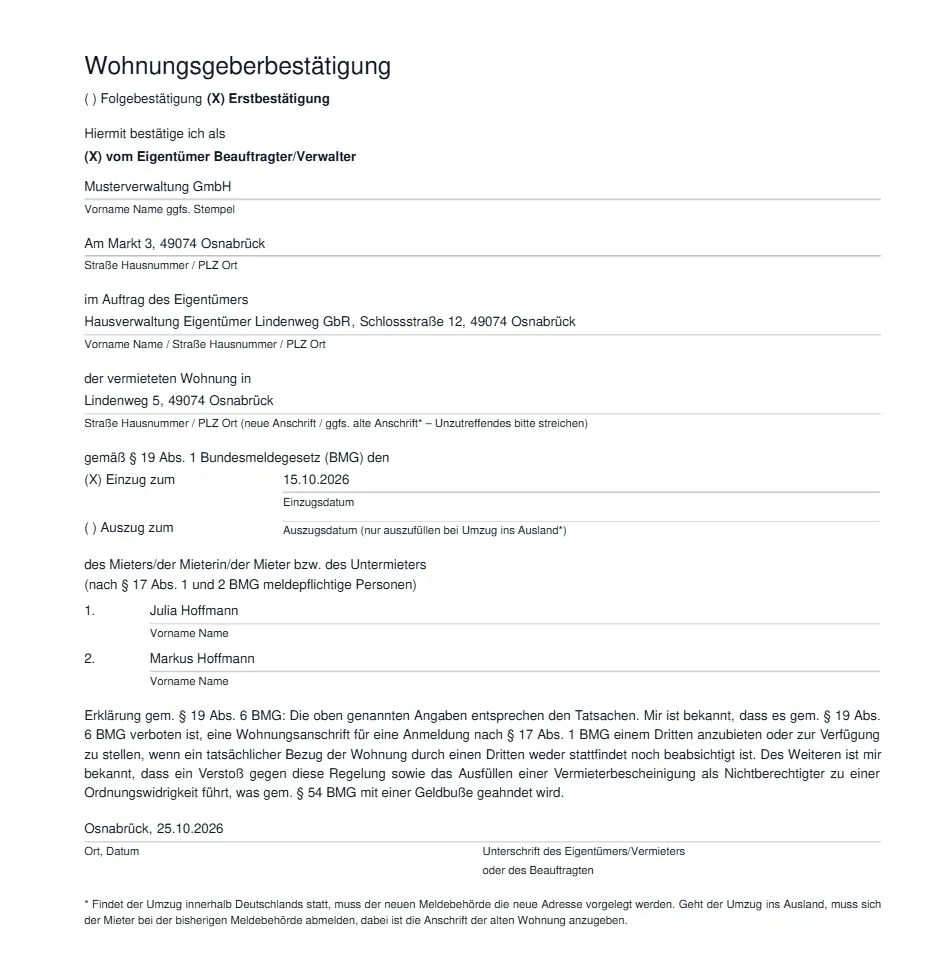
Section titled “What the sheet contains”The sheet is always in German, whatever language you work in, because the registration office expects the German wording.
- First or follow-up confirmation, depending on the tick in the dialog.
- You as the owner or, if the property has a different owner, as the person commissioned by the owner, with the name and address of your company. In the second case the owner follows with their address.
- The address of the rented apartment.
- The move-in with the move-in date from the dialog. The move-out line stays empty.
- All registered persons, numbered.
- The declaration under § 19 (6) BMG, followed by place, date and the signature line.
Sign and hand out
Section titled “Sign and hand out”- Print the sheet and sign it, or have the owner sign it.
- Hand it to the tenant. The tenant shows it at the registration office and keeps it.
You do not need to enter anything else in SMARTBRIX.
Checkpoint in the checklist
Section titled “Checkpoint in the checklist”For residential space, the Handover group on the Checklist tab contains the row Landlord certificate:
| Progress | Note | Meaning |
|---|---|---|
| due with date | empty or overdue | No sheet created yet. It is due 14 days after the start date. |
| issued with date | empty | Done. |
The checkpoint only warns. It does not hold up the move to the Active phase or any other phase.
with customer portal What the tenant sees in the portal
- On the page of their tenancy, the Documents card shows the heading Landlord certificate with the file to download.
- If a follow-up certificate replaces the first sheet, both files are listed there.
Checks
Section titled “Checks”- The chatter shows “Landlord certificate created” with the file attached.
- The Documents tab holds the file with your date in its name.
- The Landlord certificate row of the checklist shows issued with today’s date.
Common errors
Section titled “Common errors”| Problem | Cause | Solution |
|---|---|---|
| The dialog reports that the address of the unit is incomplete. | The unit has no house number, ZIP or city. | Add street, house number, ZIP and city on the unit and open the dialog again. |
| A person cannot be selected in the dialog. | The dialog does not create new contacts. | Create the person as a contact, enter them under Residents and open the dialog again. |
| The sheet says “Eigentümer” (owner) although you are the manager. | The property has no owner, or your own company is entered as owner. | Enter the owner on the property and create the sheet again. |
| The checklist reports overdue although the sheet has been handed out. | The confirmation was created outside SMARTBRIX. | Create the confirmation with the dialog. |
Special cases
Section titled “Special cases”Same sheet again. If you create the certificate again with unchanged details, SMARTBRIX downloads the same file. No second document is created.
Changed details. If you change persons, move-in date, place, date or the Follow-up certificate tick, a new document is created. The checkpoint then shows the date of the new sheet.
Signature as an image. If an image is stored for your user under Settings › Users & Companies › Users on the Signature tab, SMARTBRIX prints it next to place and date. What counts is the user who creates the sheet.
No start date. The checkpoint shows “no move-in date is recorded” and has no deadline. In the dialog you then enter the move-in date by hand.
Commercial letting. For commercial lettings the checkpoint does not apply and the Residents field is hidden.
What is not included
Section titled “What is not included”- SMARTBRIX does not transmit the certificate electronically to the registration office and does not send it by email.
- SMARTBRIX does not create a move-out confirmation (for moving abroad). That line stays empty.
- There is no activity or reminder for the deadline. You only see it in the checklist.
- SMARTBRIX does not check whether the sheet was signed and handed out. The point is done once the sheet is created.
Didn't find an answer? Contact support