

Additional products
Question about the manual? Ask Claude · Ask ChatGPT
Additional products are items on top of the rent that have no property of their own: a fitted kitchen let with the apartment, a cable connection or a maintenance surcharge. You also record a rent reduction as an additional product, with a negative amount. You enter additional products on the tenancy. SMARTBRIX adds each additional product that applies on the invoice date as a line of its own to the rent invoice.
If a further property is let with the apartment, such as a parking space or a cellar, that is not an additional product but a sub-usage.
Prerequisites
Section titled “Prerequisites”- For each item there is a product with sales price, tax and income account, for example “Einbauküche” (fitted kitchen) or “Mietminderung” (rent reduction). Tax and income account of the invoice line come from the product.
Switch on additional products
Section titled “Switch on additional products”- Open the tenancy under Property Administration › Tenancies › Tenancies.
- On the Configuration tab, tick Additional Products?.
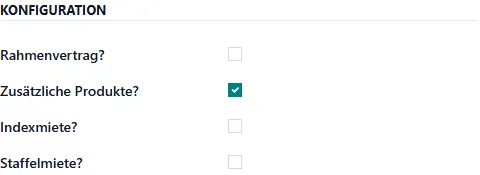
The Additional Products tab then appears.
Record an additional product
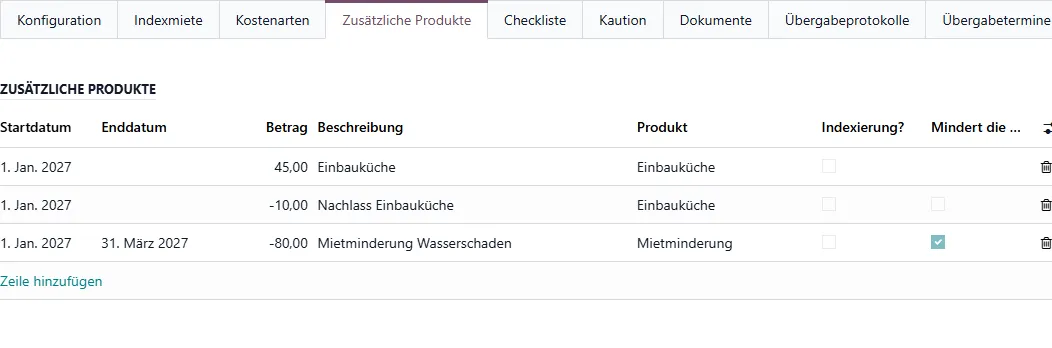
Section titled “Record an additional product”- Open the Additional Products tab.
- Click Add a line.
- Choose the Product. SMARTBRIX enters the sales price as Amount and the product name as Description. You can change both.
- Enter the Start Date and, if the item is limited in time, the End Date. Without an end date, it applies indefinitely.
- Tick Indexing? if needed, see Index-linked rent.
- Save.
The Description later appears as the text of the invoice line.
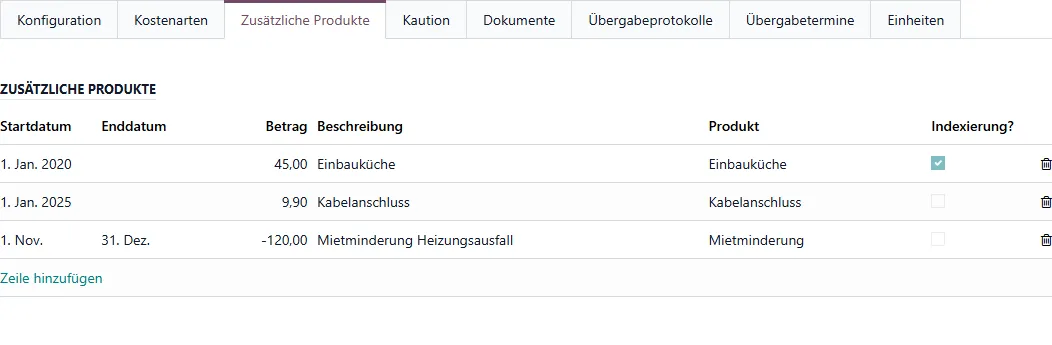
Record a rent reduction
Section titled “Record a rent reduction”A rent reduction is an additional product with a negative amount:
- Add a line on the Additional Products tab.
- Choose the product for rent reductions, “Mietminderung” in the example.
- Enter the amount with a minus sign, for example “-120.00”.
- Write the reason in the Description, for example “Mietminderung Heizungsausfall” (rent reduction for heating failure).
- Limit the reduction with Start Date and End Date to the period it applies to.
Rent invoices with an invoice date after the End Date no longer contain the reduction. SMARTBRIX does not check whether a reduction is justified or how high it may be.
Effect on rent and rent invoice
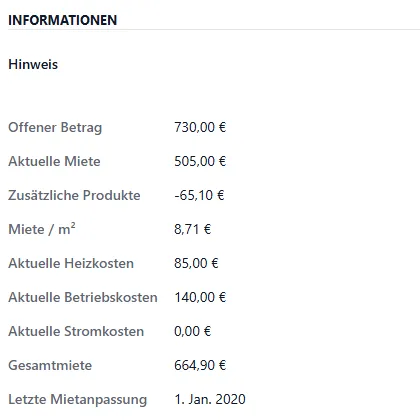
Section titled “Effect on rent and rent invoice”In the header of the tenancy, the Informations section shows the sum of the additional products that apply today. It is part of the Total Current Rent, in the example €505.00 base rent plus €225.00 advance payments plus €45.00 and €9.90 minus €120.00, €664.90 in total.
On the rent invoice, the additional products appear in a section of their own, Additional Products, one line each with the amount. With a monthly invoice the quantity is 1. With Quarterly or Yearly it is the number of billed months in which the additional product applies, for example 3 for a full quarter. They are posted to the income account of the product and the analytic account of the property.
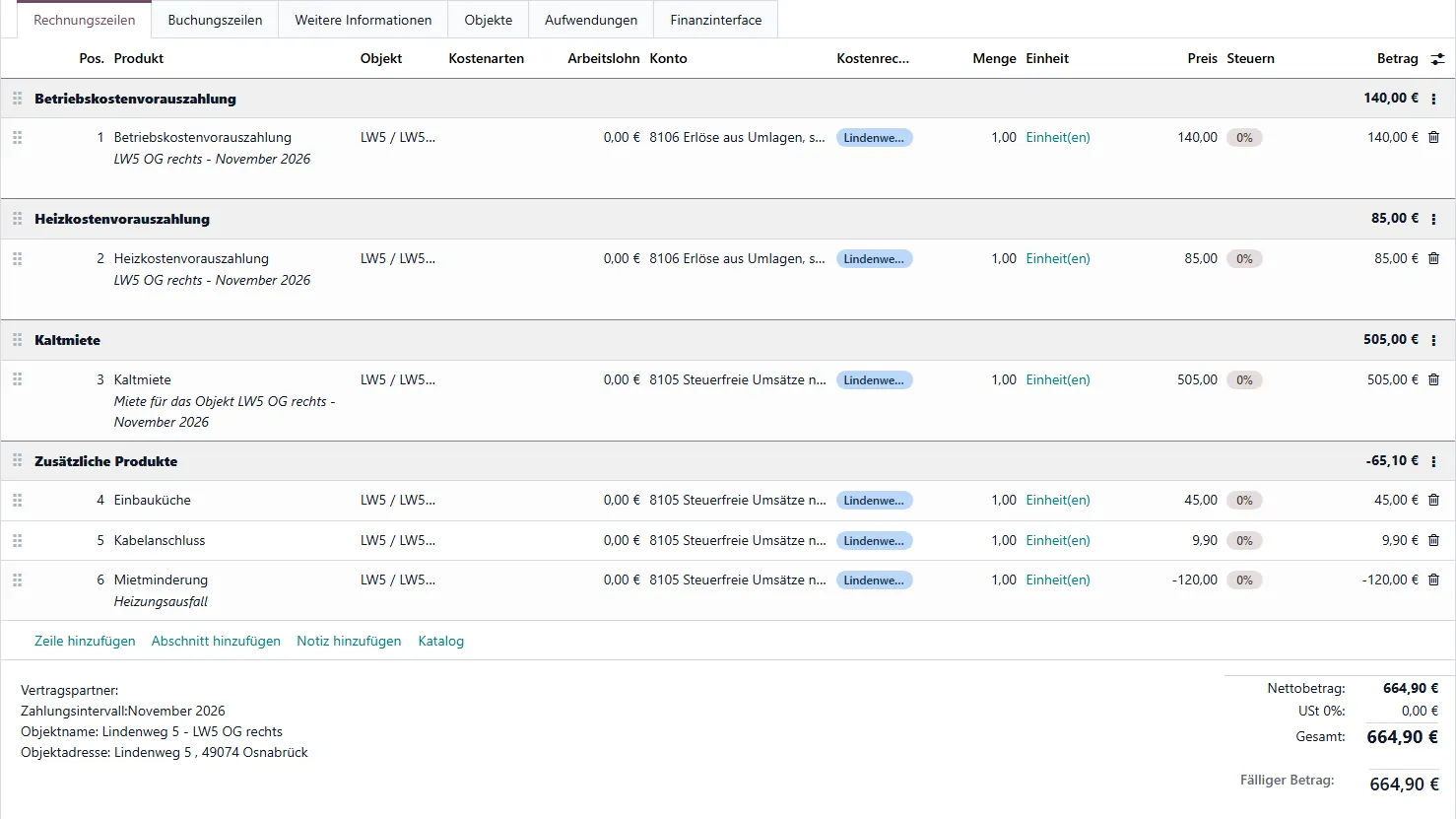
An additional product appears on the rent invoice if its period includes the invoice date. If the tenancy starts in the billing month, SMARTBRIX prorates the additional products in the first month by calendar days. If an additional product starts or ends in the middle of a month, SMARTBRIX does not prorate it: depending on the invoice date, it includes the full amount or nothing.
With a separate rent invoice
Section titled “With a separate rent invoice”With the Separate Rent Invoice setting, the additional products get a document of their own. For negative amounts, the Reduces Rent tick decides where they go. The checkbox only appears on lines with a negative amount.
- Ticked: the amount reduces the rent invoice. If it is higher than the rent, the rest reduces the prepayment documents. This suits a rent reduction.
- Not ticked: the amount stays on the document of the additional products. This suits a discount on another additional product, for example on the fitted kitchen.
A new line with a negative amount gets the tick automatically. If you remove it, it stays off even if you change the amount later. Without a separate rent invoice the tick has no effect, since all lines are on one rent invoice anyway.
All additional products at a glance
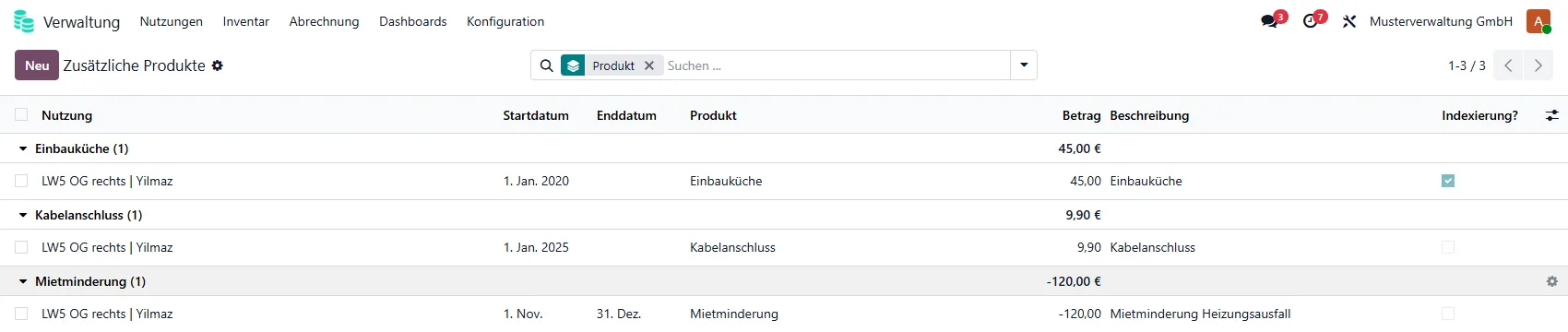
Section titled “All additional products at a glance”Property Administration › Tenancies › Additional Products lists the additional products of all tenancies, grouped by product. The group rows show the sum per product.
Limit the choice per property
Section titled “Limit the choice per property”On the property, the Administration tab has the Financial section with the Additional Product Catalog. There you define which products can be chosen for the tenancies of this property. The catalog also applies to the child properties. A child property can add products of its own; you see the inherited ones under Inherited from Parent Properties. If the catalog stays empty, all products of the company can be chosen. The catalog limits only the choice, not the price.
Index-linked rent
Section titled “Index-linked rent”An index increase changes an additional product only if two ticks are set: Additional products in the indexed components of the index-linked rent, and Indexing? on the line. SMARTBRIX then ends the old line on the day before the increase and creates a new one with the increased amount. SMARTBRIX never increases rent reductions or other negative amounts. See Index-linked rent.
Checkpoints
Section titled “Checkpoints”- In the Informations section, the tenancy shows the sum of the lines that apply today.
- The next rent invoice has the Additional Products section with one line per applicable additional product.
- A time-limited rent reduction is missing from the first invoice after its End Date.
Common mistakes
Section titled “Common mistakes”| Problem | Cause | Solution |
|---|---|---|
| The additional product is missing from the rent invoice. | The Start Date lies after the invoice date, or the End Date lies before the Start Date. | Check the dates of the line. SMARTBRIX does not report an end date before the start date. |
| No rent invoice is created, and the chatter says “kein Erlöskonto für …” (no income account for …). | The product has no income account. | Enter the income account on the product. |
| The product you want cannot be chosen. | The additional product catalog of the property does not contain it. | Add the product to the catalog. |
| After removing the Additional Products? tick, the items are still invoiced. | The tick only hides the tab. | Set an End Date on the lines or delete them. |
Special cases
Section titled “Special cases”Two lines for the same item: if two lines with the same product and the same description overlap, only the one with the later start date applies. This way you replace an amount from a reference date without ending the old line.
Permanent rent invoice: the permanent rent invoice lists the additional products that apply on its start date. It leaves out lines with an amount of 0.
Management fee: with the Incl. Additional Products tick in the management contract, additional products count towards the rent basis, see Management contract.
Framework contract: under Sum Of Additional Products, the framework contract shows the additional products of its framework usages, see Framework contracts.
A tenant provides an allocable service: if a tenant takes over the caretaker service, for example, and is paid by offsetting against the rent, do not record the payment as an additional product with a negative amount. An additional product creates no expenditure, so the costs are missing from the service charge statement, and the amount reduces the rental income instead of being booked as an expense. Instead, book the service every month as a vendor bill with the tenant as vendor, the building as property, the cost type, for example “Hausmeister” (caretaker), and the service period. If the tenant pays the rent reduced by the amount, reconcile the payment in the bank reconciliation with the rent invoice and the vendor bill together.
What is not included
Section titled “What is not included”- An additional product has no quantity and no billing rhythm of its own. The amount applies per month and follows the rhythm of the rent invoice.
- You do not choose account and analytic account per line. They come from the product and the property.
- Additional products do not affect graduated rent or deposit. They only affect the service charge statement with a separate rent invoice, when a reduction lowers the prepayment documents.
Didn't find an answer? Contact support