

E-invoicing
Question about the manual? Ask Claude · Ask ChatGPT
An e-invoice is an invoice in a structured data format that software can read without retyping. In Germany these are mainly XRechnung and ZUGFeRD. A PDF on its own is not an e-invoice, even when it arrives by email. This page sums up what the law requires, what SMARTBRIX does with customer invoices and vendor bills, and where the limits are.
In the Light / Pro plan, the app is called Invoicing instead of Accounting. Everything on this page applies to all plans. Only reading ordinary PDF bills without an e-invoice is limited to the Business plan.
What the law requires
Section titled “What the law requires”The obligation applies to invoices between two German businesses for supplies subject to VAT.
| From | Obligation |
|---|---|
| 01/01/2025 | Every business must be able to receive e-invoices. An email inbox is enough. |
| until 12/31/2026 | Invoices may still go on paper or, if the recipient agrees, as a PDF. |
| 01/01/2027 | Businesses with more than €800,000 turnover in the previous year must issue e-invoices. Smaller ones may still send paper or PDF in 2027. |
| 01/01/2028 | All businesses must issue e-invoices. |
Permitted formats: XRechnung, ZUGFeRD from version 2.0.1 (except the MINIMUM and BASIC-WL profiles), Factur-X and any other format following the European standard EN 16931. With ZUGFeRD, the XML file sits inside a PDF. If PDF and XML differ, the XML file counts. A file whose structure is faulty and cannot be read in full does not count as an e-invoice. Breaking individual validation rules of the format does no harm as long as all mandatory details are correct.
Exempt are small invoices up to €250 gross, tickets, invoices from small businesses under § 19 UStG, invoices to private persons and VAT-exempt supplies under § 4 Nos. 8 to 29 UStG.
What this means for property management:
- Residential rent is exempt from VAT (§ 4 No. 12 UStG). Rent invoices to residential tenants need no e-invoice.
- Commercial rent with VAT (option to tax under § 9 UStG) needs an e-invoice. The BMF letters say nothing specific about the service charge statement to that tenant; since it is part of the taxable letting, an e-invoice is the safer choice. Clarify this with your tax advisor. For the ongoing rent, a permanent rent invoice as an e-invoice is enough. The invoice number must be in the XML file; a one-off number such as the tenant number is enough. A new permanent invoice is only needed when details such as the rent change. A permanent invoice you issued on paper or as a PDF before 01/01/2027 stays valid as long as it does not change.
- House money of a condominium is exempt from VAT (§ 4 No. 13 UStG) and needs no e-invoice. The BMF letters do not say explicitly whether a condominium must receive e-invoices, for example the manager’s or a contractor’s invoice. They do require businesses with only VAT-exempt supplies to receive them. Set up receiving for the condominium as a precaution.
- Vendor bills from contractors and utilities must be accepted as e-invoices and kept in the form they arrived in. The XML file is what counts; you only need to keep the PDF of a hybrid invoice as well if it carries additional tax-relevant details. The retention period is 8 years.
- Input VAT: If the vendor is obliged to issue an e-invoice and still sends only a PDF, the input VAT deduction is at risk. Ask for an e-invoice in that case.
- Public authorities usually require an XRechnung with a Leitweg-ID (the German routing ID for public buyers). Federal and state rules set this independently of the dates above.
Customer invoices
Section titled “Customer invoices”What SMARTBRIX creates
Section titled “What SMARTBRIX creates”All invoices from accounting can carry an e-invoice: rent invoices from the rent debits, service charge statements, deposit invoices, management fees, house money and invoices you create by hand. What the invoice contains depends on the contact:
- No setting on the contact: When you Send a posted invoice to a customer in Germany, or print it for the first time, SMARTBRIX embeds a ZUGFeRD file (EXTENDED profile) in the PDF. People read the PDF as usual, the recipient’s software reads the data. No separate XML file is created.
- Format set on the contact: SMARTBRIX also creates a separate XML file in that format and attaches it to the email, for example “RE_2026_00009_xrechnung.xml”.
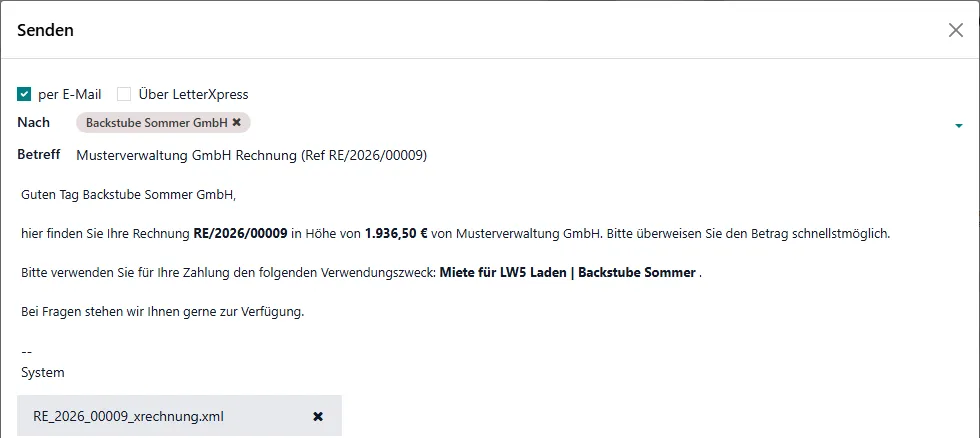
The permanent rent invoice is a separate document outside accounting. SMARTBRIX stores its PDF and XRechnung as two separate files on the tenancy. You send both yourself.
Set up your company
Section titled “Set up your company”An e-invoice needs your company details in full. Check them in Settings with Update Info in the Companies block, see Set up a new company:
- Tax ID: The e-invoice carries only the VAT ID, not the German tax number (St.-Nr.).
- Address, Phone and Email: XRechnung requires the sender’s phone and email.
- Bank account: The invoice needs bank details for the payment.
Set the format on the contact
Section titled “Set the format on the contact”For customers who ask for a specific e-invoice, such as a commercial tenant who wants XRechnung, set the format on the contact. The field only appears in developer mode. Turn it on at the very bottom of Settings with Activate the developer mode.
- Open the contact and go to the Accounting tab.
- Under Customer Invoices, choose the eInvoice format, for German recipients usually Germany (XRechnung) or Germany (ZUGFeRD).
- Under Invoice sending, choose the channel, usually by Email.
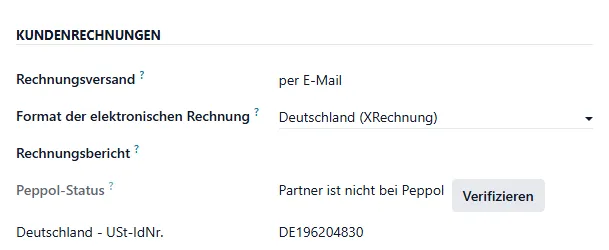
From then on the format applies to every invoice to this contact, including when you send several invoices at once. You do not choose the format in the Send dialog.
Public authorities: On the same tab, in the last row of the Customer Invoices group, which shows Germany VAT by default, choose the address type Germany Leitweg-ID and enter the Leitweg-ID next to it. SMARTBRIX then suggests Germany (XRechnung) as the format and writes the Leitweg-ID into the XRechnung.
Vendor bills
Section titled “Vendor bills”Ways into SMARTBRIX
Section titled “Ways into SMARTBRIX”- Upload: In Accounting › Vendors › Bills, click Upload and choose the file, or drag the file onto the list. See Vendor bills.
- Email: Forward bills to the email address of the purchase journal. You find it under Accounting › Configuration › Accounting › Journals in the Purchase journal, Advanced Settings tab, Email Alias field. Every email with an attachment becomes a draft bill. A PDF and an XML file in the same email make one bill.
What SMARTBRIX reads
Section titled “What SMARTBRIX reads”SMARTBRIX reads XRechnung (in both variants, UBL and CII), ZUGFeRD from version 2 and Factur-X. From the e-invoice, SMARTBRIX takes the Vendor, Bill Reference, Bill Date, Due Date, Recipient Bank and the invoice lines with quantity, price and tax. The line amounts match the e-invoice to the cent.
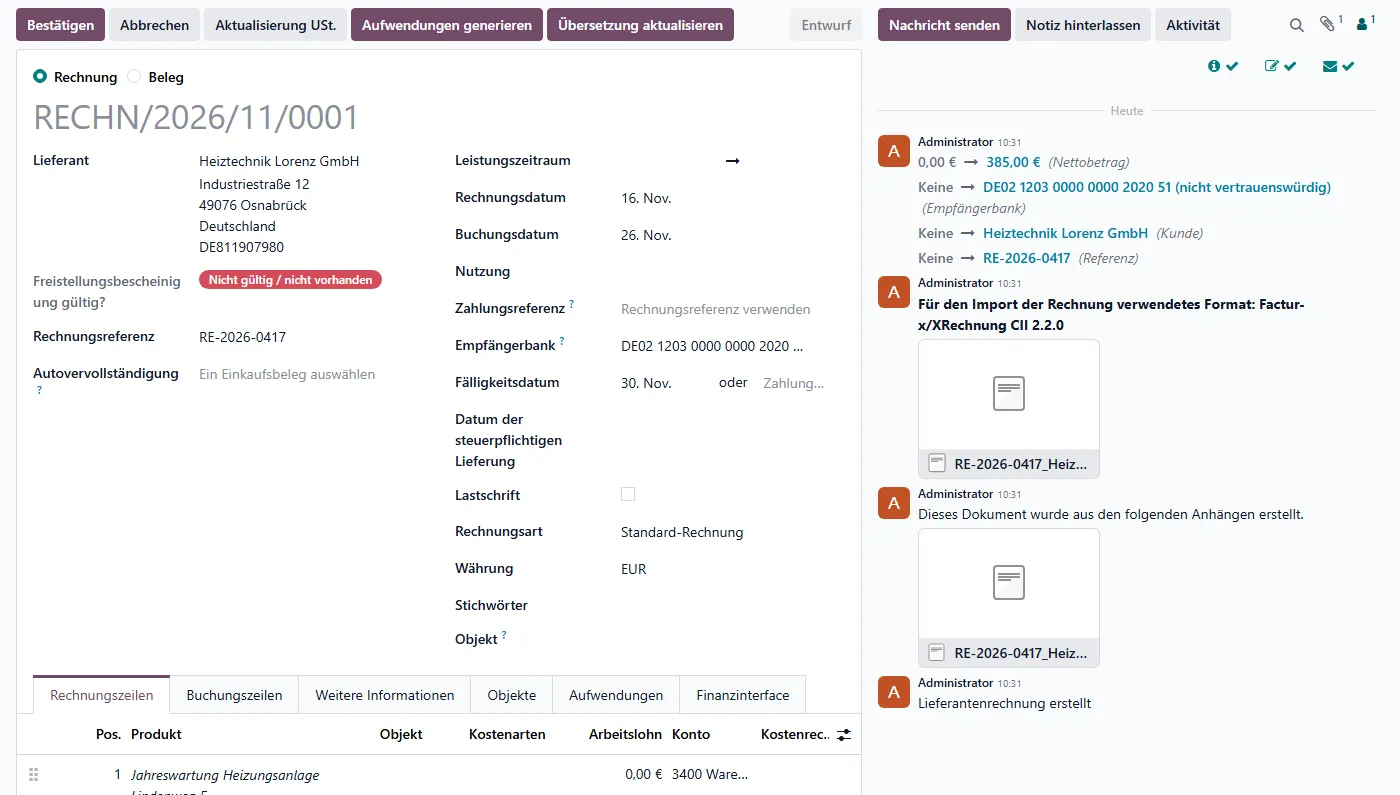
The chatter shows “Format used to import the invoice:” with the detected format and the original file. The file stays on the bill and can no longer be removed once the bill is posted, see GoBD.
Unknown vendor: SMARTBRIX looks up the vendor by VAT ID. If there is none yet, SMARTBRIX creates the vendor with the name, address and VAT ID from the e-invoice.
What you do next
Section titled “What you do next”Properties and cost types are not part of the e-invoice. Before posting:
- Assign each line to a Property and, for recoverable costs, to a cost type.
- Check the Account and tax of each line.
- Click Confirm.
All fields are explained on Vendor bills. If your vendor bills go through an approval route, it starts when you confirm.
Common errors
Section titled “Common errors”| Problem | Cause | Solution |
|---|---|---|
| Sending shows “Errors occurred while creating the EDI document”. | Details are missing on your company or the customer, usually VAT ID, phone, email or address. | Add the details and send the invoice again. The email goes out despite the message. |
| A line of the vendor bill has no tax. | SMARTBRIX finds no tax rate that matches the e-invoice. The chatter names the rate and the line. | Choose the tax on the line by hand. |
| A vendor exists twice. | The e-invoice carries a different VAT ID than the existing contact. | Check the VAT ID on the existing contact, merge the contacts and switch the bill over. |
| The uploaded XML file creates no lines. | The bill already had lines. | Upload the file to an empty bill or directly into the list. |
What is not included
Section titled “What is not included”- No check against the XRechnung rules: SMARTBRIX does not check outgoing or incoming e-invoices against all business rules. It does not check the embedded ZUGFeRD file at all. Keep your company details complete.
- No exception for VAT-exempt invoices: Rent invoices to residential tenants also carry the embedded ZUGFeRD file. This does no harm; the tenant opens the PDF as usual.
- No choice when sending: The format always comes from the contact. The ZUGFeRD profile cannot be changed.
- Permanent rent invoice: no XML file embedded in the PDF, no sending from SMARTBRIX, no Leitweg-ID.
- No comparison of PDF and XML on vendor bills. SMARTBRIX takes the values from the XML file.
- No view of plain CII XML files: For an XRechnung in UBL format, SMARTBRIX creates a readable PDF; for an XRechnung in CII format it does not.
- No other formats: SMARTBRIX does not read ZUGFeRD 1.0 or EDIFACT.
- Ordinary PDF bills without an e-invoice are not read in the Light / Pro plan. In the Business plan, document digitization does this, see Vendor bills.
Didn't find an answer? Contact support