

Check an exemption certificate (EIBE)
Question about the manual? Ask Claude · Ask ChatGPT
When you pay for construction work, such as a roof repair or a new heating system, construction withholding tax (Bauabzugsteuer) may apply. If the contractor presents a valid exemption certificate (Freistellungsbescheinigung), no tax is withheld. This add-on module queries the certificate through the EIBE service of the Federal Central Tax Office (Bundeszentralamt für Steuern) and shows the result on the contact and on every vendor bill from that contractor.
You enter your access data once and, for each contractor, the details from the certificate. You start the check by hand, and SMARTBRIX also checks automatically once a month. SMARTBRIX does not calculate any tax deduction, and you can still post a bill without a valid certificate.
Enter the access data
Section titled “Enter the access data”For the query you need an account in the EIBE portal of the Federal Central Tax Office. After logging in to the portal, request an XML-RPC key there.
- Open Settings and select EIBE on the left.
- Under EIBE Credentials, enter the User ID and the XML-RPC Key from the portal.
- Click Save.

Only users with administrator rights see this section.
Prepare the contractor
Section titled “Prepare the contractor”The query needs three details on the contractor’s contact:
- State: in the address. It determines the responsible tax office.
- Tax Number: the contractor’s tax number as it appears on the certificate.
- Security Number: the number from the exemption certificate.
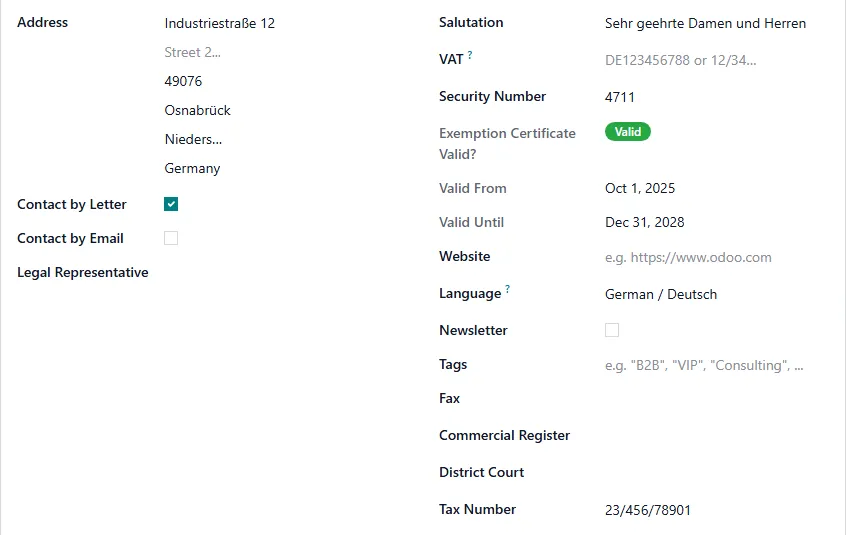
The check fills in the fields Exemption Certificate Valid?, Valid From and Valid Until. You cannot change them by hand.
Check the certificate
Section titled “Check the certificate”- Open the contractor’s contact.
- Click the gear icon Actions next to the name at the top left.
- Click Check Exemption Certificate.
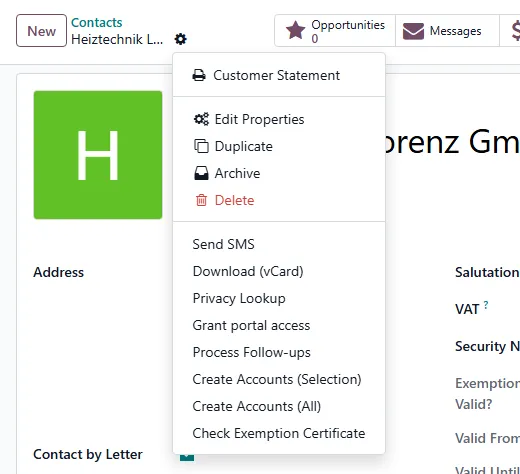
SMARTBRIX then enters the start and end of validity from the portal. If the end of validity is not in the past, the status is Valid, otherwise Not valid / missing.
To check several contractors at once, select them in the contact list and choose the same entry under Actions.
If one of the three details is missing or the portal reports an error, no message window appears. The note is in the chatter of the contact, and for a portal error it includes the error code and error message. If the Project app is installed, SMARTBRIX also creates a task for you. If the access data is missing, SMARTBRIX shows a message window right away.
Automatic check
Section titled “Automatic check”A scheduled action checks all contacts with state, tax number and security number on the first day of every month. It no longer checks contacts whose end of validity has already passed.
Status on vendor bills
Section titled “Status on vendor bills”On vendor bills, vendor credit notes and purchase receipts, the field Exemption Certificate Valid? appears below the vendor.
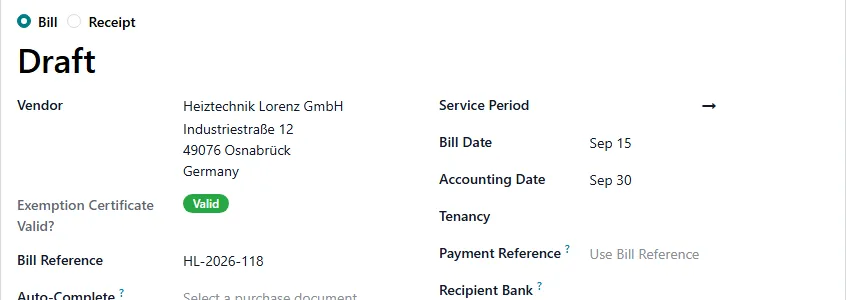
The field always shows the current status of the contact, not the status on the invoice date. If a later check changes the status, it also changes on older bills.
Frequently asked questions
Section titled “Frequently asked questions”I ran the check, but nothing changed. Look in the chatter of the contact. It says which detail is missing or which error the portal reported.
Why is the field missing for tenants? The field only appears for vendors and for contacts with a security number. A contact becomes a vendor once it has a vendor bill. Without a check it shows Not valid / missing, also for a vendor that does not perform construction work.
The company is valid, but the bill still shows “Not valid / missing”. The status comes from the contact entered as vendor on the bill. If that is a contact person or another address of the company, the bill shows their status. Select the company itself as vendor.
Do I have to withhold construction withholding tax? That depends on the individual case, for example on the number of rented apartments and the amount of the payments. SMARTBRIX only shows the status of the certificate. Clarify the tax obligation with your tax advisor.
Didn't find an answer? Contact support