

Titles and salutations
Question about the manual? Ask Claude · Ask ChatGPT
Every contact that is a person has a title such as “Mister” or “Madam”. From the title and the name, SMARTBRIX builds the salutation, for example “Sehr geehrte Frau Schulz” (Dear Ms. Schulz). The salutation is stored on the contact, and email templates and reports take it over, for example for the index-linked rent increase or the option notice. Companies get a fixed default salutation.
The salutation texts on this page are in German, because the letters themselves are German.
For this to work, every title needs a salutation text. Madam, Miss and Mister have one by default. For Doctor, Professor and your own titles, you enter it yourself. Without a salutation text, the salutation contains only the name.
Maintain titles
Section titled “Maintain titles”- Open Contacts › Configuration › Contact Titles.
- In the row of a title, click the Salutation Text column and enter the text without the name, for example “Sehr geehrter Herr Dr.”.
- Repeat this for every title you use.
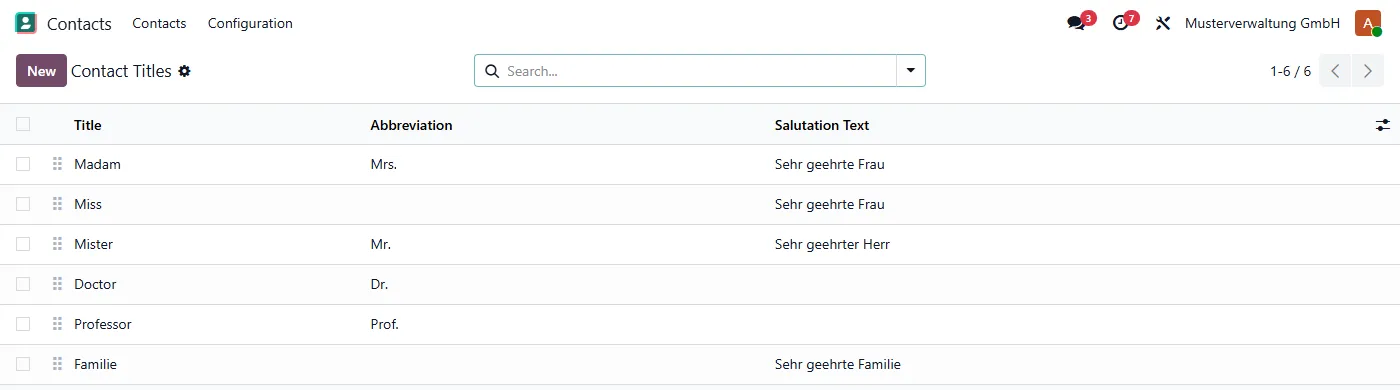
The list has three columns:
- Title: the name of the title as you select it on the contact.
- Abbreviation: the short form, such as “Dr.”.
- Salutation Text: the text SMARTBRIX puts in front of the name.
SMARTBRIX comes with the titles Madam, Miss, Mister, Doctor and Professor. Doctor and Professor have no salutation text, because in German it depends on gender. To create your own title, click New, for example “Madam Dr.” with the salutation text “Sehr geehrte Frau Dr.”. There is no separate field for academic degrees; title and degree go together in the title.
Choose the title on the contact
Section titled “Choose the title on the contact”- Open the contact and make sure Person is selected.
- In the field with the person icon below the name, choose the title, for example “Madam”.
- Enter First name and Last name separately.
The Salutation field on the right shows the result right away.
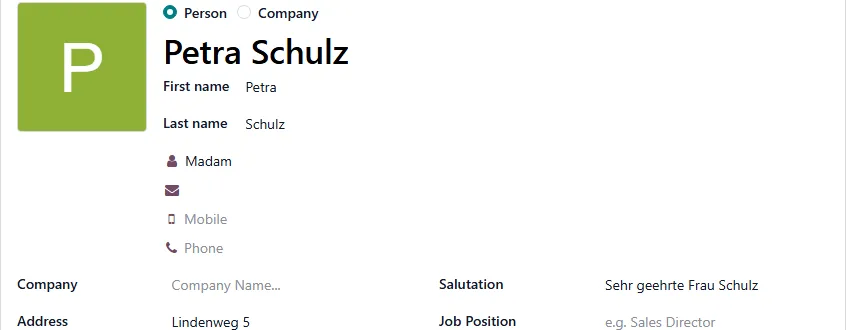
You can overwrite the salutation on the contact by hand. If you later change the title, the name or the title’s salutation text, SMARTBRIX builds the salutation again and your change is lost.
Which name the salutation uses
Section titled “Which name the salutation uses”Whether the salutation contains the last name, the first name or the full name depends on the contact’s language:
- Open Settings › General Settings and, in the Languages section, click the number of active languages, for example 1 Language.
- Open the language German / Deutsch.
- In the Salutation field, choose one of the values First Name, Last Name or Full Name. For “Sehr geehrte Frau Schulz”, choose Last Name; this is the default for German.
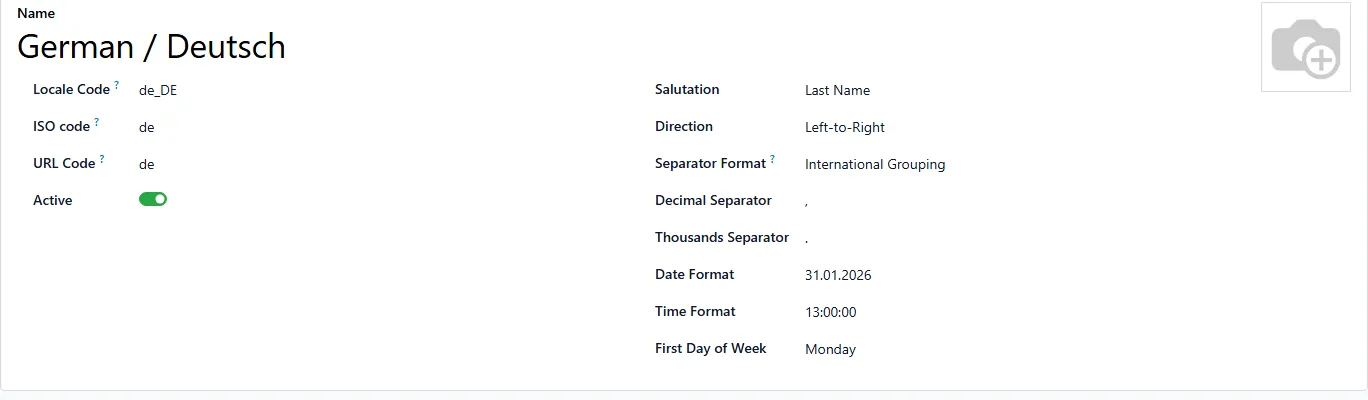
If the field is empty, SMARTBRIX uses the full name: “Sehr geehrte Frau Petra Schulz”. After a change, SMARTBRIX builds the salutation again for all contacts in this language.
Default salutation for companies
Section titled “Default salutation for companies”Companies have no title. They get the default salutation:
- Open Settings › General Settings.
- In the Contacts section, enter the text under Salutation, for example “Sehr geehrte Damen und Herren” (Dear Sir or Madam).
- Click Save.
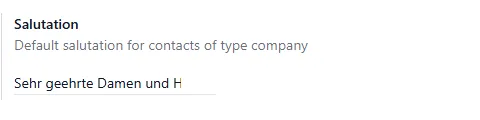
The default salutation applies to all contacts of type Company. Persons without a title do not get it; their salutation contains only the name.
Where the salutation is used
Section titled “Where the salutation is used”Email templates and reports insert the recipient’s salutation, for example the index-linked rent increase, the option notice, the emails about the tenancy agreement and the permanent rent invoice. In your own templates, insert the salutation as a placeholder, see Email templates.
Letters do not insert a salutation. Write it into the text or the template there.
Frequently asked questions
Section titled “Frequently asked questions”The salutation contains only the name. The contact’s title has no salutation text, or the contact has no title. Maintain the salutation text under Contacts › Configuration › Contact Titles.
How do I address a married couple? SMARTBRIX builds the salutation per contact; there is no shared salutation for several persons. A contact such as “Familie Becker” is a person without a title. If needed, enter the salutation on the contact by hand, for example “Sehr geehrte Familie Becker”, and do not change the title or name afterwards.
Didn't find an answer? Contact support