

Index-linked rent with automatic effect
Question about the manual? Ask Claude · Ask ChatGPT
Some commercial tenancy agreements contain a sliding clause: by contract, the rent changes by itself as soon as the index reaches the agreed threshold. The landlord does not have to declare anything. If such an adjustment was missed, the tenant owes the higher rent for the past months as well. SMARTBRIX therefore looks month by month for the first month in which the threshold is reached, adds the missing steps as rent lines and creates an Index Back Charge as a draft invoice for the months already invoiced. You check the preview and trigger the run, or SMARTBRIX does it daily by itself.
The basics of index-linked rent (index values, reference date, thresholds, limitation) are explained on the page Index-linked rent.
Requirements
Section titled “Requirements”- The tenancy is marked as Commercial Rent?. For residential space, the new rent only applies after the declaration has reached the tenant; there is no retroactive increase. SMARTBRIX does not allow the automatic effect for residential space.
- The index-linked rent is set up, and the reference line carries the Indexing Date from the contract.
- Index values exist for every month since the reference date, without gaps.
- The contract has a threshold (in percent or in points) or an Adjustment interval (months). Without either, every monthly change would trigger a new step, so SMARTBRIX does not save it.
Set up
Section titled “Set up”- Open the tenancy and the Index-linked Rent tab.
- Under Configuration, set Clause effect to Automatic once exceeded. The field only appears for commercial rents.
- Save.
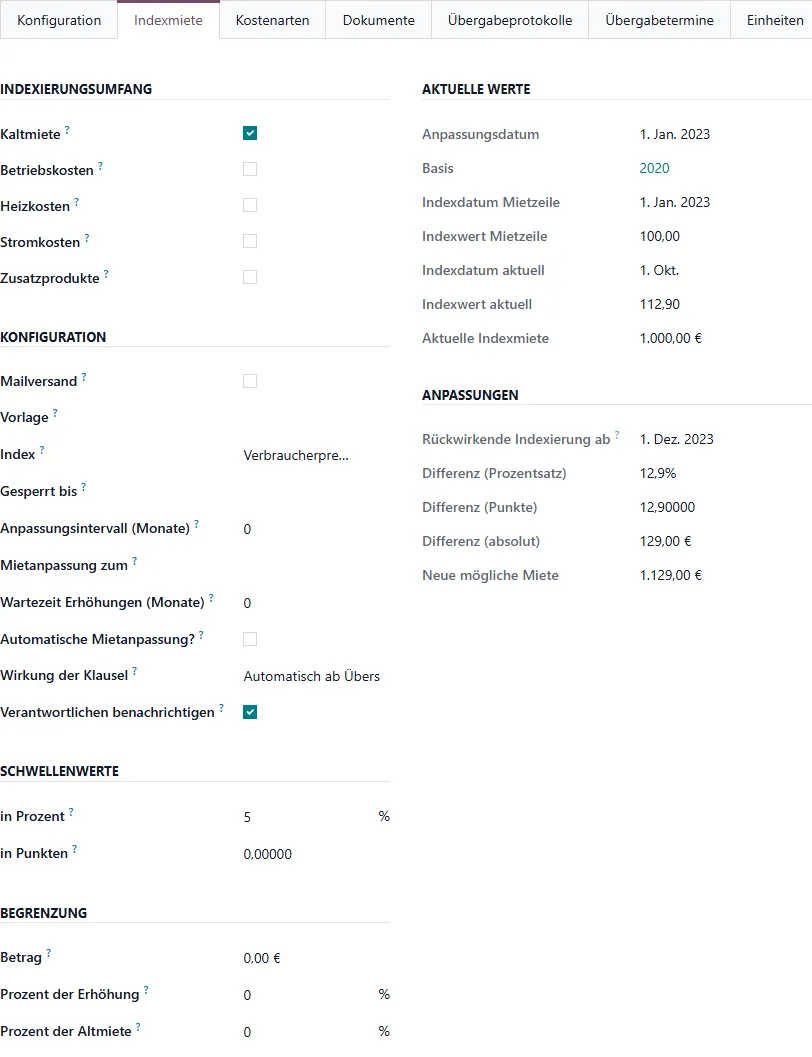
- Clause effect: From declaration is the default and matches the process on the page Index-linked rent: notice, then an increase from a future date. Automatic once exceeded switches on the retroactive process on this page.
- Automatic rent adjustment?: decides whether SMARTBRIX runs the process itself or gives you a task. See Automation.
Existing contracts stay on From declaration until you change them. After saving, the tab shows Retroactive Indexation From on the right under Adjustment when a step is due. SMARTBRIX hides the fields of the process with notice (Rent Adjustment Possible?, Next Possible Adjustment Date, Notice deadline) with this effect.
How SMARTBRIX calculates
Section titled “How SMARTBRIX calculates”Example: commercial rent with a base rent of €1,000.00, indexing date January 2023 with “100.0”, threshold “5 %”, no adjustment interval.
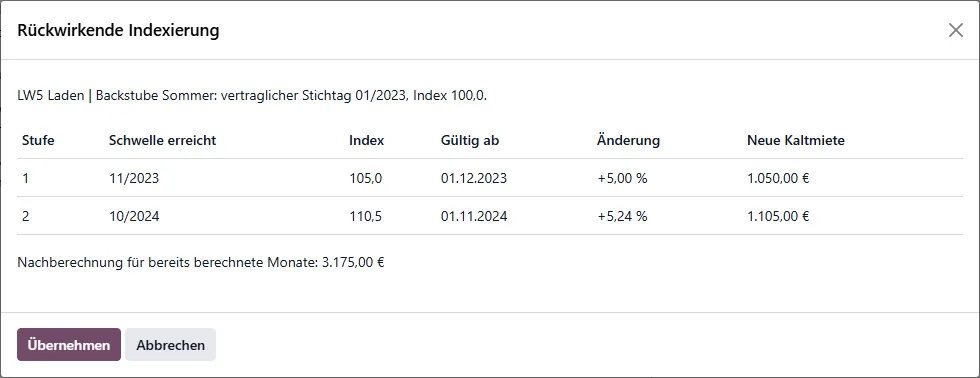
- Find the first time the threshold is reached. SMARTBRIX compares every monthly value from February 2023 with the reference date. In November 2023 the index is at “105.0”, which is 5 %.
- Set the start. The new rent applies from the month after the threshold is reached, here from December 1, 2023: €1,000.00 × 105.0 / 100.0 = €1,050.00.
- New reference date. November 2023 with “105.0” becomes the new reference date. The next step needs 5 % more than 105.0, that is “110.25”.
- Further steps. In October 2024 the index is at “110.5”. From November 1, 2024 the rent is €1,050.00 × 110.5 / 105.0 = €1,105.00.
- Repeat up to today. SMARTBRIX checks up to the newest published index value. Each step becomes a rent line of its own with its own reference date.
Each step is rounded to the cent. Limitation (Amount, Percentage of increase, Percentage of prior rent) applies to each step separately, exactly as for a single increase.
Trigger the retroactive indexation
Section titled “Trigger the retroactive indexation”-
Open the tenancy.
-
Use the gear icon next to the name (Actions) and choose Index Rent Increase.
-
The window Retroactive indexation shows the preview: the reference date used with its index value and a table with the columns Step, Threshold reached, Index, Valid from, Change and New base rent. Below are the total of the back charge and, if any, the time-barred amount.
-
Check the reference date and the steps. Click Apply.
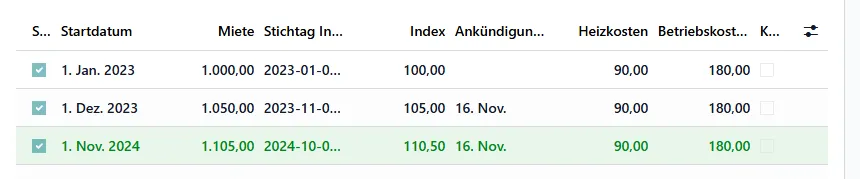
The tenancy then has a new rent line per step; the newest one is the new reference line. For the months already invoiced, a customer invoice of the type Index Back Charge exists as a draft.
- If Mail sending is selected, the email window opens with the subject “Index adjustment of your rent” and the step table in the text.
- Without Mail sending, SMARTBRIX stores the step table as a note in the history and opens the back charge.
If a hint in bold appears below the table, SMARTBRIX cannot apply the run. The Apply button is then missing. See Common errors.
Index back charge
Section titled “Index back charge”The back charge is a customer invoice to the invoice recipient of the tenancy. The old months were already invoiced with the old amount. SMARTBRIX does not change these invoices; it only charges the difference.
- One line per step and item. The line names the item, the property, the period and the index month, for example “Base Rent LW5 Laden: index adjustment 12/2023 to 10/2024 (index 11/2023)”. The quantity is the number of months, the unit price the monthly difference.
- Product, account, tax and analytic account come from the tenancy, as on the rent invoice. For commercial rent with the option to tax, VAT is included.
- Only invoiced months. SMARTBRIX only counts months for which a posted rent invoice exists, including future months invoiced in advance. With quarterly or yearly billing, all months of the billed period count. Rent invoices in draft do not count: the preview names them; create them again at the new rent.
- Gaps. If an invoiced month is missing in between, a new line starts.
- Draft. Check and post the invoice yourself.
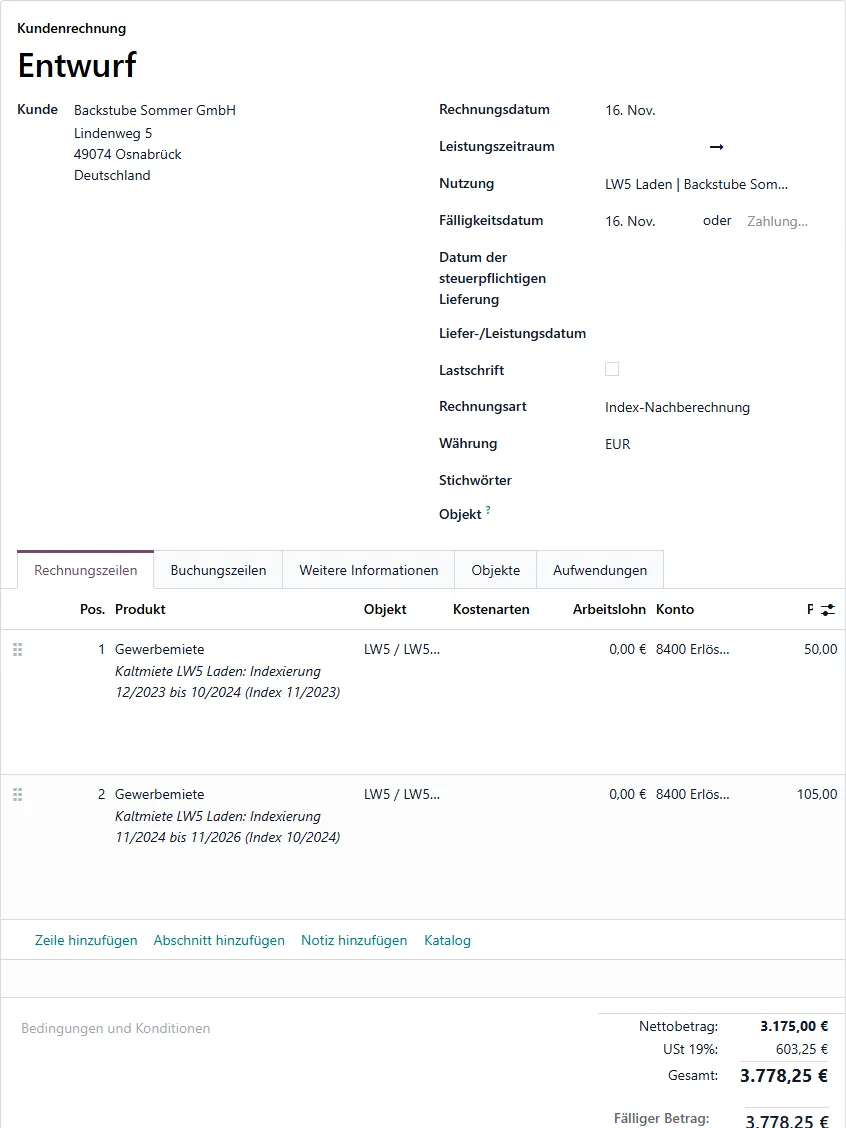
In the example above, calculated in November 2026: December 2023 to October 2024 is 11 × €50.00 = €550.00, November 2024 to November 2026 is 25 × €105.00 = €2,625.00, together €3,175.00 net.
Automation
Section titled “Automation”SMARTBRIX checks contracts with automatic effect daily and whenever they are saved.
- Automatic rent adjustment? selected: SMARTBRIX adds the steps and the back charge itself, writes the step table to the history and gives the responsible user of the property the task “Check index back charge”. SMARTBRIX does not send an email to the tenant in this case.
- Automatic rent adjustment? not selected: the responsible user gets the task “Indexation due retroactively” with the month from which the rent changes. You trigger the run as described above.
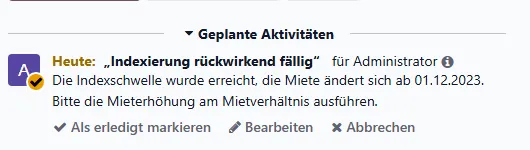
If SMARTBRIX cannot apply a due step, the responsible user gets the task “Retroactive indexation not applied” with the reason. Each task is created only once while it is open.
Checkpoints
Section titled “Checkpoints”- The rent lines contain one line per step, starting on the first of the month after the threshold was reached.
- The newest step carries the check mark of the reference line and, as Indexing Date, the index value of its month.
- A customer invoice Index Back Charge is in draft.
- Retroactive Indexation From is empty after the run.
Common errors
Section titled “Common errors”| Problem | Cause | Solution |
|---|---|---|
| The field Clause effect is missing. | The tenancy is not a commercial rent. | Select Commercial Rent? if the contract is one. |
| Saving fails with “An automatic index clause needs a threshold or an adjustment interval.” | Threshold and adjustment interval are 0. | Enter the threshold or the interval from the contract. |
| Hint “A later rent line changes an indexed amount by hand.” | After the first step there is a rent line in which, for example, the base rent was raised by hand. SMARTBRIX cannot tell whether this raise already contains the indexation. | Check the rent lines. If the later raise is the missed indexation, set the Indexing Date there. SMARTBRIX then calculates from that line. |
| Hint “The tenancy also has a graduated rent.” | Graduated rent and index-linked rent on the same contract. | Add the steps by hand. |
| Hint “Index values are missing for a month; the steps end there.” | A monthly value is missing in the index series. | Add the value. You can already apply the steps up to the gap. |
| Hint “The index has a new base; anchor the reference date again.” | The Federal Statistical Office changed the base year. | Choose the reference date with a value of the new base, as described on the page Index-linked rent. |
| The preview says “The threshold has not been reached since the reference date.” | No step is due. | Nothing to do. |
| Task “Retroactive indexation not applied” with “The run failed; see the server log.” | An error occurred during the daily run, for example a product has no income account. The other tenancies are processed. | Trigger the indexation on the tenancy. The message in the window names the cause. |
| Index Rent Increase (List) changes nothing. | The list action only knows the From declaration process. | Trigger the retroactive indexation per tenancy. |
Special cases
Section titled “Special cases”Adjustment interval. If an interval is agreed, a step starts at the earliest that many months after the previous one. SMARTBRIX then only searches from the month before this earliest start. Example: indexing date January 2023, interval “12”. The first step starts in January 2024 at the earliest. The index value of December 2023 decides, provided the threshold is reached then. This way no increase between reaching the threshold and the start is lost.
Locked Till. No step starts before this date. As with the interval, the index value of the month before the lock ends decides.
Threshold in points. The threshold in points works like the one in percent, measured as the distance to the current reference date. If both are set, one is enough.
Later rent lines. If later rent lines already exist after a step, for example a new service charge prepayment after the statement, SMARTBRIX carries them forward: the indexed items rise by the same factor, all other amounts stay. If a rent line starts exactly at the start of a step, it becomes the step itself.
Additional products. If Additional products is part of the indexed components, SMARTBRIX splits the marked additional products at the start of the step and raises them by the same factor. They also appear on the back charge. Rent reductions stay unchanged.
Limitation period. Rent claims become time-barred after three years, counted from the end of the year in which they arose. SMARTBRIX leaves months before January 1 of the third-to-last year out of the back charge. In November 2026 these are all months up to December 2022. The amount left out appears in the preview and in the history as “Time-barred and not charged”. The earlier steps still count for today’s rent. If you want to claim the amount anyway, add it to the draft invoice by hand.
Ongoing operation. The Federal Statistical Office publishes a monthly value around the middle of the following month. If the threshold is reached in October, the new rent applies from November, but this is only known in mid-November. The November invoice has usually been created by then. So even in ongoing operation, a small back charge for one or two months almost always arises.
Months without a rent invoice. Months for which no rent invoice was created, for example before the tenancy started, are not charged afterwards. The new rent still applies to them; the rent schedule uses it for future invoices by itself.
Framework contract. The clause effect is part of the index agreement of the framework contract and applies to all framework usages. Each framework usage calculates from its own reference date. You trigger the indexation on the framework contract; the preview shows all framework usages. The back charge goes to the contract partner as one invoice, with lines of its own per framework usage.
Second run. After a run, the newest step is the new reference date. A new run only finds something again once the threshold is reached from there. No duplicate steps or back charges arise.
Back to From declaration. If you switch the effect back, the process with notice applies again. Steps and back charges already created remain.
What is not included
Section titled “What is not included”- SMARTBRIX does not check whether the clause in the contract is valid or really takes effect automatically. The setting must reflect the contract.
- You do not choose the start: the new rent always applies from the month after the threshold is reached or from the earliest permitted start.
- Posted rent invoices are neither cancelled nor created again.
- A first month that started mid-month counts as a full month on the back charge.
- A service charge prepayment charged afterwards does not count as a paid prepayment in the service charge statement.
- The letter to the tenant is the step table in the email window, not the index rent letter with PDF.
Didn't find an answer? Contact support