

The fee run runs automatically every day. For each running management contract, it creates the fee invoices that are due as drafts. It never posts. You review the drafts and post them, one at a time or several at once.
When a draft is created
Section titled “When a draft is created”- In advance: the run charges flat fees and amounts per unit of a contract billed in advance on the first day of the period.
- In arrears: the run charges everything else, including a percentage of the target rent, on the day after the end of the period. These lines go on the contract’s next invoice. If no invoice in advance is due, they get an invoice of their own.
- One invoice per contract and run: whatever a run finds for a contract goes on one invoice. There is no combined invoice for several contracts. Each invoice stays with its properties.
- Nothing twice: if a line for a period is already on a fee invoice, the run does not create it again. This applies to drafts, posted and canceled invoices.
- Missed periods: if a run did not take place or a contract was skipped, the next run catches up on the missing periods. They then appear together on one invoice, each line with its period.
- Several companies: each contract is charged with the settings of its company.
You do not have to wait until the next day for a new contract. With the Create Fee Invoices button on the contract, SMARTBRIX creates the drafts that are due right away. If nothing is due, SMARTBRIX shows “Nothing is due.” A second click does not create anything twice.
Cancel or delete a draft
Section titled “Cancel or delete a draft”- Cancel: the period counts as done. The run creates nothing more for it.
- Delete: the next run creates the draft for this period again, with the contract as it stands then.
So delete a draft if you want it recalculated after correcting the contract. Cancel it if no fee is due for the period.
Closed periods
Section titled “Closed periods”After the end of a period, the run decides once on the minimum and maximum fee and on the positions charged after the period, such as a percentage of the target rent. Later changes to the contract or to the rent invoices do not apply retroactively. Only if you delete the draft does the next run recalculate the period.
Review and post drafts
Section titled “Review and post drafts”- Open Management Fee › Fee Invoices. The list first shows the drafts.
- Open a draft and check the lines.
- Change individual lines if needed, for example for a special case.
- Click Confirm.
To post several drafts at once, select them in the list and choose Confirm Entries under Actions. What posting creates is described under Post and pay a fee invoice.

Each line names the position, the service period and the derivation in its description, for example:
- “4 units × €24.00”
- “4 % of €18,420.00 target rent (commercial)”
- “Top-up to the minimum fee of €300.00” with “Fees of the period: €104.00”
The service period lets you tell apart, on the same invoice, lines in advance for the new period from lines in arrears for the past one. The derivation lets you justify the invoice to the advisory council and the owner. Texts and dates appear in the client’s language.
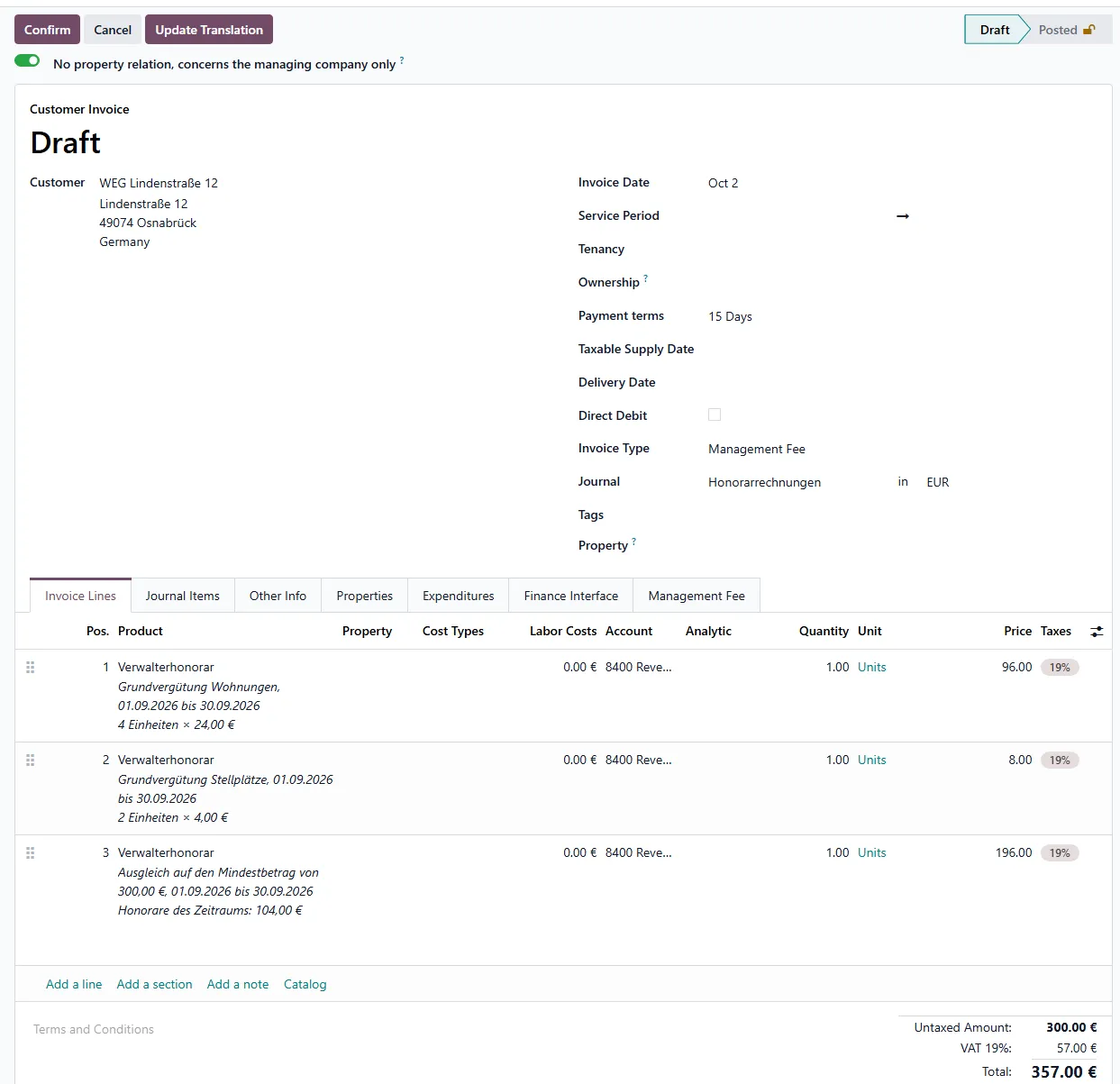
Fee invoices have the Invoice Type Management Fee. The accounting invoice lists also show this column, so fee invoices do not get lost among rent invoices and owner contributions.
Partial period
Section titled “Partial period”If the contract starts or ends within a period, SMARTBRIX charges this partial period pro rata to the day. The derivation then also states “pro rata 17 of 31 days”. This also applies to the minimum and maximum fee.
Example: a contract with a flat fee of €310 per month starts on March 15. March has 31 days, and the contract runs for 17 of them. The invoice for March is for €170.00 net.
If a fee position changes within a period, SMARTBRIX calculates each version for its days. An increase as of the 15th therefore applies from the 15th.
End of contract
Section titled “End of contract”Enter the End date of the contract and click End Contract. The next run charges the partial period up to the end date. If more was charged in advance for this period, it creates a draft credit note for the difference. After that, SMARTBRIX charges nothing more for this contract.
Example: a contract charges €900 per quarter in advance. On April 1, the second quarter with 91 days is charged. The contract ends on May 15, after 45 days. €445.05 is due. SMARTBRIX creates a draft credit note for €454.95 net.
Fee run log
Section titled “Fee run log”Management Fee › Fee Run Log shows the result for each run and contract: Created with the fee invoice created, Skipped or Error with the reason in the Message column.
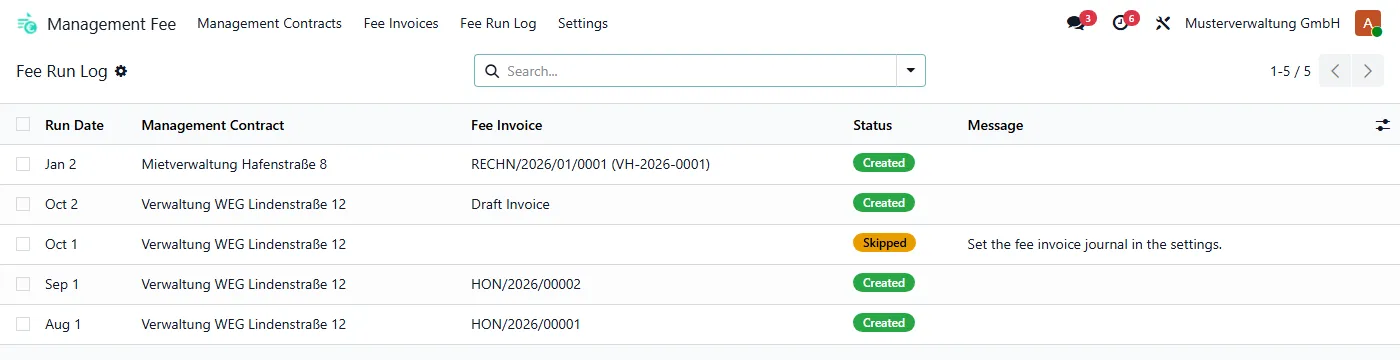
If a required setting is missing for a contract, such as the journal in the settings, the daily run skips this contract. It continues with the other contracts. Add the missing setting, and the next run catches up on the period. In the example above, the journal was missing on October 1, and the run on October 2 caught up on September. If you click Create Fee Invoices on the contract instead, SMARTBRIX shows the missing setting right away as a message.
Frequently asked questions
Section titled “Frequently asked questions”No draft is created for a contract. Check that the contract is Running and the period lies within its term. Lines in arrears are only created on the day after the end of the period. Look in the fee run log to see whether the contract was skipped and why. If a canceled invoice already exists for the period, the run does not create a new one.
A new apartment is missing from the invoice. The stock at the time the run creates the draft counts. An apartment added afterwards appears from the next run. If it should already be on this draft, delete the draft and click Create Fee Invoices on the contract.
The percentage position is missing from the invoice in advance. A percentage of the target rent is always charged in arrears. The line goes on the next invoice after the end of the period.
The target rent is lower than expected. Only posted rent invoices whose service period starts within the period count, net and only with the selected components. Credit notes reduce the rent basis. Also check the Usage of the position and the Commercial Rent? checkbox on the tenancies. A rent invoice posted only after the period was closed no longer counts.
Didn't find an answer? Contact support