

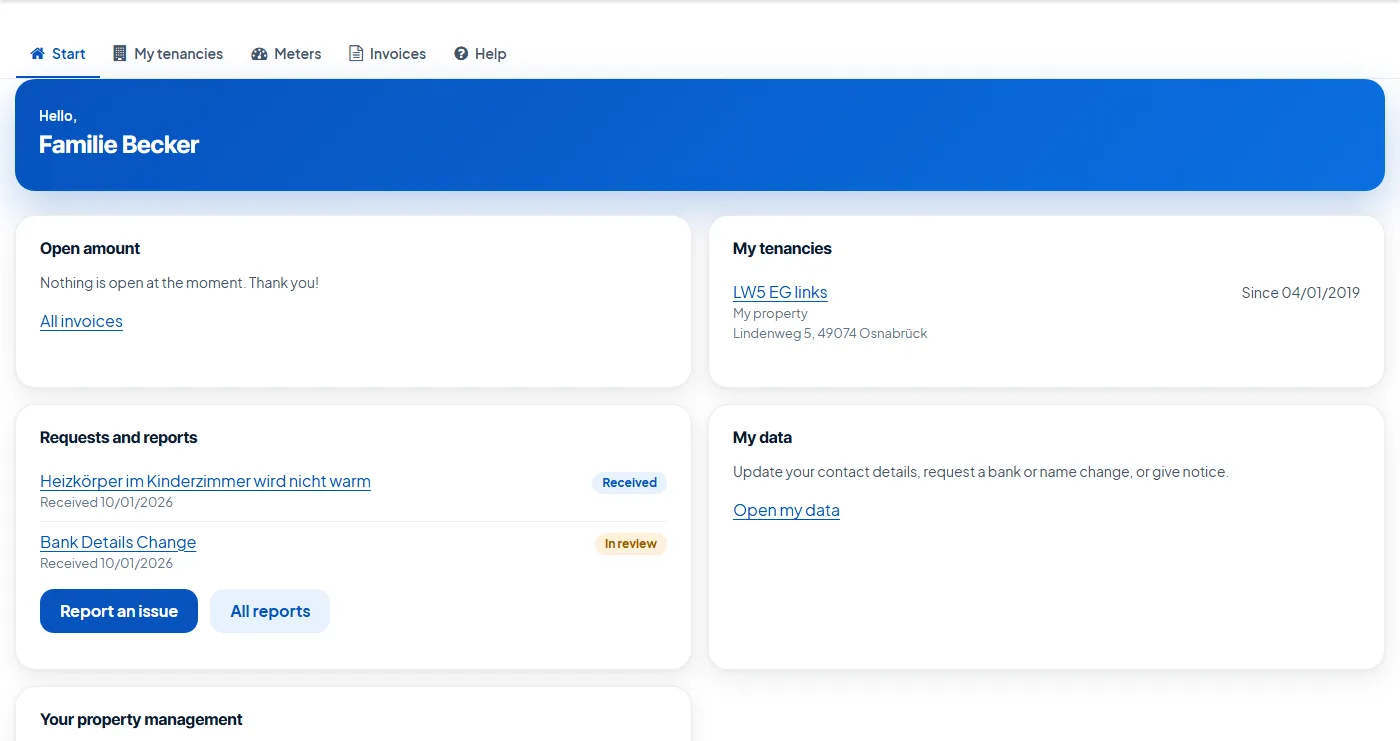
In the customer portal, your tenants see their tenancy, their invoices and their documents in the browser. They report meter readings and defects, change their contact details and submit requests, for example for new bank details or a termination. Every issue report and every request arrives in SMARTBRIX as a portal request or ticket, with an activity for the person responsible.
- Set up the customer portal: settings, portal access, visibility per tenancy
- What tenants see in the portal
- Handle requests and issue reports
- Owner portal: what owners see, invitation, documents for owners
The portal also accompanies the letting: application, viewing appointment, contract signature, handover and move-out. These steps are described on the Letting pages, each in the “with customer portal” box. Meter submissions are described on the Meters and readings page.
Prospects can get access too. They then see My searches with their search profiles and Saved with the properties they saved, see Search profiles.
Portal and Portal Plus
Section titled “Portal and Portal Plus”The customer portal comes in two levels.
Portal is the Odoo customer portal with its start page and the usual tiles. Your customers see:
- their invoices, if you have released the invoices of the tenancy for the portal,
- their contact details,
- the properties that concern them,
- documents you share with them.
Portal Plus adds the areas SMARTBRIX has built for rental management. It replaces the start page with its own, showing a card for each tenancy, and brings:
- the tenancy page with rent, contract and documents,
- meter submissions,
- requests for termination, new bank details or a name change, which reach you as a portal request,
- signing the tenancy agreement in the portal,
- choosing the handover appointment and signing the handover protocol by link,
- applying by link and the link to the viewing appointment,
- a notice about reminders on open invoices,
- help entries and the color of your website,
- in SMARTBRIX, the Portal menu with portal requests, meter submissions, help entries and settings.
All pages of this module and the “with customer portal” boxes in Letting describe Portal Plus. Without Portal Plus, you take appointment wishes, terminations and meter readings yourself and enter them in SMARTBRIX.
The Owner portal and search profiles with a saved list for prospects are additional products of their own. They require Portal Plus.
Didn't find an answer? Contact support