

If a flat’s consumption is recorded by remotely read devices, the building owner must tell the occupant their heating and hot water consumption of the previous month every month (§ 6a Heizkostenverordnung, the German Heating Costs Ordinance). This includes a comparison with the consumption of a standardized average user. If this consumption information is missing or incomplete, the occupant may reduce their share of the heating and hot water costs by 3% (§ 12 (1) Heizkostenverordnung).
SMARTBRIX creates the consumption information for every tenancy of a building for which you switch it on. You import the meter readings every month. SMARTBRIX works out the monthly consumption, converts it into kWh equivalent and compares it with the previous month, the same month last year and the average user under DIN 94680. It then tells the tenants: in the customer portal with an email, as a PDF by email or as a letter.
Requirements
Section titled “Requirements”- The meters are attached directly to the rented unit, not to the main property (see Meters and readings).
- The meters have the Type Heating Cost Meter, Heat Meter or Hot Water Meter and the Remote Readout box checked. Cold water, electricity and gas meters and difference meters do not count.
- The meter readings reach SMARTBRIX at least once a month, ideally through Import readings, from a CSV file or the readout file of a radio gateway. Every imported reading is Approved at once.
- The tenancy has contractual partners or an invoice recipient. They receive the consumption information.
- For the conversion and the comparison with the average user, the fuel, the living areas and the figures of the last heating cost statement are maintained (see Data for conversion and comparison).
- To be reminded of missing meter readings, a user is entered under Responsible on the main property.
Switch on consumption information
Section titled “Switch on consumption information”- Open the main property, that is, the building the flats belong to.
- Go to the Energy and Consumption tab and expand the Metering Service section.
- Check Consumption information by SMARTBRIX.
- Save.
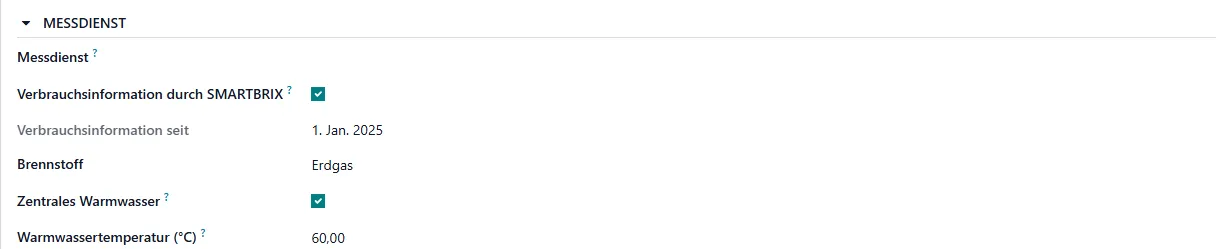
The box is only on the main property and applies to all flats below it. It is off by default. SMARTBRIX enters the day you switched it on under Consumption information since. Months that end before this day are never sent. If you switch it on on November 17, the first consumption information goes out for November, early in December.
If you uncheck the box again, no new consumption information is created, and the Consumption page disappears from the portal, including the earlier months.
Data for conversion and comparison
Section titled “Data for conversion and comparison”To convert into kWh equivalent and compare with the average user, SMARTBRIX needs details about the building, the areas and the last heating cost statement. If any of these is missing, the consumption information still goes out, but as incomplete (see When data is missing).
Fuel and hot water
Section titled “Fuel and hot water”On the main property, enter:
- Fuel: Natural Gas, Heating Oil, Liquefied Petroleum Gas, Wood Pellets, District Heating or Heat Pump. SMARTBRIX picks the comparison values by it. For liquefied petroleum gas it uses the values for natural gas, because the standard does not list liquefied petroleum gas.
- Central Hot Water: the heating system also heats the hot water. SMARTBRIX picks the comparison table for heating by it.
- Hot Water Temperature (°C): SMARTBRIX only needs it if there are no statement figures for hot water.
Where the fields are depends on who settles the heating costs:
- A metering service settles: the fields are in the Energy and Consumption tab, in the Metering Service section, right below the box Consumption information by SMARTBRIX.
- SMARTBRIX settles itself: the fields are in the Energy and Consumption tab, in the Heating Costs section, as described in Own heating cost statement.
Living areas
Section titled “Living areas”- Living space of every unit: the sum of the living spaces of all units in the building gives the building’s size class. Vacant units count too.
- Space (m²) in the rent line: this is the living area SMARTBRIX uses to compare the tenant.
Statement values
Section titled “Statement values”To convert the heat cost allocators, SMARTBRIX needs the plant sensitivity of the building. It describes how many heat cost allocator units or how many heat meter kWh correspond to one kWh of final energy used by the heating system.
- SMARTBRIX settles itself: the plant sensitivity comes from the building’s last released heating cost statement. You do not enter anything.
- A metering service settles: you enter the figures from its heating and hot water cost statement as Statement Values.
To enter statement values:
- Open the main property, go to the Energy and Consumption tab and expand the Metering Service section. The Statement Values section appears as soon as Consumption information by SMARTBRIX is checked.
- Under Statement Values, click Add a line.
- Enter the settlement period under From and To.
- Enter the totals from the metering service’s statement:
- Heating Cost Allocator Units: the sum of the units of all heat cost allocators in the building. If the building records heating with heat meters, enter the sum of all heat meters under Heat Meters (kWh) instead. Fill in only one of the two fields.
- Energy for Heating (kWh): the energy the system used for heating, without hot water.
- Energy for Hot Water (kWh): the energy the system used for hot water.
- Hot Water (m³): the hot water volume of all units.
- Save.
For gas, enter the final energy in kWh by gross calorific value, as on the gas invoice. Add a new line for every new settlement period. The old lines stay.

A month always uses the period that ended last before that month. Figures for 2025 therefore apply from January 2026. If an own heating cost statement ends on the same day as entered statement values, the heating cost statement applies.
If a line has both Heating Cost Allocator Units and Heat Meters (kWh), SMARTBRIX does not convert heating with this line. It cannot tell which part of the final energy belongs to which devices.
Apartment station
Section titled “Apartment station”If an apartment station in the flat heats both the rooms and the hot water and one heat meter measures both, check Measures Heating and Hot Water (Apartment Station) on that meter. The box only appears for heat meters.
- Unit without its own hot water meter: the consumption information shows one combined value Heating and Hot Water. It is compared with heating and hot water of the average user together.
- Unit with a hot water meter: heating and hot water appear separately as usual.
How the monthly consumption is formed
Section titled “How the monthly consumption is formed”A device’s monthly consumption is its reading at the end of the month minus its reading at the end of the previous month. SMARTBRIX forms this month-end reading as follows:
- Reading close to the end of the month: if an approved reading lies no more than three days before or after the end of the month, its value counts. If there are several, the closest one counts.
- Otherwise estimated: SMARTBRIX spreads the consumption between the reading before and the reading after. Heating is spread by the heating demand of the months (degree days), hot water evenly by days. The month is then marked Estimated.
- No reading: if the two readings are more than 45 days apart or there is no reading after yet, the device has no reading for this month. SMARTBRIX never projects beyond the last reading.
Estimated readings and calculated reference date readings do not count as readings here. SMARTBRIX does not create any readings for the consumption information; the service charge statement and the heating cost statement are not affected.
Further rules:
- Heat cost allocators start again at 0 on their reference date. SMARTBRIX calculates across this restart and rates the units with the radiator’s rating factor.
- Meter replacement: each device counts its part up to or from the replacement date.
- Move-in or move-out during the month: the period starts or ends on the day of the tenancy, and the month is marked Part of the month. SMARTBRIX prefers the handover or return reading for the reading on that day.
- Liters: SMARTBRIX converts hot water meters in liters to m³.
Conversion into kWh equivalent
Section titled “Conversion into kWh equivalent”So that the tenant can put their consumption into context, SMARTBRIX converts it into the energy the heating system used for it. This value is called kWh equivalent, short kWh eq.
- Heating: SMARTBRIX converts the heat cost allocator units and the heat meter kWh with the plant sensitivity and adds them up to one heating value. If there is no plant sensitivity for heat meters, their measured kWh count.
- Hot water: the volume stays in m³. The energy in kWh equivalent is added. SMARTBRIX uses the energy for hot water per m³ from the last statement. If it is missing, the substitute rule of the Heizkostenverordnung applies: 2.5 kWh per m³ for every degree the hot water temperature lies above 10 °C, adjusted to the fuel. If no temperature is entered, SMARTBRIX uses 60 °C without adjustment, that is 125 kWh per m³.
Every month uses the plant sensitivity that applied to it. New statement values therefore do not change earlier months. SMARTBRIX only compares the previous month and the same month last year in the same unit as the current month.
The kWh equivalent is an approximation for information. It is not the basis of the heating cost statement. The portal and the PDF carry this note too. The tenant still sees the units of each heat cost allocator in the breakdown by device.
Comparison with the average user
Section titled “Comparison with the average user”SMARTBRIX compares the monthly consumption with the comparison values of DIN 94680. For comparable households the standard gives a median and a range: most comparable households lie between the lower and the upper value.
Which comparison value applies depends on:
- the Fuel of the building,
- Central Hot Water: with central hot water, heating uses its own table,
- the building’s size class from the sum of the living spaces,
- the tenant’s living area from the rent line.
The standard’s heating value is per m² of living area. SMARTBRIX multiplies it by the tenant’s living area. It spreads the annual value by the heating demand of the months for heating and by days for hot water. In a part month only the days of the tenancy count.
There is only a heating comparison if heating is converted into kWh equivalent. SMARTBRIX does not rate the consumption as “economical” or “high”.
The comparison values of the standard are under Property Management › Configuration › Property Management › Comparison Values and under Property Administration › Configuration › Comparison Values. They are read-only and come with the module.
When data is missing
Section titled “When data is missing”If something is missing, the consumption information goes out with what there is and carries the Incomplete flag:
- Plant sensitivity missing: heat cost allocators stay in units, as before. A note says that units are not kWh. There is no comparison with the average user for heating.
- Fuel missing: no comparison with the average user.
- Living area missing: if the rent line has no space or the building has no living space, there is no comparison with the average user.
The portal and the PDF then give the reason, for example “No comparison value this month: the living area is not recorded.” In the form of the consumption information, the Comparison tab shows which values SMARTBRIX used and what is missing (see Check consumption information).
Once you have added the missing data, SMARTBRIX recalculates open months with the next run. Recalculate does it at once.
What the consumption information contains
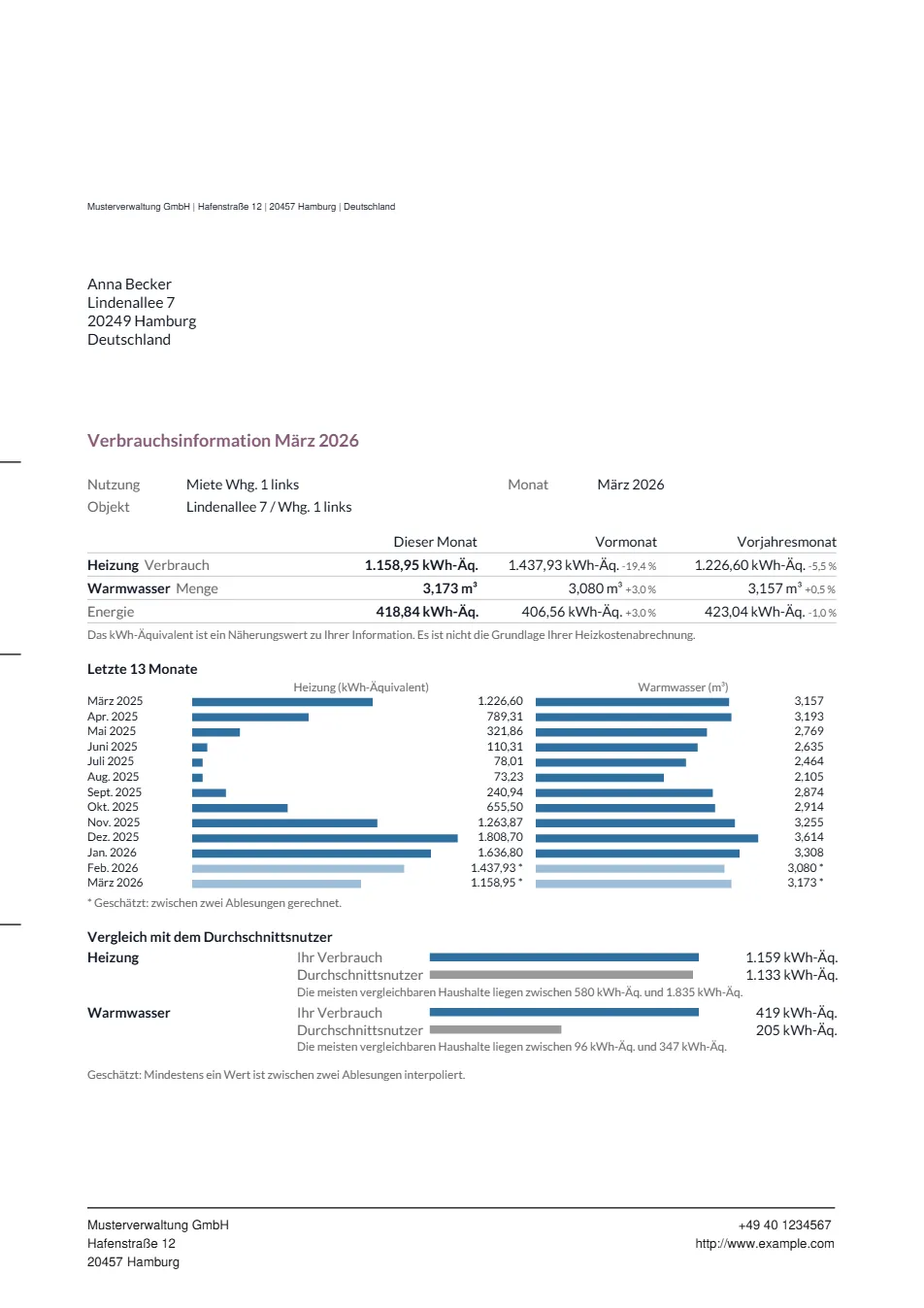
Section titled “What the consumption information contains”- Heating: the month’s consumption in kWh equivalent. Without plant sensitivity, heat cost allocators are shown in units.
- Hot Water: the volume in m³ and the energy in kWh equivalent.
- Heating and Hot Water: only for an apartment station without its own hot water meter, as one combined value.
- Comparison: Previous month and Same month last year as a value and as a percentage change. A comparison month only appears if it falls within the same tenant’s tenancy and has a value in the same unit. If it was already sent, SMARTBRIX compares with the value given then.
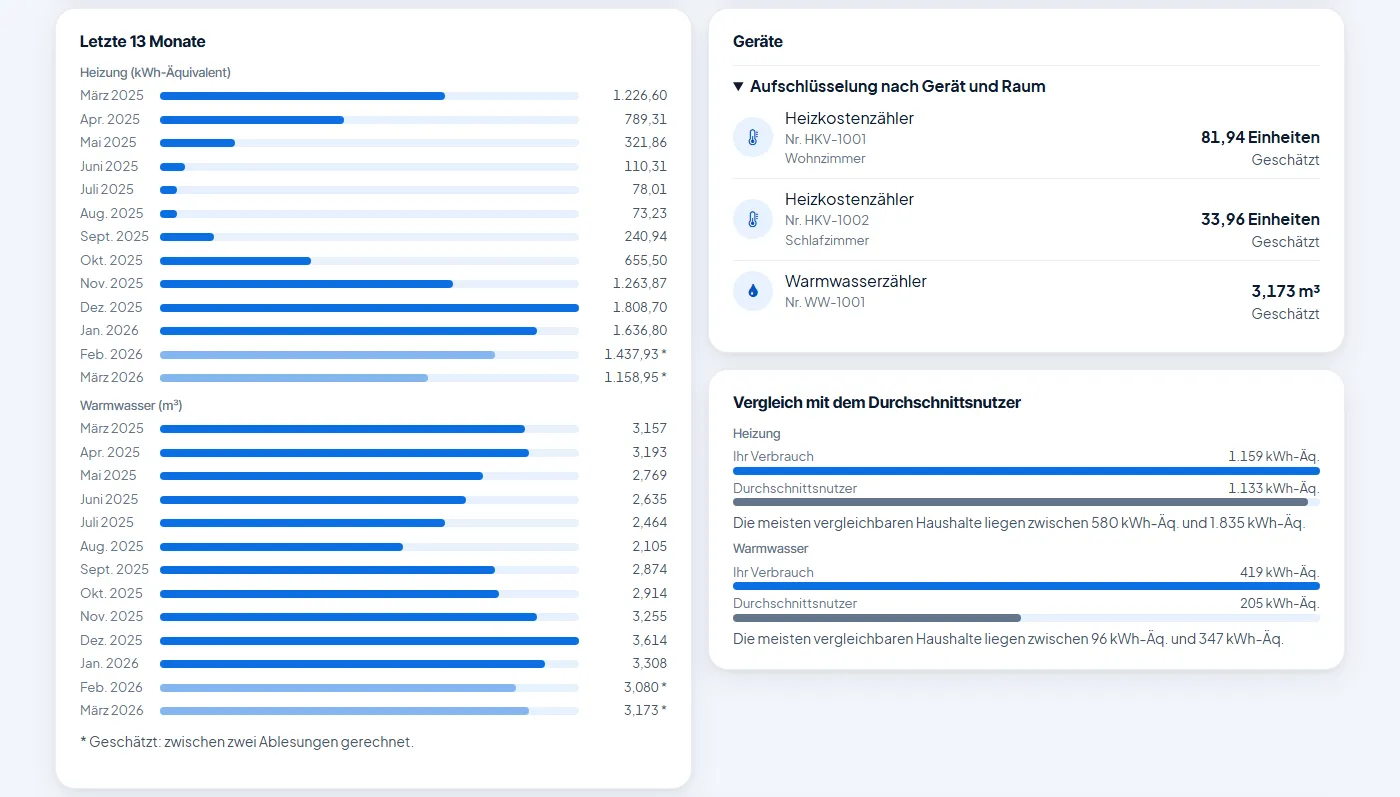
- Last 13 months: one bar per month for heating and hot water. Months whose heating is not converted stay empty in the kWh equivalent history.
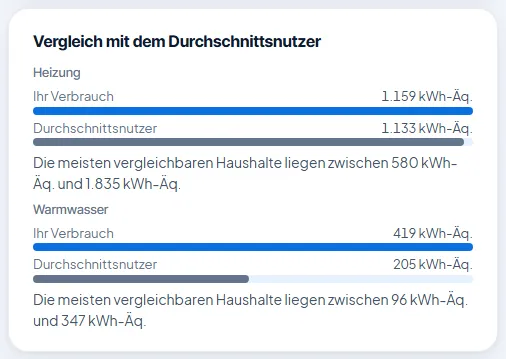
- Comparison with the average user: for each part one bar for the tenant’s own consumption and one for the average user, plus the sentence “Most comparable households use between” with the range.
- Flags: Estimated, Incomplete and Part of the month. With Incomplete, a note says whether a device is missing or data for the conversion or comparison is missing.
The consumption information contains no costs or amounts and no building average.
When SMARTBRIX sends
Section titled “When SMARTBRIX sends”The scheduled action Consumption information: daily run handles the previous month of all tenancies in buildings that are switched on, every day:
- From the 1st: SMARTBRIX creates the previous month’s consumption information for each tenancy and recalculates it daily. As soon as every device has a month-end reading, it goes out, even on the 1st or 2nd.
- From the 5th: if readings or recipients are still missing, the user entered under Responsible on the main property gets an activity “Missing readings or recipients: consumption information” with the month. It lists the devices without a reading with their meter number for each tenancy, and the tenancies without a recipient. There is one activity per main property and month.
- From the 10th: SMARTBRIX sends what there is. If a device lacks a reading, the consumption information goes out as Sent incomplete. If no device has a reading, SMARTBRIX sends nothing and the status becomes No data. If there is no recipient, it becomes No recipient.
If a unit has a device without remote readout next to the remotely read ones, its consumption information always counts as incomplete. The same applies if data for the conversion or comparison is missing. It goes out as soon as the remotely read devices have their reading, with the status Sent incomplete.
If the run failed around the 10th and a month is still Open, SMARTBRIX finishes it with the next run just as on the 10th. This applies to the three months before. Anything older stays Open.
SMARTBRIX no longer changes a sent consumption information, even if you correct a reading or enter new statement values later. This also applies to consumption information sent before the conversion into kWh equivalent. It still shows units and the placeholder “Comparison value to follow.”
How tenants receive it
Section titled “How tenants receive it”Recipients are the contractual partners and the invoice recipient of the tenancy, each contact once. For each one SMARTBRIX picks the way:
- Portal mail: the contact has an email address and access to the customer portal, and Hide Tenancy in Portal is not checked on the tenancy. They get a short email with the subject “Your consumption information for” and the month, and a link to the portal. This also applies if Contact by Letter is checked on the contact.
- Mail with PDF: the contact has an email address but no portal access, and Contact by Letter is not checked. They get the consumption information as a PDF attachment.
- Letter: everyone else. SMARTBRIX creates a letter and posts it like any other letter: with LetterXpress it goes to the letter service, otherwise it lands in the print batch.
Each recipient gets the email and PDF in their own language. SMARTBRIX keeps the PDF for each recipient on the consumption information.
Check consumption information
Section titled “Check consumption information”All consumption information records are under Property Management › Inventory › Meter Management › Consumption Information and under Property Administration › Inventory › Meter Management › Consumption Information, one per tenancy and month.
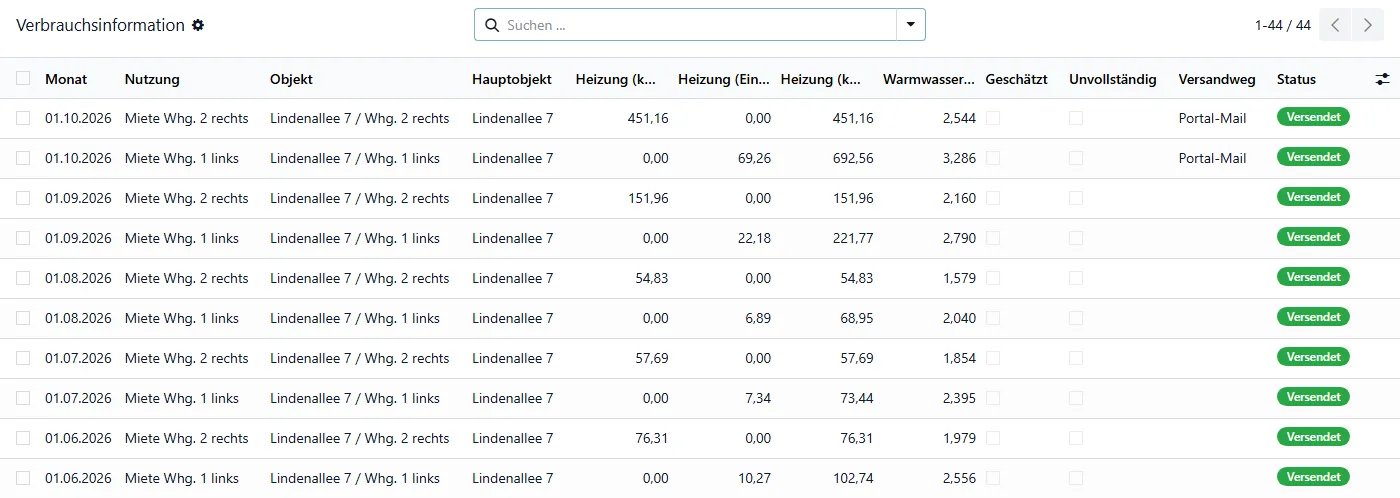
The Status column shows where it stands:
- Open: the month has not been sent yet. SMARTBRIX recalculates it daily.
- Sent: went out to all recipients, with all devices.
- Sent incomplete: went out, but not every device had a remotely read value, or data for the conversion or comparison was missing.
- No data: by the 10th, no device had a reading. Nothing was sent.
- No recipient: by the 10th, no recipient was entered. Nothing was sent.
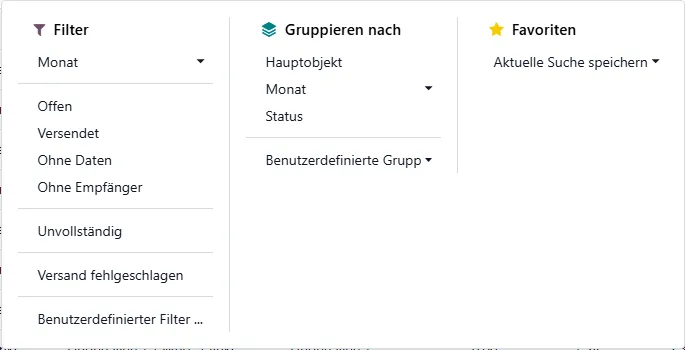
In the search you filter by Open, Sent, No data, No recipient, Incomplete and Delivery failed, by Month, and group by Main Property, Month or Status.
A click opens the consumption information:
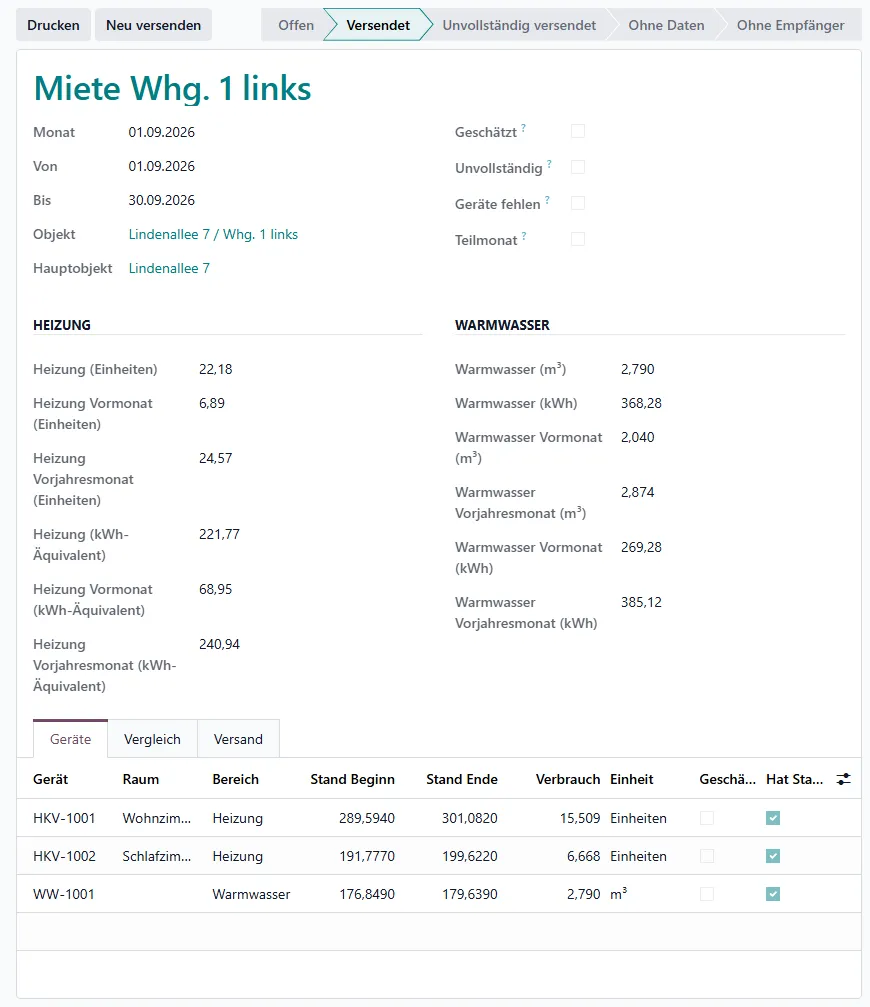
- At the top are Month, From and To, Property and Main Property, on the right the flags Estimated, Incomplete, Devices Missing and Part of the month.
- Under Heating and Hot Water are the month’s values and the comparison values, only for the devices the unit has. For heating, the value in kWh equivalent is shown next to the measured kWh or units.
- The Devices tab shows Room, Part, Start Stand, End Stand, Consumption and Unit for each device, plus whether the reading is Estimated and whether the device has a reading at all (Has Stand).
- The Comparison tab shows what SMARTBRIX calculated with (see below).
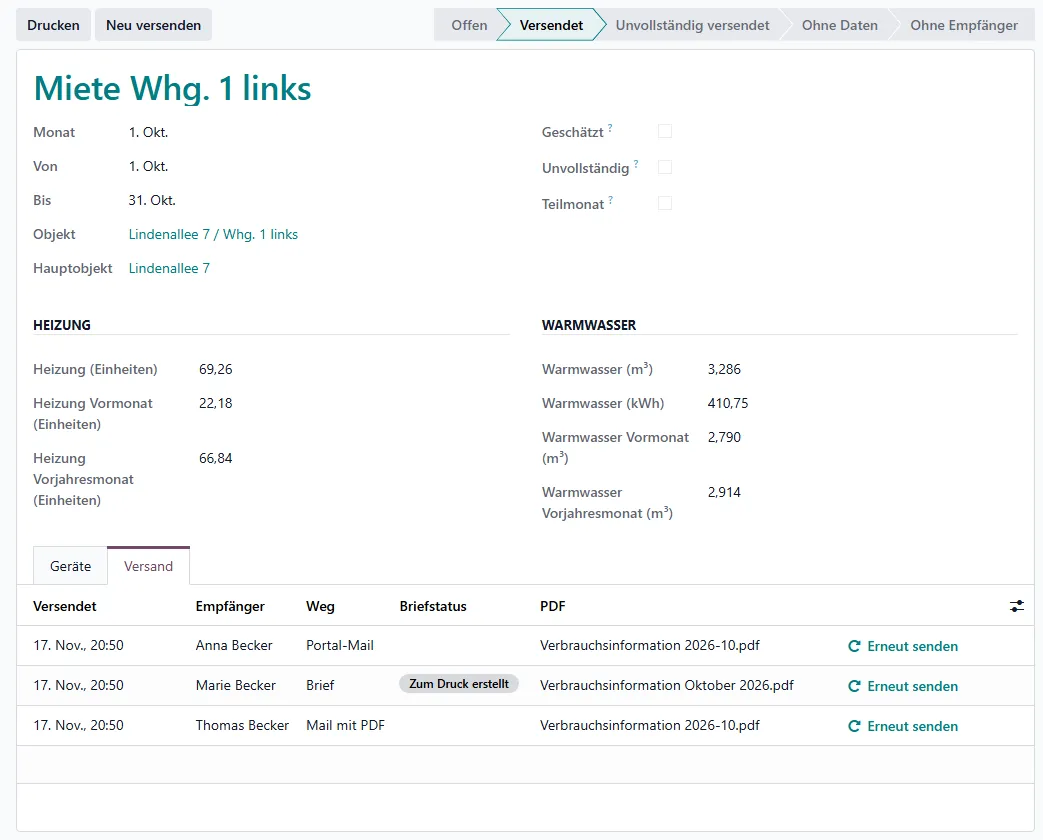
- The Deliveries tab shows for each recipient when and by which Way SMARTBRIX sent it, for letters the Letter Status and Letter Error, and the PDF that was sent.
- Print creates the PDF. Recalculate recalculates an open month at once, without waiting for the next run.
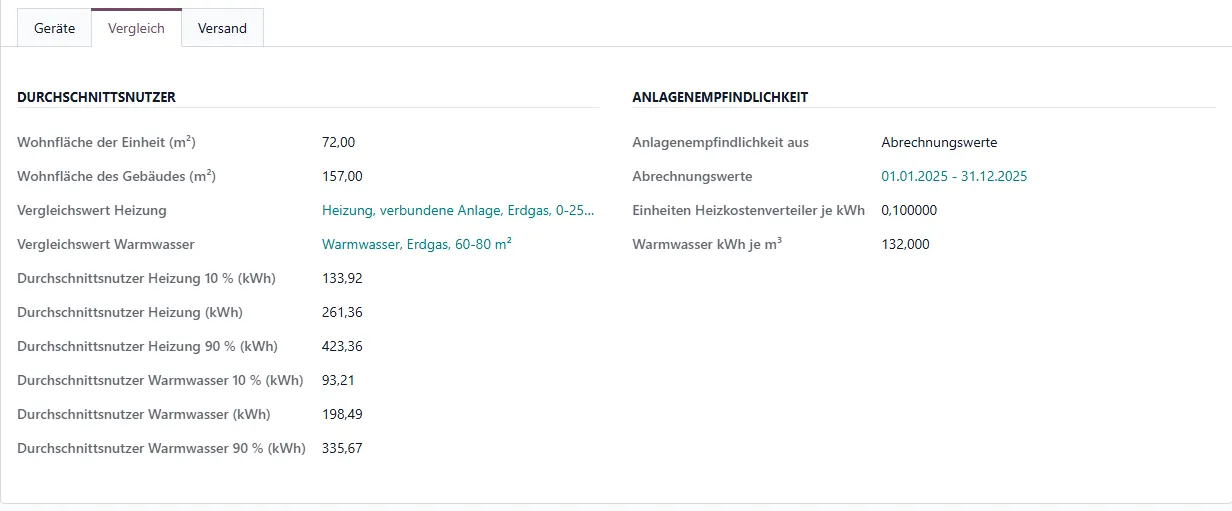
The Comparison tab helps with tenants’ questions:
- Under Average User are the Living Area of the Unit (m²), the Living Area of the Building (m²), the rows of the standard used (Comparison Value Heating, Comparison Value Hot Water) and the average user’s values for 10 %, median and 90 %. If something is missing, Fuel Missing or Living Area Missing is checked.
- Under Plant Sensitivity is where it comes from (Plant Sensitivity From: Heating Cost Statement or Statement Values), with the statement or the period and the conversion values. If it is missing, Plant Sensitivity Missing is checked.
For each recipient, the Deliveries tab records when, by which way and with which PDF SMARTBRIX gave the consumption information.
Resend
Section titled “Resend”If you find a mistake after sending, such as a wrong reading, you can send the consumption information again.
- Open the sent consumption information.
- Click Resend and confirm the question “Send this consumption information to all recipients again?”.
SMARTBRIX sends to all recipients with the values that applied at the first sending, and adds new lines in the Deliveries tab and new PDFs. The old ones are kept. If only one recipient should get it again, click Send again in that recipient’s line in the Deliveries tab instead. The status does not change. A corrected reading does not flow into the sent consumption information; it affects the following months.
Failed letters
Section titled “Failed letters”If a letter could not be handed to the letter service, the Deliveries tab shows an error under Letter Status and the reason under Letter Error. The user entered under Responsible on the main property gets an activity “Letter not sent: consumption information” with the month. The Delivery failed filter shows all these cases, including letters still stuck at the letter service.
SMARTBRIX does not resend a failed letter on its own, because it is unclear whether it reached the letter service. Check there. If it did not arrive, click Send again in its line in the Deliveries tab. Only this recipient then gets the consumption information again. While the letter is still with the letter service, SMARTBRIX refuses this.
No recipient
Section titled “No recipient”If a tenancy has neither contractual partners nor an invoice recipient on the 10th, the consumption information stays with the status No recipient. Its values stay as they were on the 10th.
- Enter the contractual partner or invoice recipient on the tenancy.
- Open the consumption information and click Send.
The status then becomes Sent or Sent incomplete.
with customer portal What the tenant sees in the portal
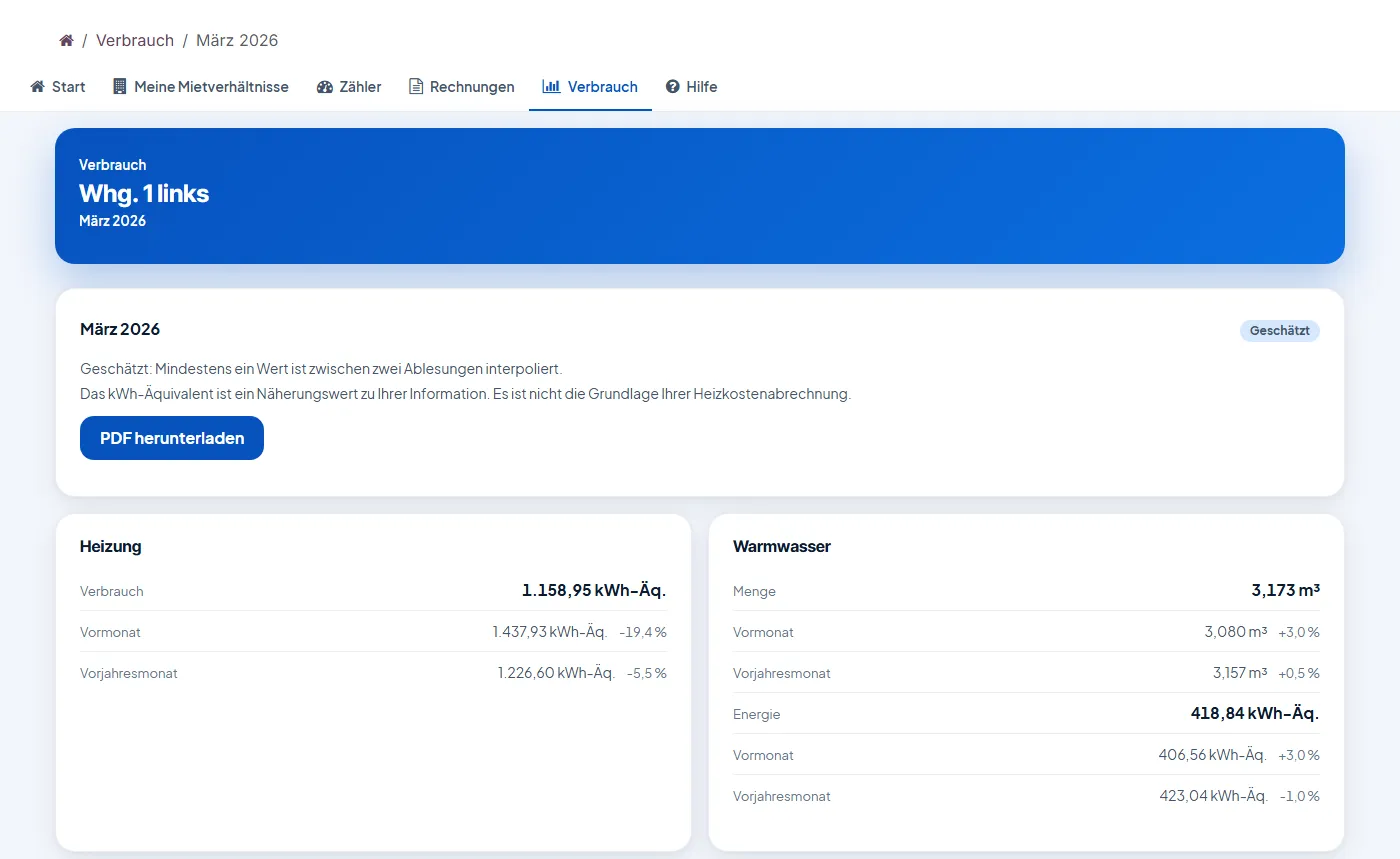
- The bar shows Consumption, between Invoices and Help, as soon as consumption information is switched on for the tenant’s building. If they have several tenancies, they see the page for the tenancy chosen under Your properties.
- The page shows the latest month with Heating in kWh eq. and Hot Water in m³ and kWh eq., the comparison with Previous month and Same month last year including the percentage change, and the matching flag with a short explanation. A month that has not been sent yet carries the Preliminary flag: the values may still change.
- Below are Last 13 months and, under Devices, the expandable Breakdown by device and room with the units of the heat cost allocators.
- The Comparison with the average user card shows two bars for each part, You and Average user, and below them the range of most comparable households. If a comparison value is missing, the reason is shown there.
- Under All months is the list of all months, each with PDF. Download PDF downloads the consumption information as a PDF.
- The tenant only sees months from their own tenancy, also after moving out. Months without data do not appear.
Checkpoints
Section titled “Checkpoints”- The previous month’s consumption information is Sent or Sent incomplete by the 10th at the latest.
- The Heating (kWh Equivalent) column in the list has a value. If it is empty, the plant sensitivity is missing.
- The Comparison tab shows values for the average user, and none of Fuel Missing, Living Area Missing or Plant Sensitivity Missing is checked.
- The Deliveries tab has a line with Way and PDF for each contractual partner and invoice recipient.
- The Delivery failed filter is empty.
Common errors
Section titled “Common errors”| Problem | Cause | Solution |
|---|---|---|
| No consumption information is created for a tenancy. | The unit has no heating cost, heat or hot water meter with Remote Readout, or the meter is attached to the main property instead of the unit. | Attach the meter to the unit and check Remote Readout. |
| The month stays Open and is Estimated or without a reading. | A reading near the end of the month or after it is missing. | Import current readings. Before the 10th, the consumption information then goes out complete. |
| Status No data. | By the 10th, no device had a reading. | Import readings regularly. A month with this status is not sent later. |
| Every month is Sent incomplete. | A device of these types without Remote Readout is attached to the unit, or data for the conversion or comparison is missing. | Switch the device to remote readout or, if it has been removed, replace it with a meter replacement. Check what is missing in the Comparison tab. |
| Heating is shown in units instead of kWh equivalent. | There is no plant sensitivity for the month: no released heating cost statement, no statement values ending before the month, or a line with both units and heat meter kWh. | Enter Statement Values on the main property and fill in only one of the two fields. Recalculate open months with Recalculate. |
| No comparison with the average user. | The Fuel is missing on the main property, the rent line has no Space (m²) or the units have no Living Space. | Add the details and recalculate open months. |
| The tenant does not see Consumption in the portal. | The box is not checked on the main property, or the tenant chose a different tenancy. | Check the box on the main property; in the portal, switch the tenancy under Your properties. |
| No activity about missing readings. | Nobody is entered under Responsible on the main property. | Enter a responsible user. |
What is not included
Section titled “What is not included”- Cold water, electricity and gas.
- Consumption information exists only for tenancies in rental management, not for owner occupancy, vacancy or for unit owners in condominium management.
- SMARTBRIX does not fetch meter readings or statement values from the metering service. You import or enter them yourself.
- Systems with several fuels. SMARTBRIX always compares with the building’s one fuel.
- The plant sensitivity of a comparable building if the own building has no statement.
- Costs, building average, weather adjustment and a rating of the consumption.
- The 5th and the 10th are fixed dates.
Didn't find an answer? Contact support