

Dunning run
Question about the manual? Ask Claude · Ask ChatGPT
In the dunning run, the dunning notices of a company are created as drafts. You check each draft and release it. Only on release does SMARTBRIX book the dunning fee, create the letter and send the email or letter. How to set up levels, texts and senders is described under Dunning.
All menus are under Dunning, in the Business plan in the Accounting app, in the Light and Pro plans in the Invoicing app.
Prerequisites
Section titled “Prerequisites”- The company uses the dunning run: New Dunning Run is ticked in the settings, see Switch to the dunning run.
- The bank transactions up to the cut-off date are matched, see Bank matching.
Overview
Section titled “Overview”Dunning › Overview shows what needs doing and how high the open claims are. Every number and bar opens the matching list.
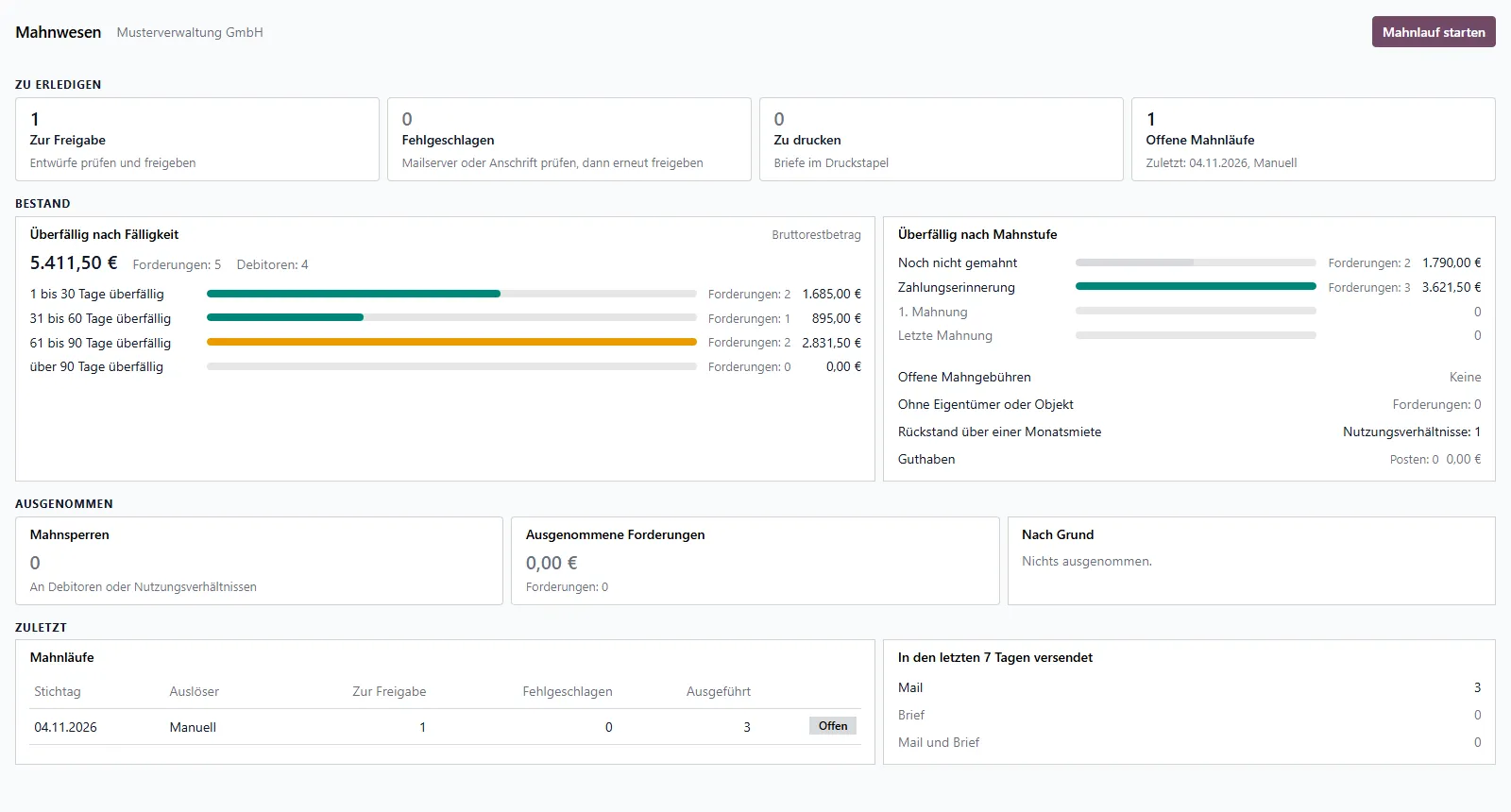
- To Do: To Approve, Failed, To Print and Open Runs.
- Stock: overdue claims by days and by dunning level reached, plus open dunning fees, claims without owner or property, tenancies with Arrears over One Monthly Rent and credits.
- Excluded: dunning blocks and the claims that are not dunned because of them.
- Recent: the latest dunning runs and what was sent in the last 7 days.
If several companies are ticked in the top right corner, the overview shows one row per company. Open shows the full view of a company.
Start a dunning run
Section titled “Start a dunning run”- Click Start Dunning Run on the overview or open Dunning › Dun › Start Dunning Run.
- Choose the Company and the Cut-off Date. The default is today.
- Click Start.
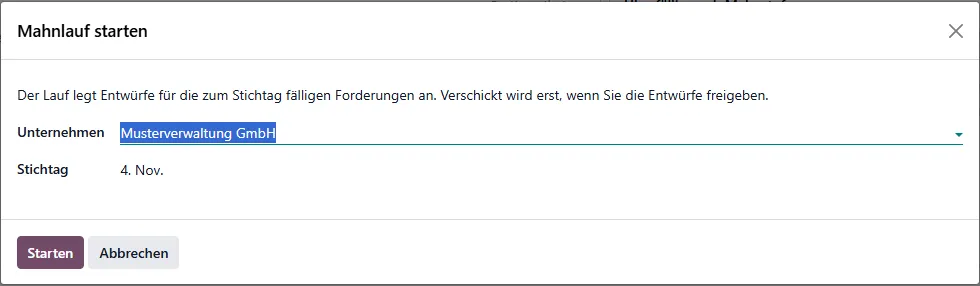
SMARTBRIX finds all claims that reach a new dunning level on the cut-off date and creates one draft per debtor. A message says how many drafts are new, how many were taken over from earlier runs and how many were discarded. The dunning run then opens. If nothing is due, SMARTBRIX reports “Nothing is due for dunning.” and does not create a run.
A debtor gets a dunning notice if all three conditions are met:
- At least one claim reaches a new level.
- The due balance is greater than zero. Credits, such as an overpayment, count towards it.
- The overdue amount reaches the Minimum Amount from the settings.
The notice then contains all overdue claims of the debtor, including those that already have their level. Claims with a dunning block stay out. Open dunning fees are included in the notice but do not trigger a notice on their own.
If you start a new run while drafts are still open, SMARTBRIX updates those drafts. What you deselected stays deselected. Drafts that are no longer due, for example because the debtor has paid in the meantime, are discarded with a note in the history.
Check drafts
Section titled “Check drafts”Under Open Dunning Notices, the dunning run lists all drafts with debtor, dunning level, amount and delivery. Above it, you see how many emails and letters the release will send. A yellow note names bank transactions that are not matched yet.
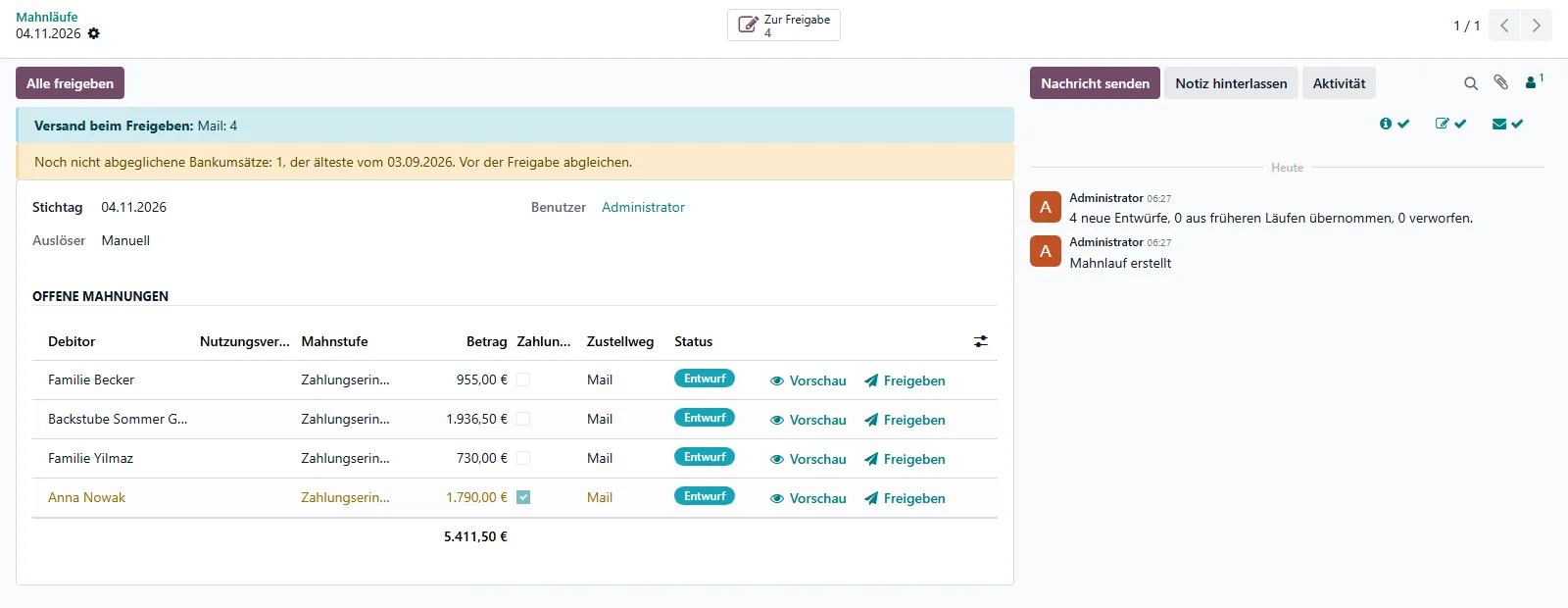
Click a row to open a draft.
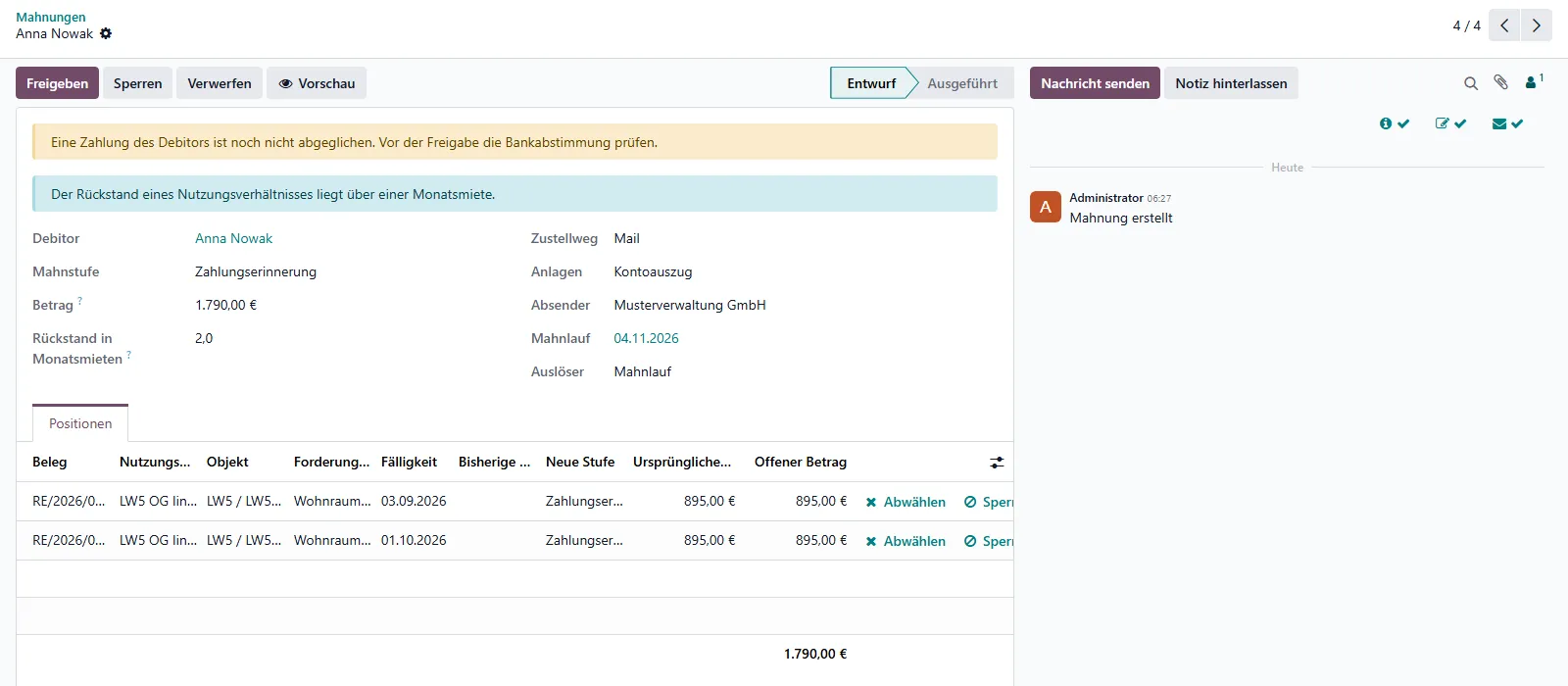
- The status bar shows Draft. The header shows Follow-up Level, Amount, Delivery, Enclosures and Sender.
- The Positions tab lists every claim with document, tenancy, due date, previous and new level and open amount. You can spot a partial payment where the open amount differs from the Original Amount.
- Preview shows the letter as PDF marked “Draft, not sent”. The preview has no enclosures.
Colored notes above the header tell you what to check before release:
| Note | What you do |
|---|---|
| A payment of the debtor is not reconciled yet. | Match the bank transaction, then start the run again. |
| The debtor has a credit on the account that is not allocated to any claim. | Allocate the credit to an invoice in bank reconciliation. |
| The debtor has no complete postal address. | Complete the address on the contact. |
| The debtor has no email address. | Add an email address or send a letter. |
| The debtor has been dunned repeatedly in the last twelve months. | For information only: from three notices in twelve months. |
| The arrears of a tenancy exceed one monthly rent. | For information only. The field Arrears in Monthly Rents shows the value. |
Notices with the first two notes are ticked as Check Payments in the lists. The automatic dunning run never releases them.
Deselect positions
Section titled “Deselect positions”If a claim should not be in this notice, click Unselect in its row. Select adds it again. A deselected claim does not reach a new level. If the amount then falls below the minimum amount or no position reaches a new level any more, the notice says so and cannot be released.
Block or discard
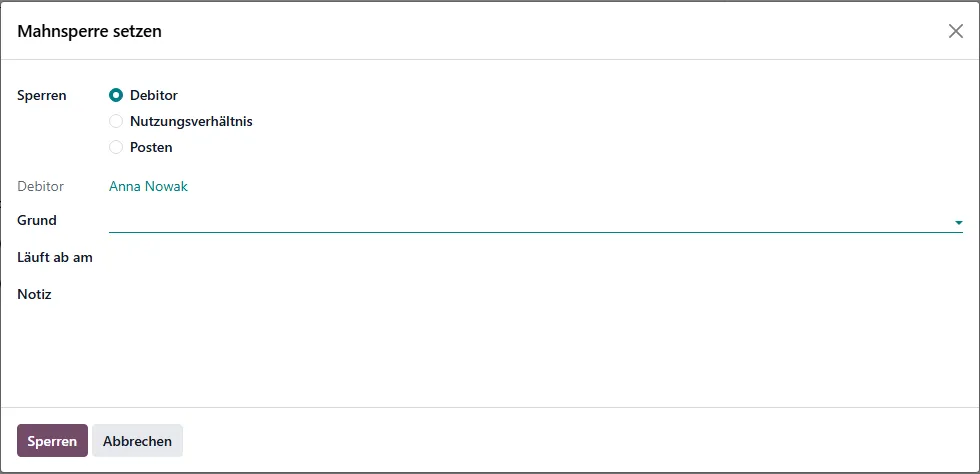
Section titled “Block or discard”- Block opens the Block Dunning dialog. You block the whole Debtor, a Tenancy or a single Item (button in the row of the position), with Reason, Expires On and Note. SMARTBRIX no longer dunns the blocked claims until the block expires. More under Dunning blocks.
- Discard sets the draft aside without sending anything. The next run creates it again if the claim is still due.
Release
Section titled “Release”There are three ways:
- Release in the draft or in its row in the dunning run.
- Release All in the dunning run releases all drafts and retries failed notices. SMARTBRIX asks first.
- In Dunning › Dun › Dunning Notices, select the notices and click Release at the top.
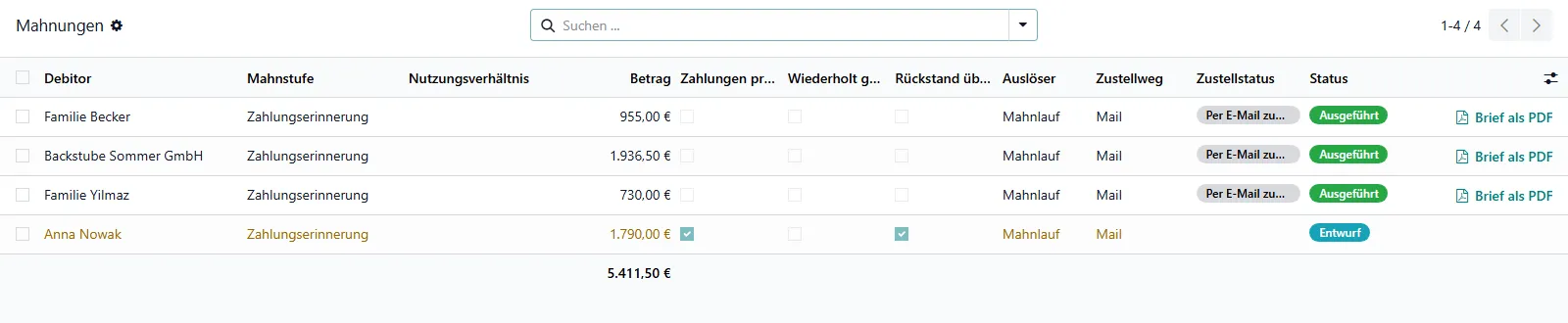
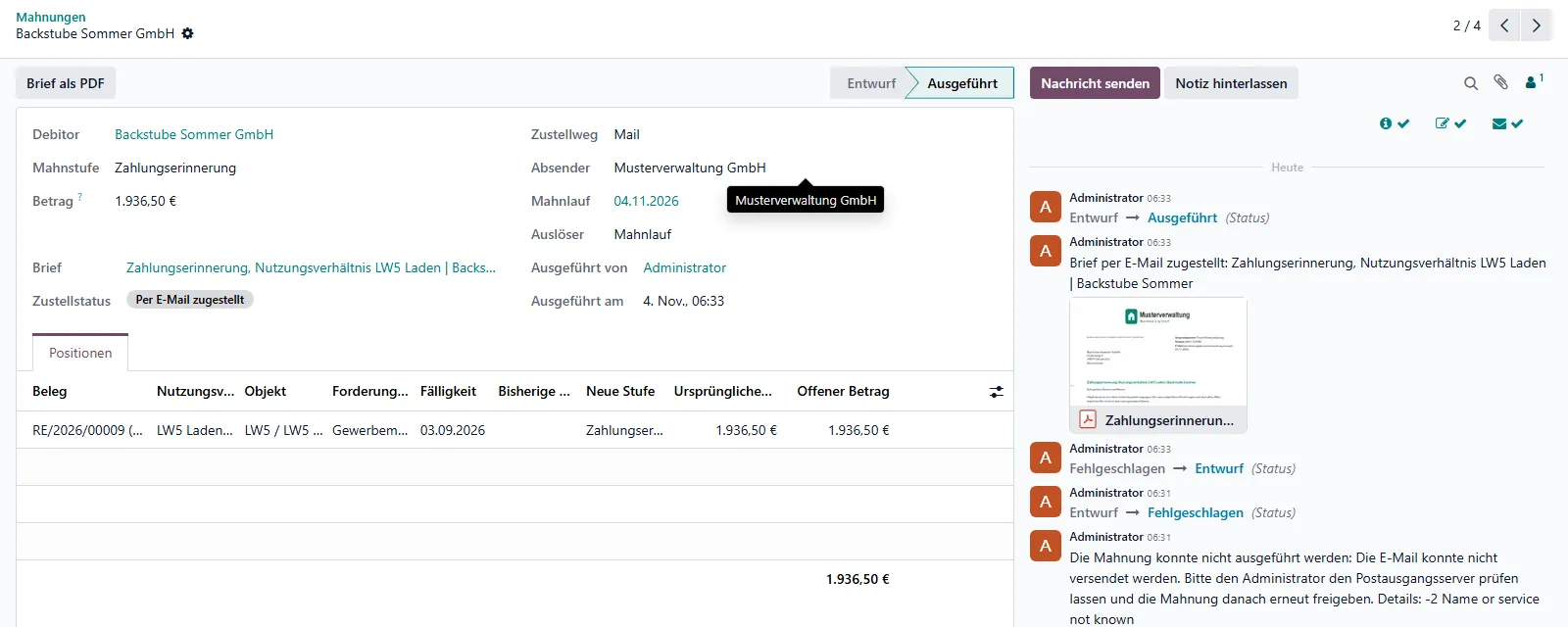
For each notice, SMARTBRIX first books the dunning fee, then creates the letter and finally sends the email or letter. The notice is then Executed, with user, time and delivery. The claims now have the new level. Letter PDF opens the letter.
If you release more than ten notices at once, SMARTBRIX processes them in the background. The dunning run shows a note and you get a message once everything is done.
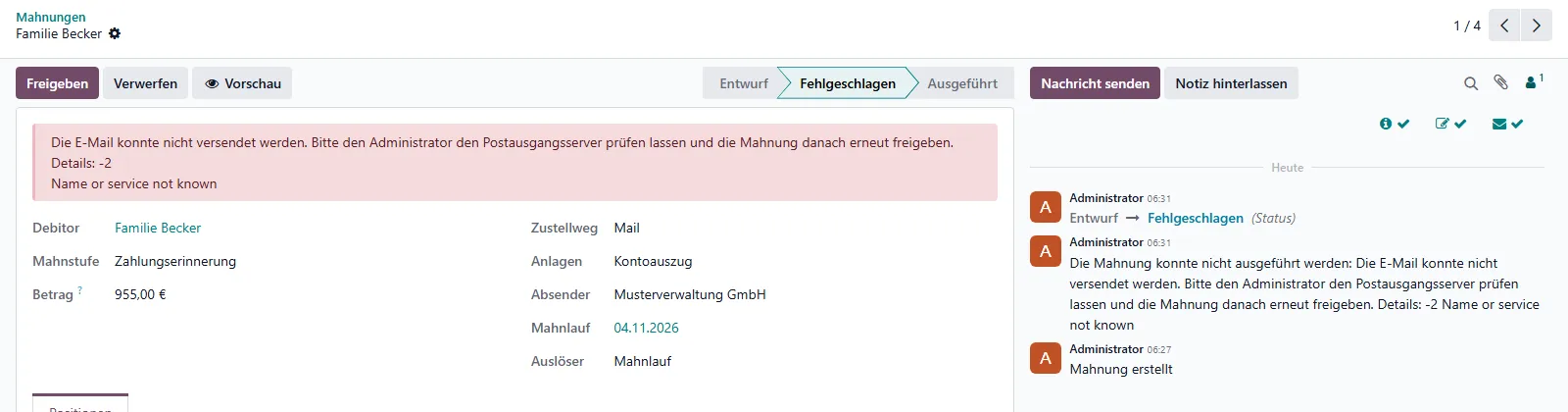
If sending fails, for example because the outgoing mail server cannot be reached, the notice is Failed. SMARTBRIX then books no fee, creates no letter and sets no new level. A red note in the notice gives the reason. Fix it and click Release again, or Discard the notice.
The letter
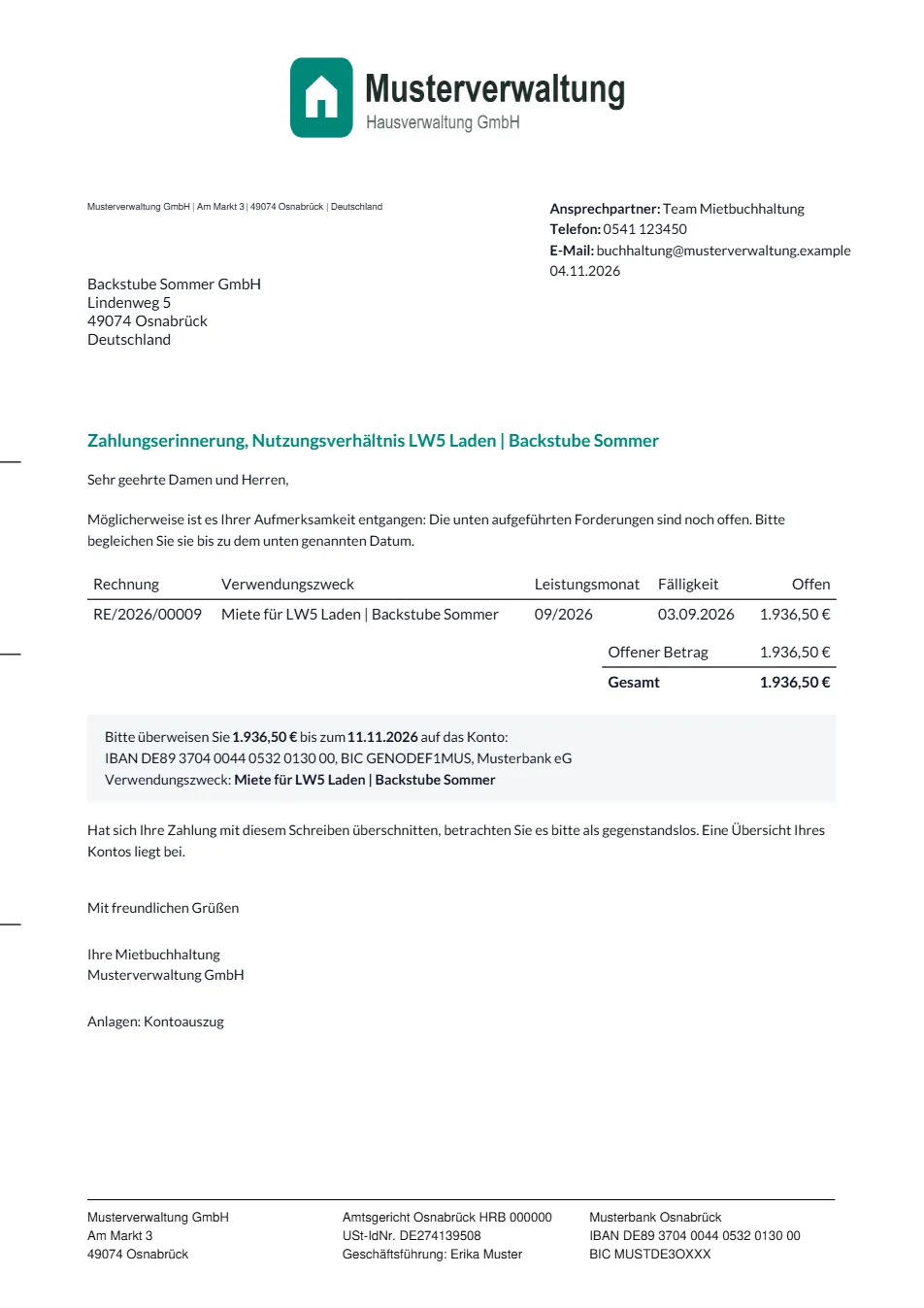
Section titled “The letter”The letter uses the layout of the company. It contains:
- the level and the tenancy as subject, with several tenancies the customer number,
- the salutation of the contact, otherwise “Dear Sir or Madam”,
- the letter text of the level,
- a table with Invoice, Payment Reference, Service Month, Due Date and Open, below it open amount, dunning fee and total,
- the payment request with amount, deadline, bank account and payment reference,
- the blocks of the level, closing, contact and signature.
An account statement with all open items of the debtor is always enclosed. Overdue items that this notice does not contain are marked “not dunned” there. If the level has Enclose Invoices, the invoices follow.
The email contains the salutation, the mail text of the level and the closing with the contact. The letter is attached as PDF.
Print letters
Section titled “Print letters”Notices with delivery Letter or Email and letter go to the print stack.
- Open the dunning run, for example from the To Print tile of the overview.
- Click Print Letters. SMARTBRIX creates one PDF with all letters of the run.
- Print and send the letters.
- Click Mark as Printed. The letters leave the print stack.
Dunning fee
Section titled “Dunning fee”If the level has a fee, SMARTBRIX books a separate customer invoice for the fee for each notice on release. If positions of a notice reach different levels, the highest fee applies. SMARTBRIX never changes a fee invoice afterwards. If a fee should be dropped, book a credit note.
The letter states the fee below the table; the fee invoice is not enclosed. On the dunned invoice, the Dunning Fees button opens the related fee invoices. An open fee invoice is included in the next notice.
Dun a single debtor
Section titled “Dun a single debtor”- On the contact: click Dun at the top. SMARTBRIX creates a draft for this debtor and opens it.
- In Dunning › Claims › Open Claims: select rows and choose Action › Dunning Run for Selected Debtors. Each notice contains all overdue claims of the debtor, not only the selected rows.
Check and release the draft as above.
Automatic dunning run
Section titled “Automatic dunning run”If Prepare Dunning Runs Automatically is ticked in the settings, SMARTBRIX starts the dunning run at the chosen interval for each company with the dunning run. Then:
- Drafts of levels with Release Automatically are sent immediately, except those marked Check Payments.
- For all other drafts, the responsible persons of the level get a task on the dunning run, for example “2 dunning notices of level 1st Dunning Notice to release”.
SMARTBRIX lifts expired dunning blocks once a day.
In the customer portal
Section titled “In the customer portal”If the customer portal is booked, the tenant sees “Payment reminder from …” or “Dunning notice from …” with the date of the last executed notice on a dunned invoice.
Checkpoints
Section titled “Checkpoints”- The notice is Executed, the Delivery Status is Sent by email or the letter is marked as printed.
- The history of the notice shows the letter as PDF.
- For a level with a fee, there is a posted fee invoice, available via Dunning Fees on the dunned invoice.
- On the overview, the claim counts under Overdue by Dunning Level at the new level.
Common errors
Section titled “Common errors”| Problem | Cause | Solution |
|---|---|---|
| “Nothing is due for dunning.” | No claim reaches a new level on the cut-off date, or the payment deadline of the last notice is still running. | Check the cut-off date and the days of the levels. Open Claims shows due date and last notice. |
| A tenant who has paid is in the run. | The bank transaction is not matched yet. | Match it and start the run again. The draft is discarded. |
| Notice Failed, note about the email | The outgoing mail server cannot be reached or is set up incorrectly. | Have the server checked, then Release again. |
| “The dunning run is not switched on for this company.” | The company still uses the previous process. | Switch or follow the previous dunning process. |
| Fee booked to the wrong account | The dunning fee product has no income account. | Set the income account on the product, correct wrong fee invoices with a credit note. |
| A debtor is missing although in arrears | Dunning block, amount below the minimum or a credit of the same amount | Check the category in Open Claims and the block under Dunning Blocks. |
What is not included
Section titled “What is not included”- You cannot edit the text of a single notice. Change the text of the level or deselect positions.
- The dunning run does not offset payments. Only bank reconciliation decides what is paid.
- SMARTBRIX does not calculate default interest or the lump sum under section 288 (5) BGB.
- SMARTBRIX does not monitor deadlines for termination due to payment arrears. The note on arrears over one monthly rent is for information only.
Didn't find an answer? Contact support