

Asset catalog and templates
Question about the manual? Ask Claude · Ask ChatGPT
The asset catalog organizes your assets by the cost groups of DIN 276, the German standard for building costs. Below them you create your own sub groups, such as “Gas-Brennwertkessel”. An asset template describes how an asset is built and which duties it has. Every new asset is created from the asset template with all its components and duties in one step.
You set up the catalog once. It applies to all properties of your company.
Load DIN 276
Section titled “Load DIN 276”- Open Property Maintenance › Configuration › Settings.
- In the Catalog section, click Load DIN 276.
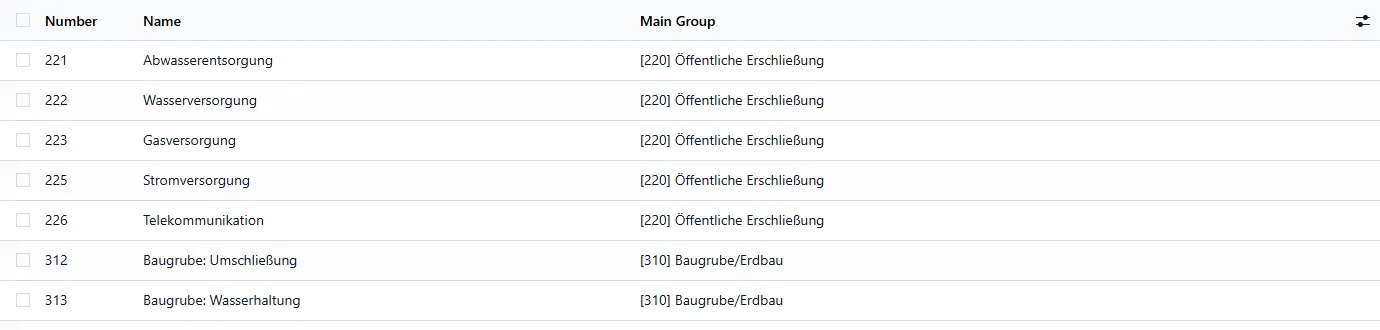
SMARTBRIX creates the three levels of DIN 276: Cost Group (for example 400 building, technical installations), Main Group (420 heat supply systems) and Side Group (421 heat generation systems). A message states how many entries were created and updated. You can click the button again at any time. Entries you created yourself stay unchanged.
The levels are listed under Property Maintenance › Catalog › Cost Group, Main Group and Side Group.
Create sub groups
Section titled “Create sub groups”Sub groups are your own asset types below a side group.
- Open Property Maintenance › Catalog › Sub Groups and click New.
- Fill in the details:
- Name: for example “Gas-Brennwertkessel”.
- Number: for example “421.01”.
- Side Group: the DIN level the sub group belongs to.
- Parent Sub Group: if you nest sub groups further.
- Asset Features: the features that belong to this type.
- Reminder Lead Time: how long before a deadline the technician is reminded.
- Save.
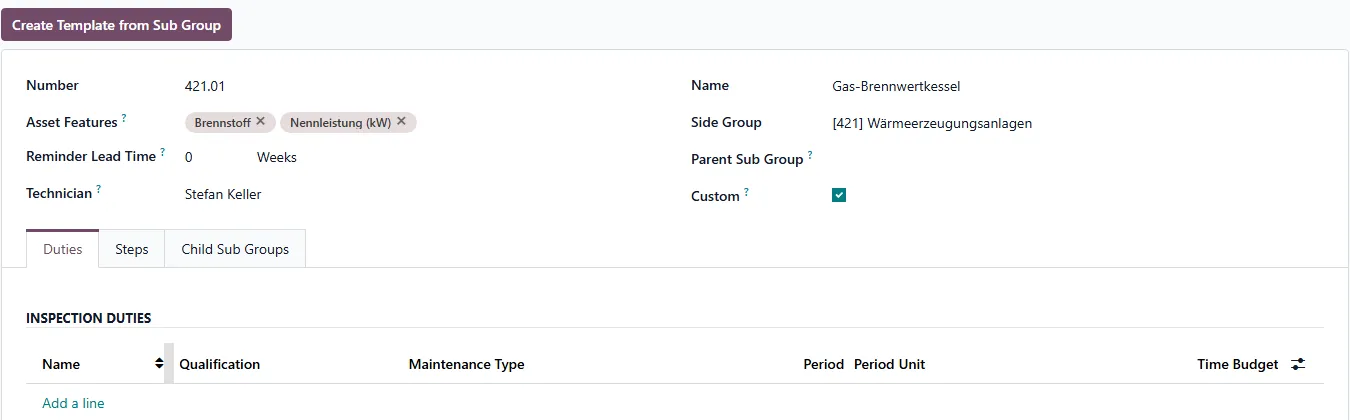
The Custom checkbox shows that the entry does not come from the DIN 276 catalog.
The sub group only classifies an asset. An asset that you create with a sub group but without an asset template gets neither features nor duties, only the technician and the lead time. Duties that you enter on the Duties tab of a sub group serve as building material for an asset template (see below).
Create a template
Section titled “Create a template”- Open Property Maintenance › Catalog › Asset Templates and click New.
- Enter the Name, Reference and Sub Group. The sub group is required.
- Select the Asset Features and, if needed, a Reminder Lead Time.
- On the Components tab, add the parts, for example “Brenner” and “Heizkreispumpe”. Each component needs a sub group of its own. A Quantity of “2” later creates two identical components (“Heizkreispumpe 1” and “Heizkreispumpe 2”). Click a component to open it as an asset template of its own with components and duties.
- On the Duties tab, add the duties (see the next section).
- Save.
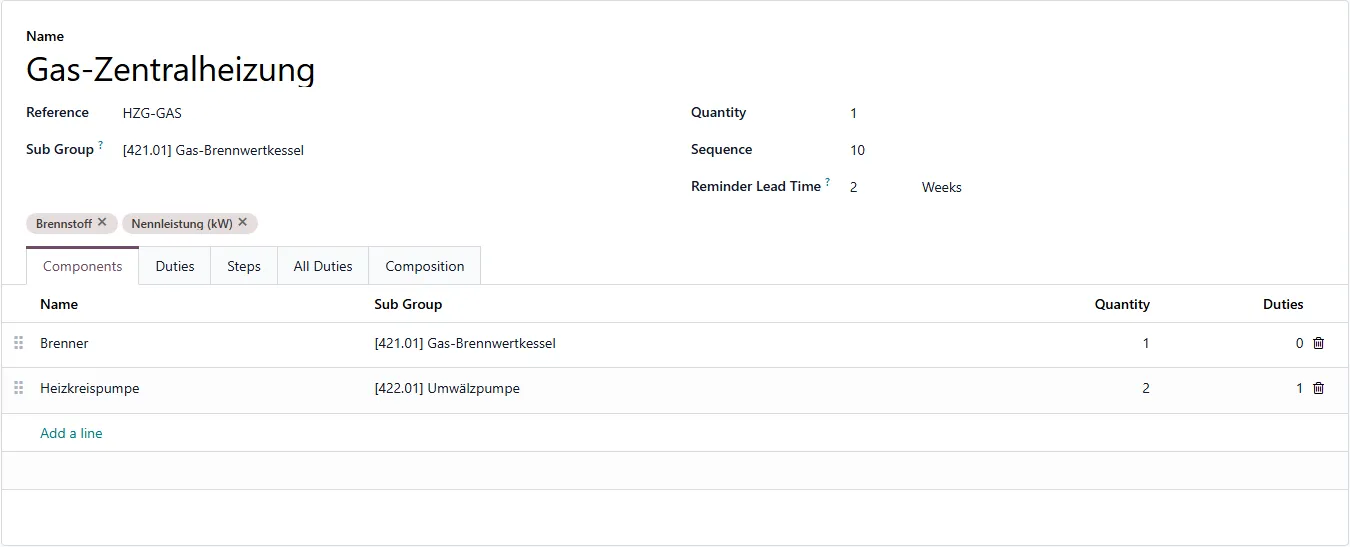
The Composition tab shows the structure as a tree with quantities and the number of duties. The All Duties tab lists the duties of the asset template and of all components, that is, everything an asset created from it receives. A component with a quantity of “2” appears there once, but the asset gets the duty for each component.

Duties of the template
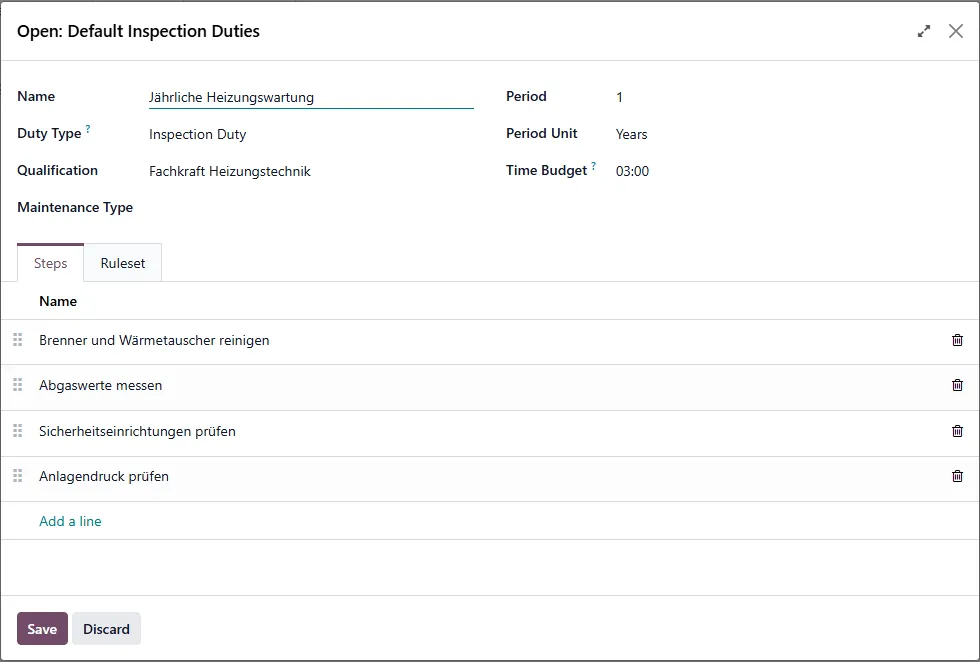
Section titled “Duties of the template”On the Duties tab, click Add a line:
- Name: for example “Jährliche Heizungswartung”.
- Duty Type: Inspection Duty or Routine Task. The difference is explained in Inspection duties and routine tasks.
- Qualification and Maintenance Type: for classification.
- Interval and Period Unit (inspection duty only): for example “1” and Years.
- Planning, Frequency, Interval, Month Days, Weekdays and Slot Time (routine task only): the calendar cycle.
- Time Budget: the planned effort in hours.
- Steps tab: the individual work steps the technician checks off, for example “Abgaswerte messen”.
- Ruleset tab: source, title and section of the regulation the duty is based on.
Create a template from a sub group
Section titled “Create a template from a sub group”If you have already maintained duties on sub groups, build an asset template from them:
- Open the sub group.
- Click Create Template from Sub Group and confirm with Create Template.
SMARTBRIX creates an asset template, turns child sub groups into components and copies duties, maintenance steps, asset features and lead time. The sub group keeps its duties. If you repeat the step, no duplicate duties are created.
Frequently asked questions
Section titled “Frequently asked questions”Does a changed asset template change existing assets? No. The asset template takes effect when the asset is created. If you later change the interval or cycle of a template duty or add a duty, adjust the existing assets yourself. New maintenance steps of a template duty, however, are copied by SMARTBRIX into the duties created from that asset template.
Why does my new asset have no duties? It was created without an asset template. Enter the duties on the asset by hand or create the asset again with an asset template.
Didn't find an answer? Contact support