

Plan maintenance
Question about the manual? Ask Claude · Ask ChatGPT
The maintenance demand is your work list: everything that needs a date and does not have one yet. You select duties there and add them to planning. SMARTBRIX then creates one maintenance per asset with a date, a technician and a checklist. SMARTBRIX schedules overdue inspection duties and automatic routine tasks by itself, so that no deadline passes unnoticed.
Maintenance demand
Section titled “Maintenance demand”Open Property Maintenance › Maintenance › Maintenance Demand. The Demand Type column distinguishes three types:
- Inspection Duty: a started inspection duty that has no open maintenance yet.
- Routine Task: the next date of a routine task with planning set to Manual via Maintenance Demand, as soon as it is no more than 14 days away.
- Unscheduled Request: a maintenance without a date, for example a damage report or a follow-up demand.
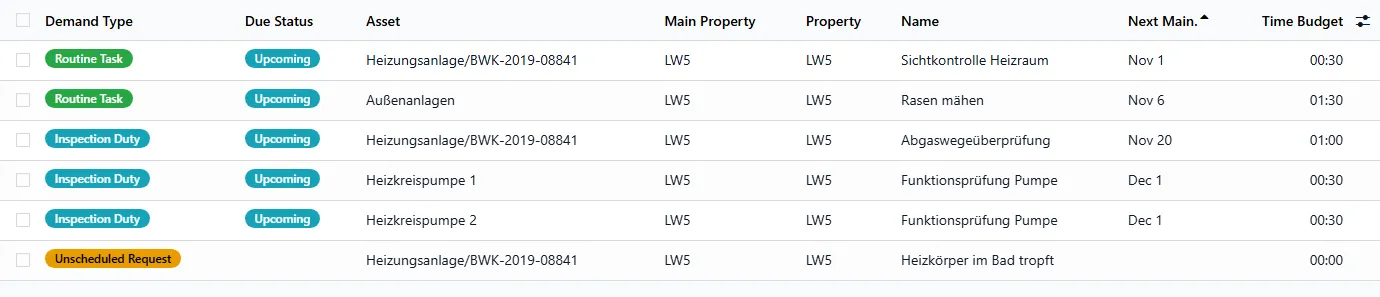
The To Plan filter is preset. It shows all unscheduled requests and all duties that are due within the next 90 days or already overdue. Further filters are Overdue, Due, Due Soon and Not Started. Group by Property, Asset, Qualification or Maintenance Contract, for example, to bundle work for the same date or the same specialist contractor.
To open the maintenance demand of a single asset, click Plan Maintenance on the asset. Properties, maintenance packages and contracts have the Demand button for this.
Add to planning
Section titled “Add to planning”- In the maintenance demand, select the lines you want to plan together. You can mix duties of different assets.
- Click Add to Planning.
- Enter the Scheduled Date and the Technician.
- Check the list and the Total Planned Hours.
- Click Plan.
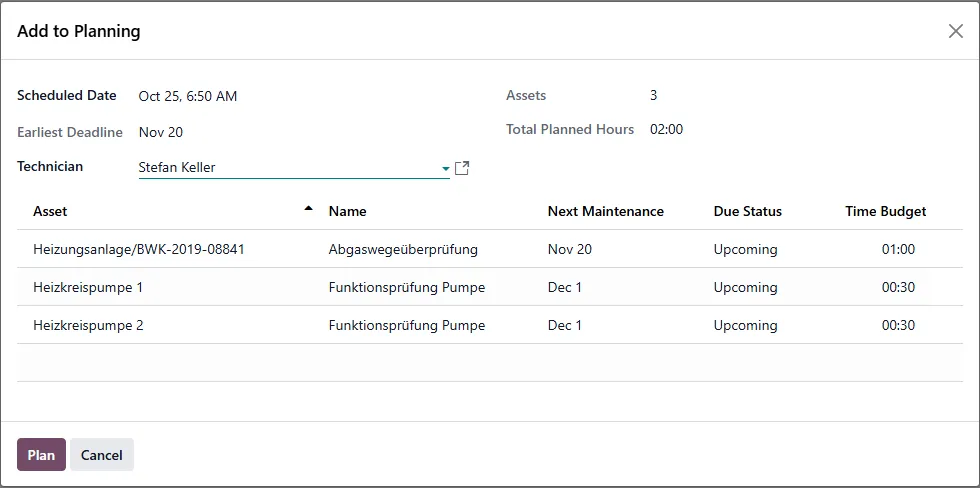
Earliest Deadline shows the earliest due date of the selected inspection duties. If your date is later, a yellow notice appears. You can still plan.
If routine tasks are included, the window offers three checkboxes in the Apply to Series section: the selected technician as the fixed technician of the series, plan the series automatically from now on, and set the series start to this date. Clear the checkboxes that should only apply to this one date.
What SMARTBRIX creates:
- one maintenance per asset, named “Maintenance: “ followed by the name of the asset, with origin Planned. Routine tasks get a maintenance of their own for each cycle.
- a checklist with one line per maintenance step, or one line per duty for duties without steps.
- the sum of the time budgets as the Duration.
- the maintenance package, maintenance contract and service provider, if all duties of the maintenance belong to the same maintenance package.
- if no technician was selected: the duty’s fixed technician, otherwise the last technician, otherwise the responsible user of the asset.
The planned duties disappear from the maintenance demand because an open maintenance now covers them.
Plan an unscheduled request: select the line and click Add to Planning. The maintenance opens. Enter the Scheduled Date and Responsible and save. Unscheduled requests and duties are planned in separate steps.
What SMARTBRIX plans by itself
Section titled “What SMARTBRIX plans by itself”Once a day SMARTBRIX checks all duties:
- Inspection duties that are due today or overdue and have no open maintenance get a maintenance with origin Automatic, one per asset. The date is the deadline.
- Routine tasks with planning set to Automatic get their next maintenance as soon as the date is no more than 14 days away. The date is the next cycle with its slot time.
- Routine tasks whose series end has passed are deactivated, and SMARTBRIX notes this on the asset.
In addition, SMARTBRIX reminds the responsible user of the asset with a Maintenance Reminder activity as soon as the next deadline of an inspection duty is closer than the asset’s Reminder Lead Time.
Maintenance plan
Section titled “Maintenance plan”Property Maintenance › Maintenance › Maintenance Plan shows all scheduled maintenance in the calendar, colored by technician. In the sidebar you show and hide technicians, teams and assets. Saturdays, Sundays and days off from the company calendar are gray.
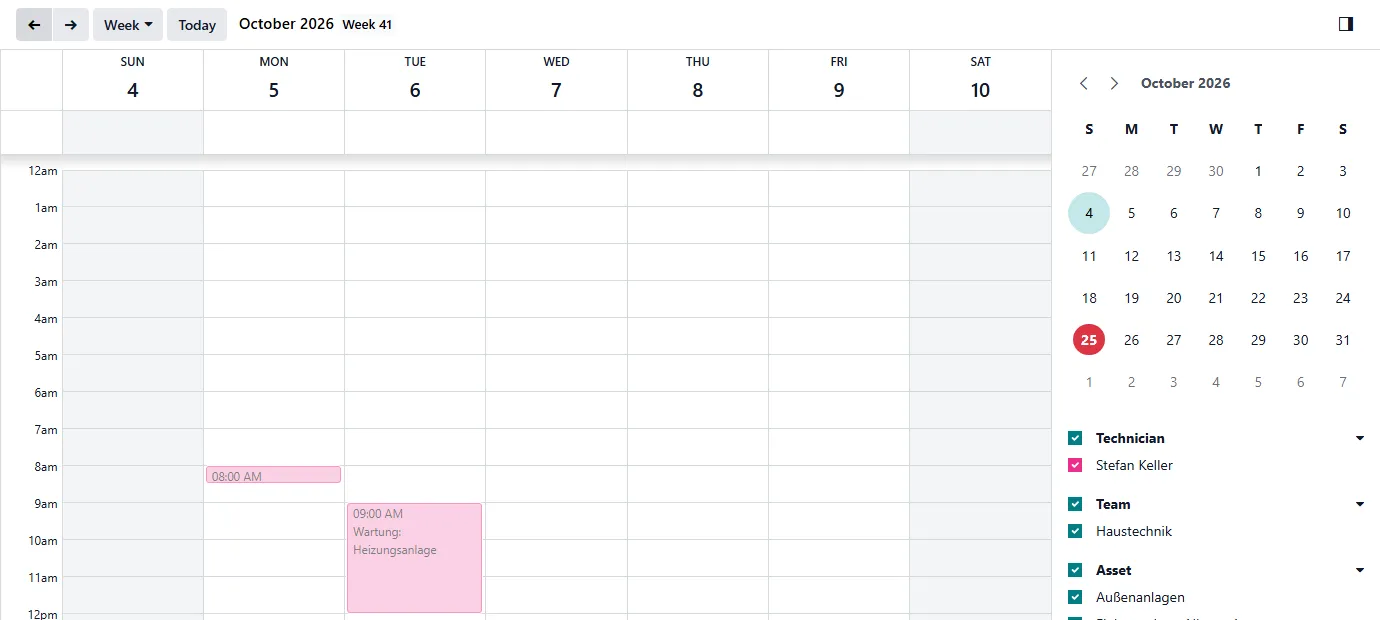
- Move: drag a maintenance to another date.
- Quick create: drag across a time range in the calendar. In the window, enter the Request, asset, team, technician, date and duration.
If you move a maintenance of a routine task, the change applies to this date only. SMARTBRIX notes it in the history. To change the cycle of the whole series, use Reschedule Series in the maintenance, see Carry out maintenance.
The maintenance plan only shows maintenance with a date. The calculated due dates of all duties are in the calendar under Configuration › Inspection Duties, see Inspection duties and routine tasks.
Frequently asked questions
Section titled “Frequently asked questions”The number on the Demand button does not match the list. The number only counts duties that are due today or overdue. The list opens with the Due Soon filter and also shows the next 90 days.
Why did one planning step create two maintenance jobs for the same asset? You planned inspection duties and routine tasks of the same asset together. Routine tasks get a maintenance of their own for each cycle.
Didn't find an answer? Contact support