

Index-linked rent
Question about the manual? Ask Claude · Ask ChatGPT
With an index-linked rent, the rent is tied to an official index, usually the consumer price index. Every month SMARTBRIX compares the current index value with the value agreed as the reference date in the tenancy agreement. If an increase is possible, the responsible user gets a task. You trigger the increase yourself: SMARTBRIX creates the new rent line and the increase letter.
Maintain index values
Section titled “Maintain index values”The index values are under Property Administration > Configuration > Index:
- Index: the index series, for example “Verbraucherpreisindex Deutschland” (the German consumer price index), with Index Type and Base (base year, for example “2020”).
- Index Value: one value per month with Index, Base, Value and Date. The date is always the first of the month.
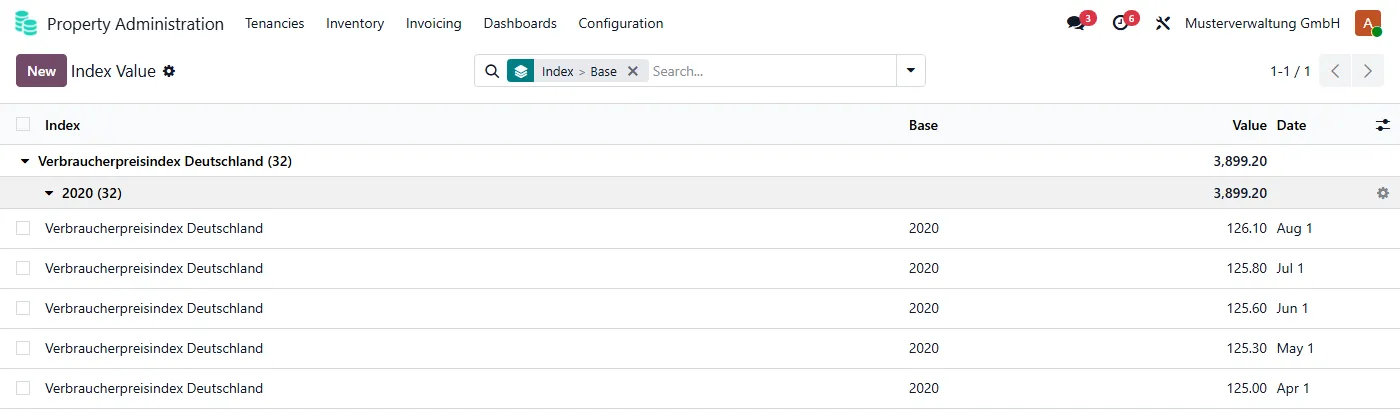
If retrieval from the Federal Statistical Office (Destatis) is set up, SMARTBRIX fetches the consumer price index values itself every two days. You find the setup and the log of retrievals in the same menu under Destatis Configuration and Sync Logs. Without retrieval, you enter each new monthly value by hand.
Set up an index-linked rent on the tenancy
Section titled “Set up an index-linked rent on the tenancy”- Open the tenancy under Property Administration > Tenancies > Tenancies.
- On the Configuration tab, select Index-linked Rent?. The Index-linked Rent tab appears.
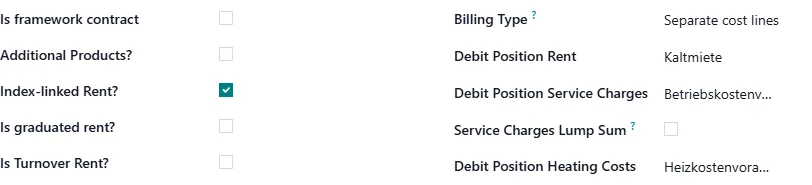
- On the Index-linked Rent tab, fill in the agreement from the tenancy agreement.
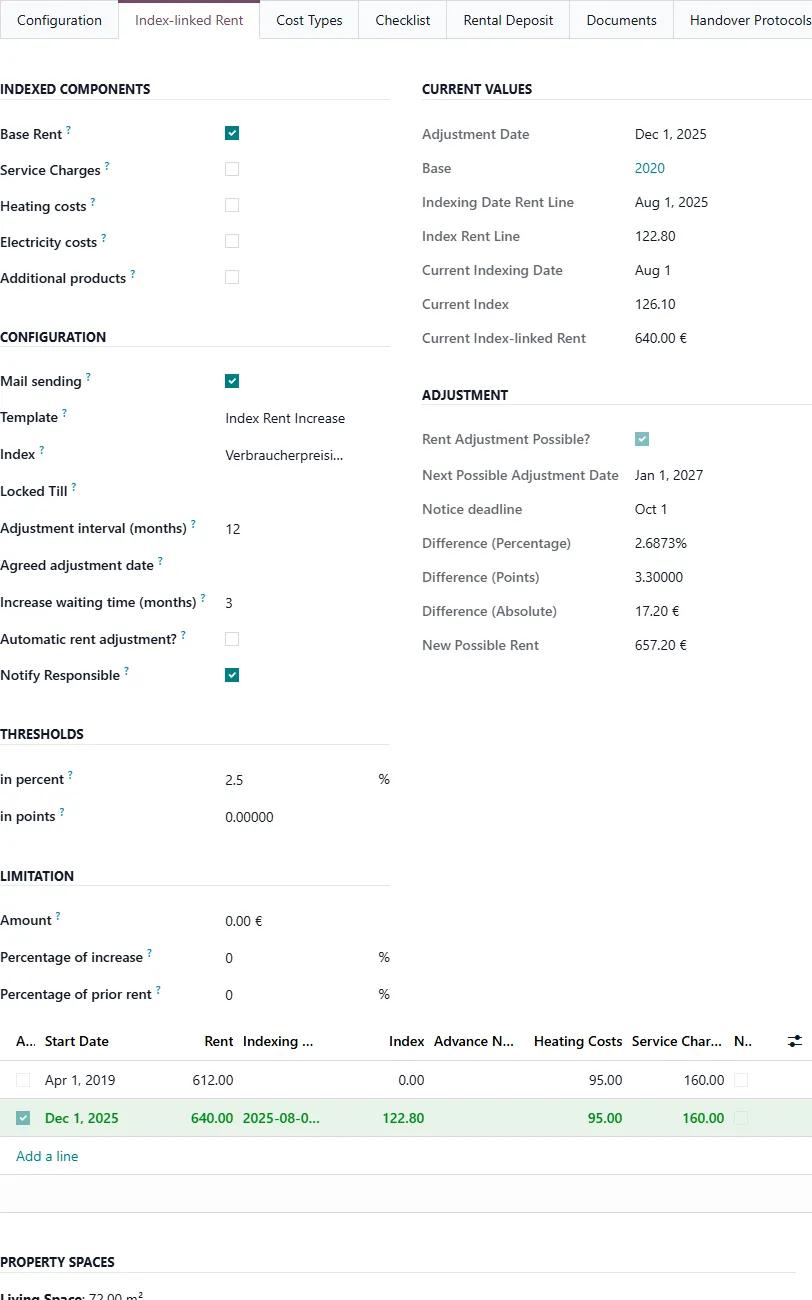
Indexed components: which items the increase changes. The default is only the Base Rent. You can add Service Charges, Heating costs, Electricity costs and Additional products. For additional products, the increase only applies to lines that are marked Indexing? there. Rent reductions are never indexed.
Configuration:
- Mail sending: When you trigger the increase, the email window opens with the letter. If this is not selected, SMARTBRIX only stores the letter as a PDF in the history.
- Template: the text of the increase letter. “Index Rent Increase” is included.
- Index: the index series the rent is tied to.
- Locked Till: No increase takes effect before this date, for example because of an agreed minimum term.
- Adjustment interval (months): the time between two increases. For residential space, one year is usual; enter “12” in that case. SMARTBRIX does not set a default.
- Agreed adjustment date: optionally a fixed month of the year in which increases take effect.
- Increase waiting time (months): how many months before the increase takes effect the letter must reach the tenant.
- Automatic rent adjustment?: see Automatic rent adjustment.
- Clause effect: commercial rents only. From declaration (default) is the process on this page. Automatic once exceeded applies to sliding clauses: the rent changes from the month after the threshold is reached, and SMARTBRIX charges missed months afterwards. See Index-linked rent with automatic effect.
- Notify Responsible: The responsible user of the property gets a task as soon as an increase is possible.
Thresholds: the change from which an increase is possible, in percent or in points. A value of 0 means no threshold: any change is enough. If both values are set, it is enough to reach one of them.
Limitation: optional caps. Amount caps the increase in euros, based on the base rent or the total increase. Percentage of increase passes on only this share of the index change. Percentage of prior rent limits the increase to this share of the previous rent. If several limits apply, the strictest one counts. A value of 0 always means no limit.
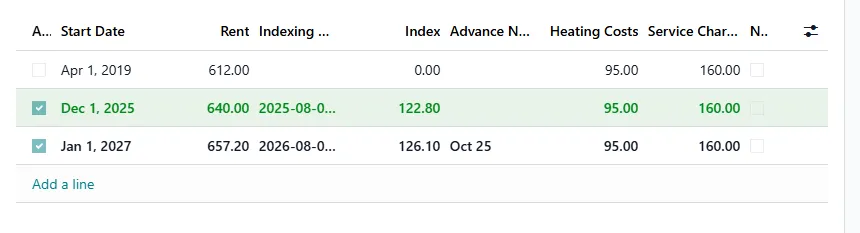
- In the table of rent lines, choose in the Indexing Date column the index value that the contract states as the starting value. This makes the line the reference line, marked by the check mark in the first column. SMARTBRIX calculates the change from it.
- Save. SMARTBRIX calculates the values on the right of the tab right away.
Under Indexation hints, SMARTBRIX reports contradictions in the setup, for example a limit that never applies or an item without an amount.
When an increase is possible
Section titled “When an increase is possible”The right side of the tab shows the status:
- Current Values: the index value at the reference date, the current index value and the current index-linked rent.
- Adjustment: Next Possible Adjustment Date, Notice deadline, the change in percent, points and euros, and the New Possible Rent.
This is how the dates are determined:
- The Next Possible Adjustment Date is the start of the reference line plus the adjustment interval, always on the first of the month. With Agreed adjustment date, the agreed month applies instead. Locked Till moves the date later if needed.
- The Notice deadline is the waiting time before it.
- If the notice deadline has already passed, the adjustment date moves forward: to the current month plus the waiting time, or with Agreed adjustment date to the same month in the following year.
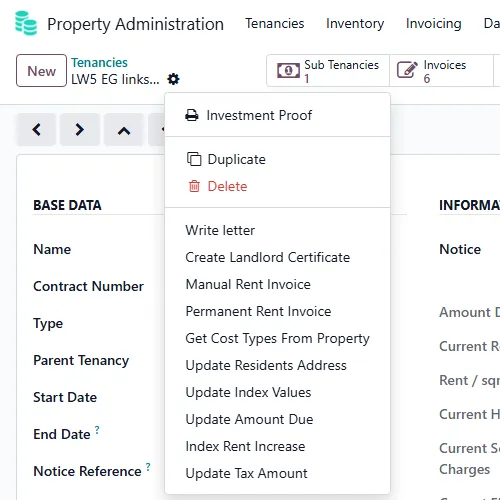
Rent Adjustment Possible? is set when the notice deadline falls in the current month, the threshold is reached, the lock has expired and the tenancy is still running on the adjustment date. SMARTBRIX checks this on the 15th of every month and every time you save. Use Actions > Update Index Values (gear icon next to the name) to start the check yourself, for example after entering a new index value.
If an increase becomes possible and Notify Responsible is set, the responsible user of the property gets the task “Index rent increase possible”.
Overview of all index-linked rents
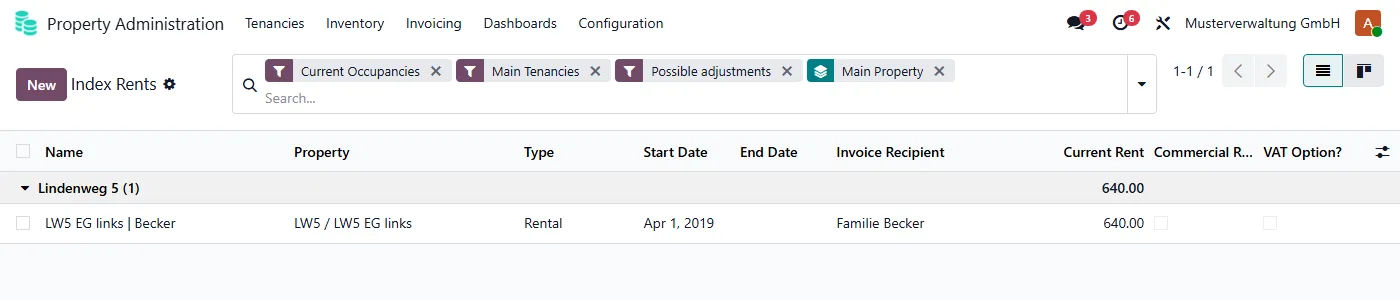
Section titled “Overview of all index-linked rents”Property Administration > Tenancies > Index Rents lists all tenancies with an index-linked rent. The Possible adjustments filter shows those where an increase is possible this month.
Carry out the rent increase
Section titled “Carry out the rent increase”- Open the tenancy.
- Use the gear icon next to the name (Actions) and choose Index Rent Increase.
- If Mail sending is set, the email window opens with the letter to the invoice recipient. It states the index values, the change, the old and new items and the date from which the new rent applies. Sub-usages such as a garage appear in the table with their unchanged amount and count towards the total rent. The PDF of the letter is attached.
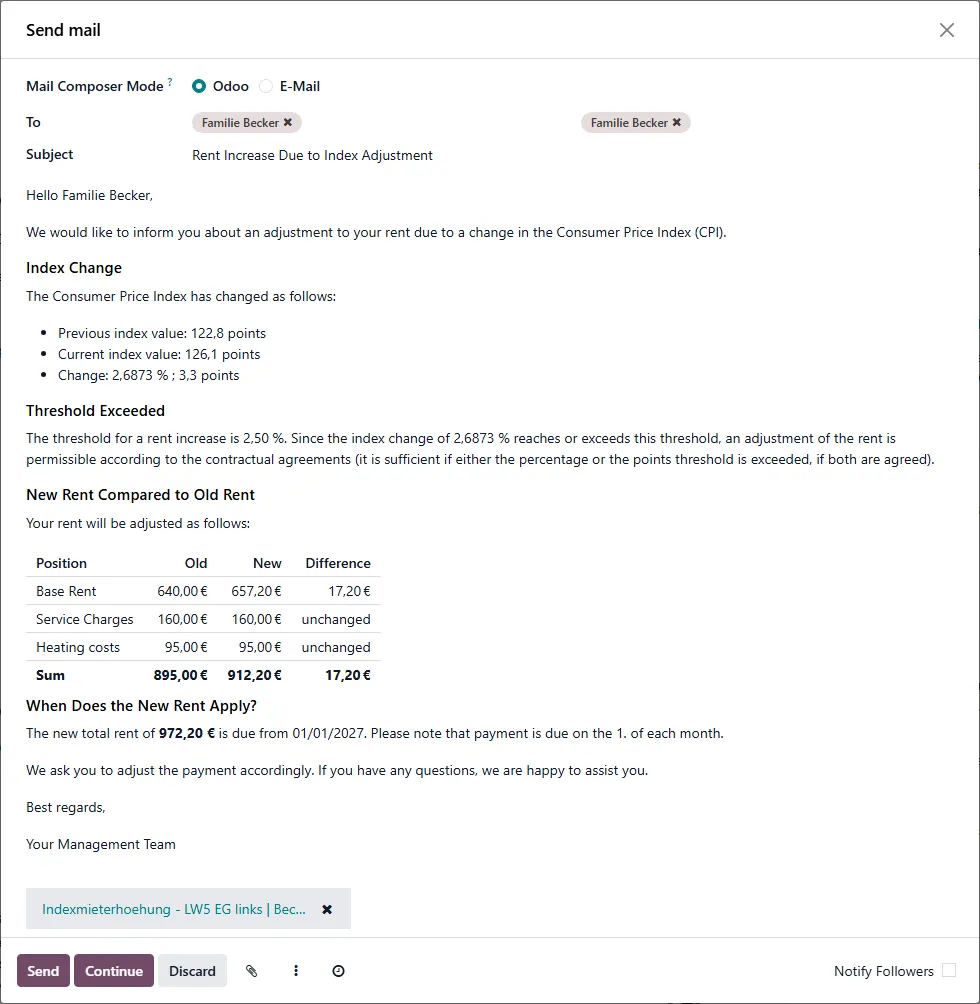
- Check the letter and click Send. Click Continue to create a letter instead.
When you trigger the increase, SMARTBRIX creates a new rent line from the adjustment date. It holds the new amounts, today’s date as Advance Notice and the current index value as Indexing Date. This makes it the new reference line from which the next increase is calculated. The rent debits pick up the new rent from the adjustment date on their own.
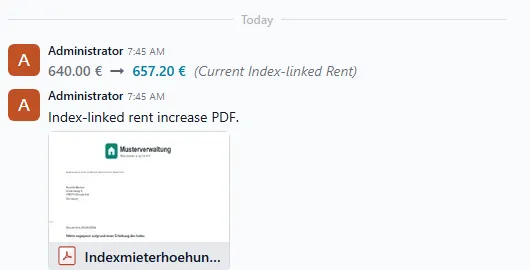
The history of the tenancy shows the old and the new rent and the PDF of the letter.
The increase is refused if the threshold is not reached, the lock is still running or Rent Adjustment Possible? is not set. The message states the reason.
Several tenancies at once: In the list of index-linked rents, select the tenancies and choose Actions > Index Rent Increase (List). SMARTBRIX creates the rent lines and stores the letters as PDFs in the history, without an email. With Actions > Index rent notices PDF (merged) you download the letters of a period as one PDF, for example to send by post.
Automatic rent adjustment
Section titled “Automatic rent adjustment”If Automatic rent adjustment? is set, SMARTBRIX carries out the increase itself every day as soon as it is possible. Only the new rent line is created, with no letter and no email. In this case you send the letter to the tenant yourself.
If a later rent line already exists after the adjustment date, for example a graduated rent step, SMARTBRIX skips the increase. The responsible user gets the task “Index increase skipped”.
Frequently asked questions
Section titled “Frequently asked questions”The change is not calculated. Check whether an Indexing Date is chosen in the reference line and whether a current index value exists for the current month.
SMARTBRIX reports an outdated index base. The Federal Statistical Office has moved the index to a new base year. Values from different base years cannot be compared. Choose the reference date in the reference line again, this time with a value of the new base. Until then no increase is possible, and the responsible user gets the task “Index base outdated”.
The tenancy belongs to a framework agreement. Then the index agreement of the framework agreement applies, and the fields on the individual tenancy are locked. You only maintain the reference date, Locked Till and Amount per tenancy. You trigger the increase on the framework agreement.
Didn't find an answer? Contact support