

Deposit management
Question about the manual? Ask Claude · Ask ChatGPT
This page covers what happens to the deposit between move-in and move-out: in what form it is provided, where it is invested, what interest and fees arise and when a certificate expires. Everything is on the tenancy, on the Rental Deposit tab. Each event there is a deposit movement. From the movements, SMARTBRIX calculates how much deposit is held. How to request the deposit is described under Deposit, how to settle it at the end under Move-out and closing.
Settings
Section titled “Settings”Under Settings › Property Administration, the Deposit block contains:
- Deposit Defaults: Default Deposit Payment Terms and Default Deposit Product are filled in on new tenancies. For commercial tenancies the payment terms stay empty, because the deposit is due there in one amount.
- Deposit Reserve Review Period (Months): When you settle the deposit, SMARTBRIX suggests the Reserve Until date this many months after the end of the contract. The default is 6 months.
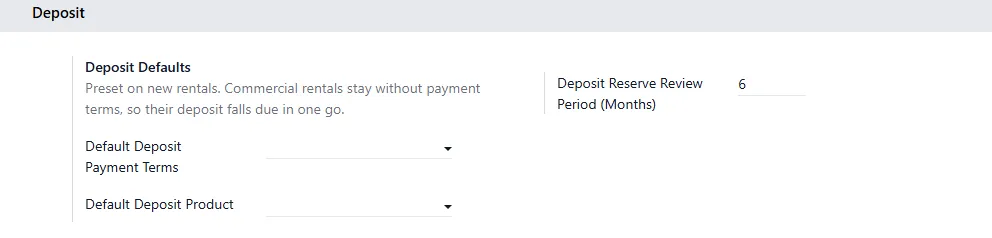
You choose the journal for deposit invoices further up under Deposit Accounting Journal. If it is empty, SMARTBRIX uses the first sales journal. The product determines which account the deposit is posted to.
Deposit status
Section titled “Deposit status”At the top of the Rental Deposit tab, Status shows:
- Agreed Deposit: the amount from the tenancy agreement.
- Deposit Received: all receipts, including interest credits.
- Deposit Retained: all retentions.
- Interest: the sum of the interest credits. Taxes and fees are not included; they reduce the deposit reserve. The field only appears once it has a value.
- Deposit Reserve: what has not been settled yet, that is, receipts minus payouts minus retentions.
- Deposit Settled: selected as soon as no deposit reserve is left open.

Set the form of security
Section titled “Set the form of security”- Open the tenancy under Property Administration › Tenancies › Tenancies and go to the Rental Deposit tab.
- Under Base Data, choose the Deposit Type: Bank Transfer, Cash, Collective Trust Account, Guarantee, Insurance, Pledge, Letter of Comfort, Pledged Savings Book or Other.
- For Guarantee and Letter of Comfort, choose the Security Variant: for a guarantee Simple, Directly Enforceable or On First Demand, for a letter of comfort Hard or Soft.
- Save.
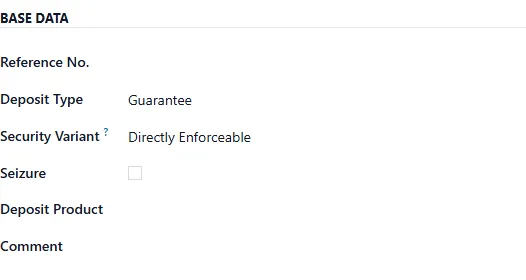
For a guarantee on first demand for residential space and for a soft letter of comfort, SMARTBRIX shows a notice about the validity of this security. It does not block anything. Whether the security holds in a given case depends on the contract and tenancy law.
Guarantee, Insurance, Pledge, Letter of Comfort and Pledged Savings Book count as a certificate in SMARTBRIX. No money changes hands; you receive a document. New movements for these deposits get the Security Form Certificate, all others Money.
Keep the certificate
Section titled “Keep the certificate”For the certificate types, the tab shows the Certificate group:
- Guarantor / Issuer: the bank or insurer that provided the security.
- Certificate Number: the number on the certificate or policy.
- Certificate Expiry: when the security ends.
- Certificate Document: the scan of the certificate.
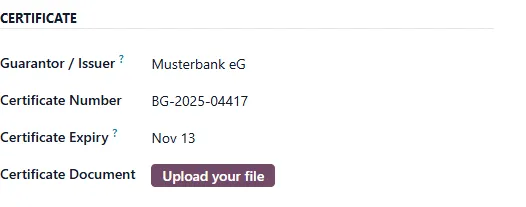
Enter the receipt of the certificate as a Receipt movement with the security form Certificate. When you return the certificate, enter a Payout. When you settle the deposit, SMARTBRIX creates this return itself.
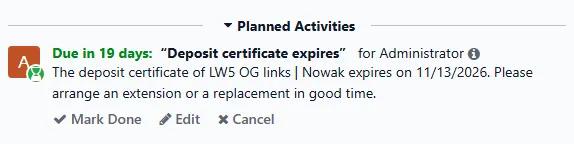
If a certificate expires within the next 60 days and the deposit is not settled, the responsible user of the property gets the task “Deposit certificate expires”, due on the expiry date.
Invest the deposit and provide proof
Section titled “Invest the deposit and provide proof”If the deposit is held in a separate account, apart from your own assets, enter this under Investment:
- Deposit Bank Account: the bank account holding the deposit.
- Invested On: the date of the investment.
- Interest Rate (%): the agreed interest rate.
- Disclosed Trust Account: select this if the bank can see that the account is a trust account for the tenant.
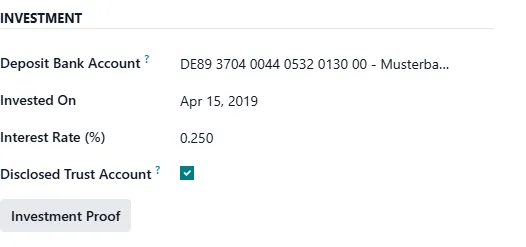
Investment Proof creates a PDF on your letterhead, in the tenant’s language. It confirms that the deposit is held separately and names the tenant, property, agreed deposit, amount received, bank, IBAN, account holder, investment date, interest rate and whether it is a disclosed trust account. The button is available as soon as a deposit bank account is entered. You find the same document in the print menu of the tenancy.
Record movements
Section titled “Record movements”The Deposit Movements table shows each event with Date, Movement Type, Security Form, Amount, Retention Reason, Reason and Document.
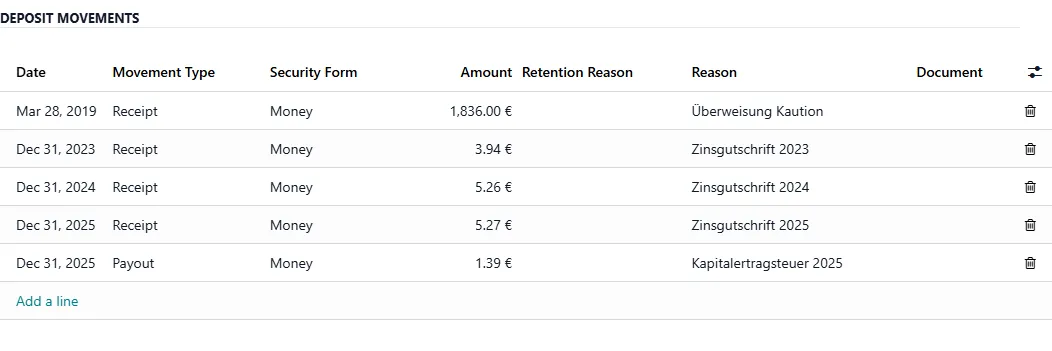
These are created automatically:
- a Receipt when a payment is reconciled with the deposit invoice,
- a Payout when the credit note from the deposit settlement is paid.
If you undo the reconciliation, the movement disappears. You enter everything else yourself:
- Under Deposit Movements, click Add a line.
- Choose the Movement Type: Receipt increases the deposit, Payout and Retention reduce it.
- Enter Date, Amount and a short text under Reason. The amount is always positive.
- Save.
For interest, taxes and fees, show the Category column with the icon on the right of the table header:
- Interest Credit: Interest belongs to the tenant and is recorded as a Receipt.
- Tax / Fee: Capital gains tax and account fees are charged to the deposit and recorded as a Payout.
SMARTBRIX does not calculate interest. Take the amounts from the bank statement of the deposit bank account.
Retention during the tenancy: For residential space, a retention before the confirmed end of the contract needs a Retention Reason, otherwise the line cannot be saved. The choices are unpaid rent, cosmetic repairs, compensation for damage to the property and unpaid service charges. This limit does not apply to commercial tenancies.
Overview of all deposits
Section titled “Overview of all deposits”Property Administration › Invoicing › Data › Deposits lists all tenancies where a deposit is agreed, requested or recorded. The columns show Agreed Deposit, Deposit Received, Deposit Reserve, Reserve Until and Deposit Settled, with the totals below.

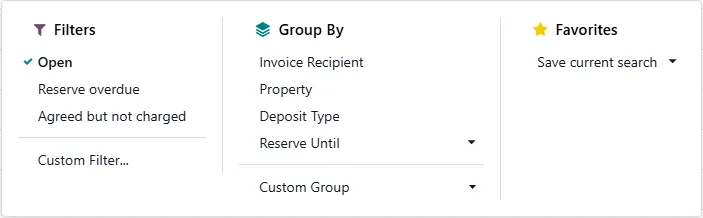
The filters:
- Open: The deposit is not settled. This filter is preselected.
- Reserve overdue: The Reserve Until date has been reached and a reserve is still open.
- Agreed but not charged: A deposit is agreed, but nothing has been received yet.
You can group by Invoice Recipient, Property, Deposit Type and Reserve Until.
Individual movements of all tenancies are under Property Administration › Invoicing › Data › Deposit Movements, with the filters Receipts, Payouts and Retentions.
What happens automatically
Section titled “What happens automatically”Two checks run every morning. Both create the task for the responsible user of the property, at most one open task per tenancy:
- Deposit Reserve Due: If Reserve Until has been reached, a reserve is still open and the deposit is not settled, the task “Resolve deposit reserve” is created, due on the same day.
- Certificate expires: If a certificate expires within the next 60 days, the task “Deposit certificate expires” is created, due on the expiry date.
If no responsible user is entered on the property, no task is created.
Frequently asked questions
Section titled “Frequently asked questions”Why is the received deposit higher than the agreed one? Deposit Received includes the interest credits. The interest belongs to the tenant and is settled together with the deposit.
Can I increase the deposit or transfer it to a new tenancy? There is no separate function for this. Enter a higher deposit as the new Agreed Deposit and record the additional receipt as a movement.
Why do I not get a reminder about the certificate expiring? Check whether a Responsible user is entered on the property and whether the deposit is already settled. The types Bank Transfer, Cash, Collective Trust Account and Other have no certificate and therefore no reminder.
Didn't find an answer? Contact support