

What tenants submit in the portal arrives in SMARTBRIX in three places:
- Portal Requests: requests for new bank details, a change of name or a termination. You review and decide.
- Ticket Inbox: issue reports about defects and other concerns. They become tickets in customer service.
- Meter Submissions: reported meter readings. See Meters and readings.
All three are in the Portal app. You also find the portal requests under Property Administration › Tenancies › Portal Requests.
Review and decide on a request
Section titled “Review and decide on a request”When a tenant submits a request, SMARTBRIX creates the activity “New portal request - please review” for the person responsible for the property. The tenant receives a confirmation of receipt by email and becomes a follower of the request.
-
Open Portal › Portal Requests or Property Administration › Tenancies › Portal Requests. With the To Review filter, the list shows all open requests.

-
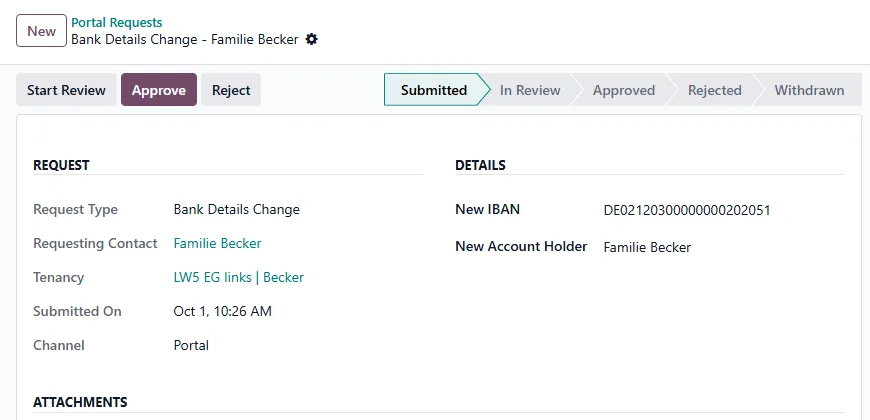
Open the request. On the left are Request Type, Requesting Contact, Tenancy and the date of receipt, on the right under Details the new data, and below them the tenant’s Attachments.
-
Click Start Review if you do not decide on the request right away. The tenant then sees the status “In review” in the portal and can no longer withdraw the request.
-
Decide:
- Approve: SMARTBRIX enters the change (see below) and sends the tenant the approval.
- Reject: enter a reason in the dialog that follows. The tenant receives the rejection with this reason.
With the decision, SMARTBRIX closes the review activity. To ask the tenant questions, use Send message in the chatter of the request; the tenant sees them in the portal under their request and can reply there.
What happens on approval
Section titled “What happens on approval”- Bank Details Change: the new IBAN becomes the bank account of the contact. SMARTBRIX archives earlier accounts, so that old direct debits remain traceable.
- Name Change: the new name is entered on the contact.
- Termination: SMARTBRIX enters the termination on the tenancy and calculates the contract end from the notice period and the day of receipt. The tenant’s requested date does not determine the end. All contract partners receive a confirmation.
If Follow-up Task after Approval is turned on under Portal › Settings, SMARTBRIX creates a task for the selected user after a change of bank details or name. Then check, for example, whether a direct debit mandate needs to be renewed.
Termination by letter
Section titled “Termination by letter”If the tenant gives notice by post, they download the form in the portal and send it back signed. The request waits until the original has arrived:
- Open the request as soon as the letter has arrived.
- Click Original Received. SMARTBRIX enters today as the day of receipt; you can change it.
- Decide as above.
The notice period counts from the day the signed original arrives. SMARTBRIX does not send a reminder if an announced original does not arrive.
Withdrawn requests
Section titled “Withdrawn requests”If the tenant withdraws a request, SMARTBRIX closes the review activity and notes this in the chatter. If the original of a termination arrives after all, open the request again with Reopen.
Handle issue reports
Section titled “Handle issue reports”An issue report from the portal becomes a ticket in the team the tenant chose when reporting. Under Portal › Ticket Inbox you see all tickets that come from the portal.

You handle them like any other ticket, in the Helpdesk app.
- The tenant sees the status in the portal as received, in progress or done.
- What you write in the chatter of the ticket with Send message, the tenant sees under their issue report. Their replies arrive in the chatter of the ticket.
- Notes stay internal.
More on the helpdesk in the Business plan: Helpdesk in the Odoo documentation.
Didn't find an answer? Contact support