

Metering import by ARGE file
Add-on moduleExperimental
Question about the manual? Ask Claude · Ask ChatGPT
Metering services that offer the ARGE file exchange deliver the result of the heating cost settlement as a file (DTA, version 03.10). Instead of typing the amounts per unit and position into the metering settlement by hand, you upload this file to SMARTBRIX. SMARTBRIX finds the condominium community and its units through the metering service’s numbers and enters the amounts.
You set up the metering service, its numbers and the positions once. After that, you upload the file every year and click Run Import. Only for the first import do you assign user numbers that SMARTBRIX does not know yet to a unit.
Metering service
Section titled “Metering service”- Open Condominium › Configuration › Metering Services and click New.
- Fill in the fields:
- Metering Service: the metering service’s contact.
- Customer Number: the number under which the metering service keeps your management company. Leading zeros do not matter.
- Data Exchange: “ARGE File Exchange”.
- Billing Company Key: the metering service’s two-digit key that appears in its files. Ask the metering service for it.
- File Version: “03.10”.
- Save.
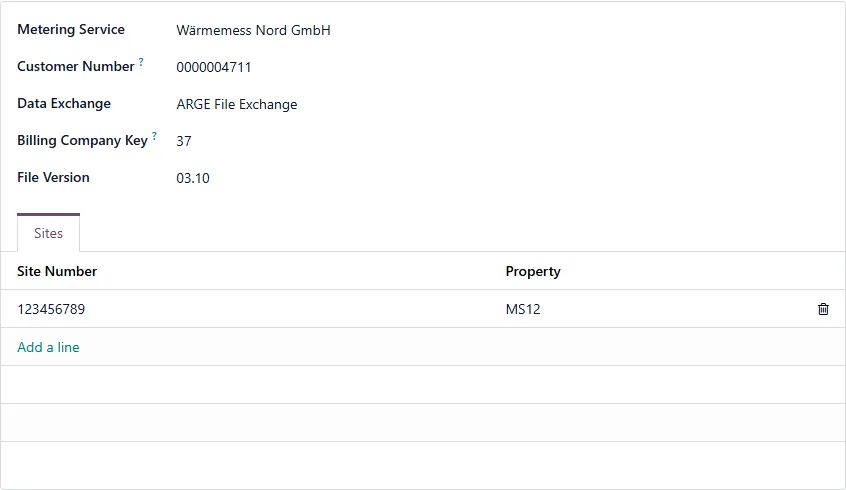
If the metering service keeps your management company under two customer numbers, create it twice, once per customer number.
Site numbers and user numbers
Section titled “Site numbers and user numbers”The metering service keeps the building under a site number and each unit under a user number. The metering service assigns both.
- Open the condominium’s property, Energy and Consumption tab, Metering Service section.
- In the Metering Service field, select the metering service that currently reads and settles the property. The field is for overview only; the import searches by the numbers.
- In the list below, click Add a line. In the window, select the Metering Service and enter the site number under Site Number.
- In the same window, click Add a line for each unit, enter the User Number and select the unit under Property.
- Click Save.
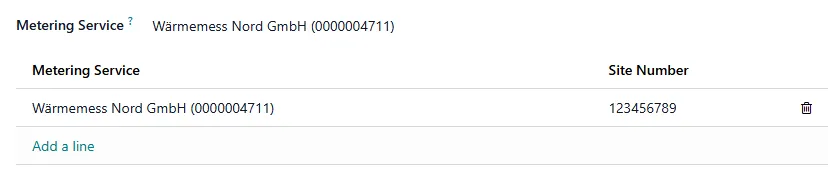
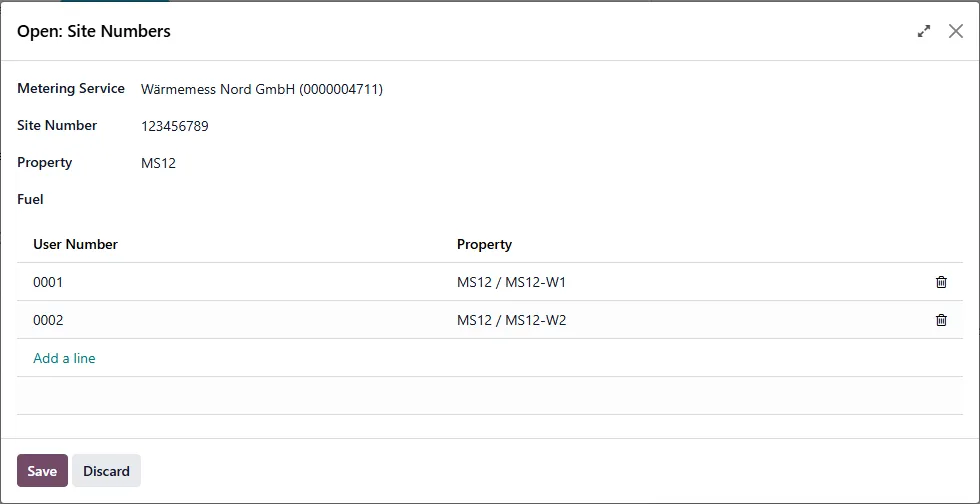
You do not have to enter the user numbers in advance. If they are missing, the first import asks for them (see below). Each user number exists only once per site, and each unit has only one per site.
If the property changes its metering service, leave the old service’s numbers in place and add another line for the new one. This way, older files can still be assigned.
Cost types on the positions
Section titled “Cost types on the positions”In the file, the metering service names a cost type for each amount, for example “052 Grundpreis Raumheizung”. You define which position of the metering settlement these amounts go into.
- Open the community, Metering Positions tab.
- For each position, select the metering service’s cost types in the Cost Types in File column. You can search by key or name.
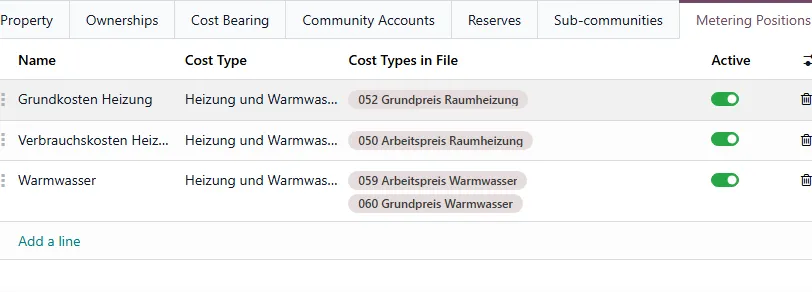
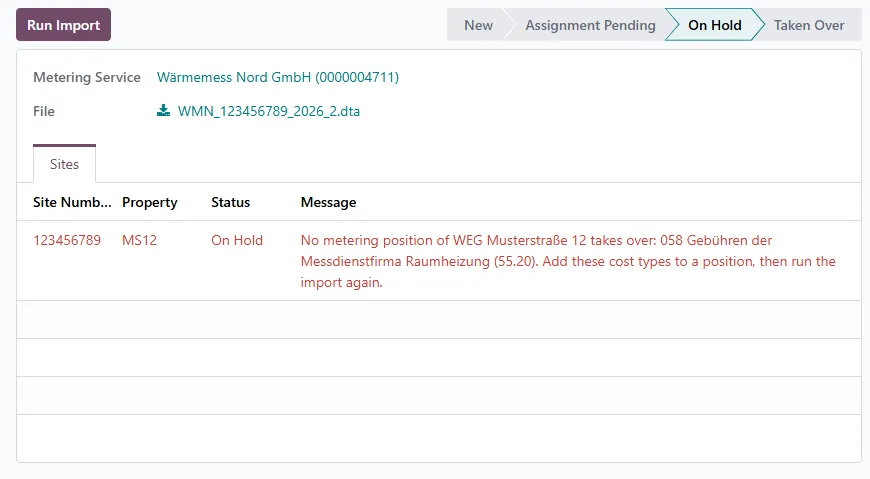
A position may take several cost types; SMARTBRIX adds up their amounts per unit. Within a condominium, a cost type belongs to at most one position. Each data exchange has its own catalog, with three-digit keys for the ARGE file exchange. A position may carry cost types from several catalogs; the import reads only those of the data exchange through which the metering service is connected. If the file contains a cost type that is not assigned to any position, the import is put on hold and names the cost type with its total. The assignment stays in place for the following years.
Import the file
Section titled “Import the file”- Open Condominium › Annual Settlement › Metering Imports and click New.
- Select the Metering Service and upload the metering service’s file under File. This can be a single file or a ZIP archive with the individual statements as PDF.
- Save and click Run Import.
SMARTBRIX first checks the whole file. If it belongs to a different customer number or billing company key, has a version other than 03.10, or a line cannot be read, the import is set to “Rejected”. The reason appears below the file, with the line number for read errors. You cannot run a rejected import again. Create a new import with the correct file.
SMARTBRIX then processes the file site by site. A file may contain several condominium communities. The result for each site appears in the Sites tab, with status and message.
First assignment of user numbers
Section titled “First assignment of user numbers”If SMARTBRIX does not know user numbers from the file yet, the import is set to “Assignment Pending”.
- Open the Unknown User Numbers tab. For each number, you see the Name in File and the Amount in File.
- In the Unit column, select the matching unit. Only units of this site’s property are available.
- Save and click Run Import again.
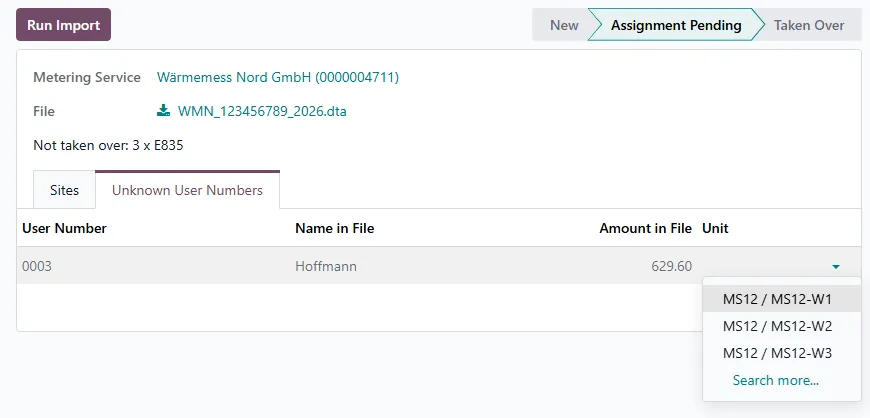
SMARTBRIX stores the user number on the unit. From the next year on, the import runs without this question. If you select a unit that already has a user number of this metering service, it receives the new number. This is correct if the metering service has renumbered the unit.
What the import enters
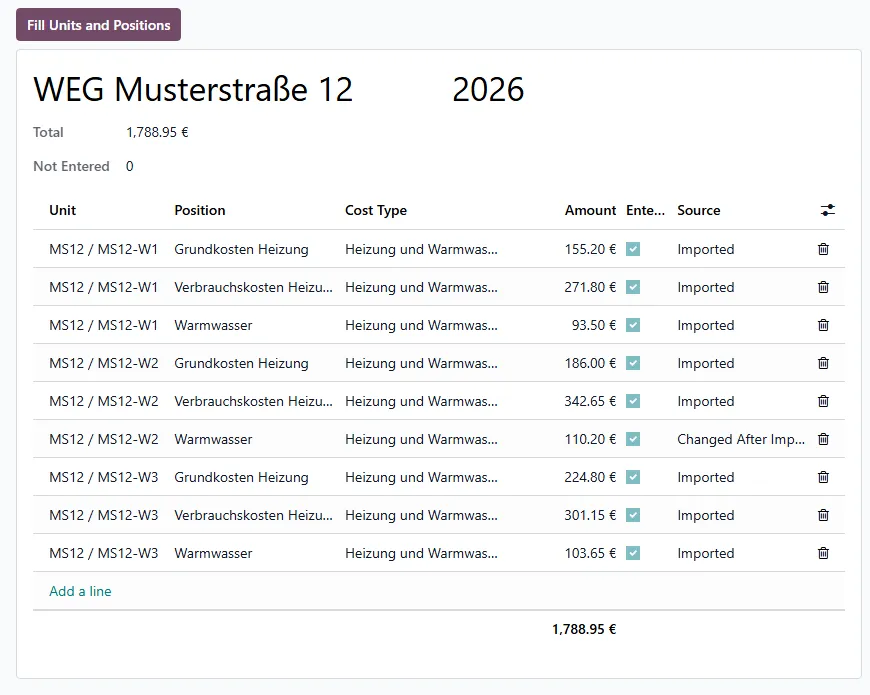
Section titled “What the import enters”- If there is no metering settlement yet for the condominium and the year, SMARTBRIX creates it and fills the lines for all units and positions.
- For each unit and position, SMARTBRIX enters the total gross costs from the file. If the owner changed during the year, both usage periods are added together.
- The lines taken over are Entered. Lines for which the file contains no amount stay unchanged.
- The year is the year in which the file’s results end.
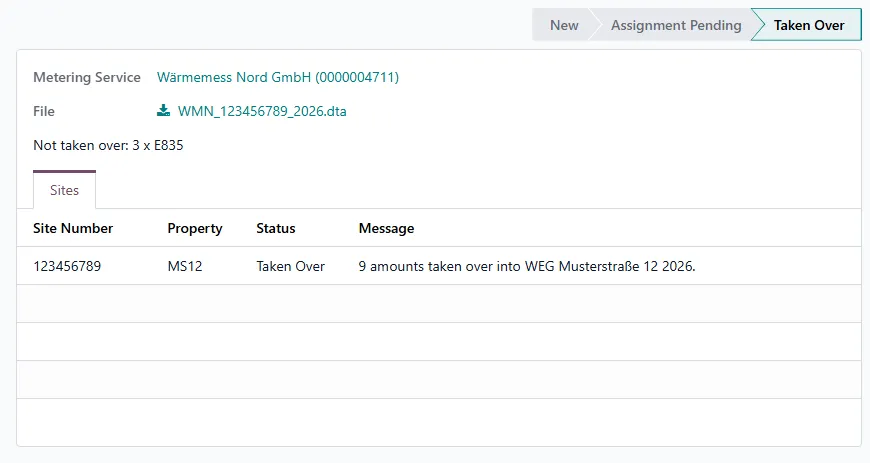
Below the file, the import also shows which records of the file SMARTBRIX did not take over. Afterward, in the metering settlement, use Totals to compare the totals per position with the metering service’s summary page.
In the metering settlement, the Source column shows where each line’s amount comes from:
- Imported: from a metering import.
- Changed After Import: from an import, then changed by hand.
- Entered: entered by hand, without an import.
When the import is on hold
Section titled “When the import is on hold”A problem at one site holds up only that site. SMARTBRIX still takes over the other sites of the file, and the import is then set to “Partially Taken Over”. If it is set to “On Hold”, SMARTBRIX has taken over nothing. The Message column in the Sites tab gives the reason.
| Message | What you do |
|---|---|
| No metering position takes a cost type | Assign the cost type named to a position on the community, or create a position for it. |
| No property has the site number | Enter the site number on the property, Energy and Consumption tab, Metering Service section. |
| No management type takes over results | The site’s property is managed neither as a condominium nor in rental management. Check whether the site number is on the right property. |
| The results do not end on December 31 | Only calendar years are taken over. Ask the metering service for a statement for the calendar year. |
| The file contains results for several years | Ask the metering service for a separate file per year. |
| The annual settlement has been resolved | For a year with a resolved annual settlement, the import no longer changes anything. |
| Units do not belong to the condominium | A user number is on a unit that does not belong to the condominium. Correct the user number on the site. |
After the correction, open the same import and click Run Import again. You do not have to upload the file again. SMARTBRIX skips sites that have already been taken over.
Corrected file and amounts changed by hand
Section titled “Corrected file and amounts changed by hand”If the metering service sends a corrected file, create a new import for it. It replaces the amounts of the earlier import.
It does not overwrite amounts that you entered by hand or changed after an import. If the file differs from them, your amount stays, and the import’s message lists the unit, position, your amount and the file’s amount under “Changed by hand, therefore kept:”. If the file’s amount should apply, enter it in the metering settlement by hand.
Individual statements as PDF
Section titled “Individual statements as PDF”If the metering service also delivers the individual statements as PDF, upload the ZIP archive as a whole. SMARTBRIX attaches every PDF that the file refers to to the metering settlement of the year and names it after the unit. You find the PDFs among the attachments in the chatter of the metering settlement.
A later import with new PDFs replaces the PDFs of the same unit. If a PDF that the file refers to is missing, SMARTBRIX still takes over the amounts and names the missing PDF below the file.
What is not taken over
Section titled “What is not taken over”- Prepayments and balances from the file: the condominium determines owner contributions and the settlement balance itself.
- Shares under § 35a EStG (the German tax reduction for household-related services and craftsman work): they follow from the labor costs the condominium paid in the year, not from the metering service’s figures.
- Consumption values and cold water results.
Limits
Section titled “Limits”- Only files in ARGE format version 03.10. The import rejects older versions.
- Only statements for the calendar year.
- SMARTBRIX does not fetch the file from the metering service and does not send it any data. You upload the file yourself.
- Not yet tested with a metering service’s files. The character set and structure of the files may vary between metering services. If the import reports a line as unreadable, contact SMARTBRIX support with the file.
The page Metering service interface (BVED) describes the exchange through the BVED web services.
Didn't find an answer? Contact support